AEM Edge Delivery Services Overview
Understanding the EDS architecture, the block development model, authoring, the delivery flow, and the main differences from traditional AEM.
Introduction
If you have worked with traditional AEM for a few years, Edge Delivery Services feels unfamiliar at first.
In a normal AEM implementation we think in terms of components, dialogs, Sling Models, HTL, OSGi services, JCR resources, client libraries, AEM Publish, and Dispatcher. When a requirement lands, we map it onto those pieces almost automatically.
EDS changes that development model. The frontend is HTML, CSS, and JavaScript. The main unit of work is a block. Content is delivered through the Edge Delivery layer, and JavaScript enhances the delivered HTML in the browser.
AEM can still be part of the solution. AEM Cloud Service and the Universal Editor can own authoring and content management while EDS handles how that content reaches the site. Getting comfortable with that split took me the first few days of the project.
Early on I tried to map every EDS concept onto something I already knew:
- block = AEM component
- model = dialog
- JavaScript = Sling Model
- Edge Delivery = Dispatcher
That comparison is useful for about five minutes and misleading after that. The better approach is to learn the EDS request flow on its own terms. Once that is clear, blocks, Universal Editor configuration, preview, publishing, and debugging all get easier to reason about.
This chapter builds that mental model before we set up the actual project in Chapter 2.
1. The First Difference: Where the Page Is Built
The easiest way into EDS is to look at what happens when someone requests a page.
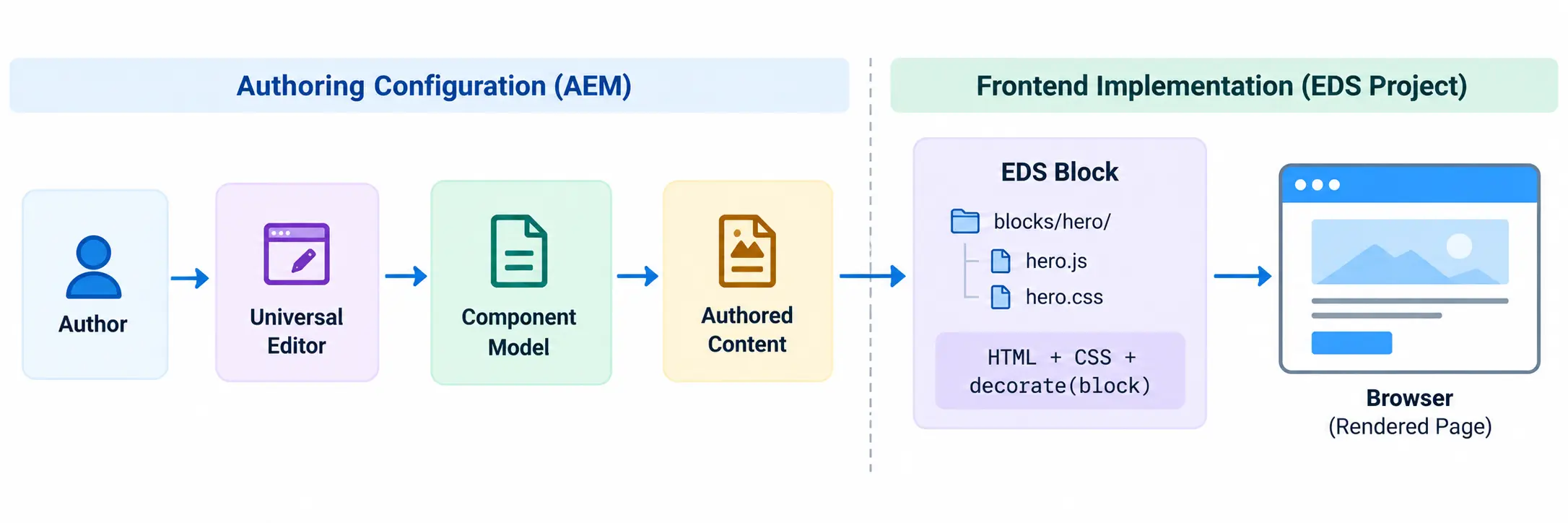
In a traditional AEM implementation, AEM Publish participates directly in producing the HTML. On a cache miss the request reaches Publish, Sling resolves the resource, application logic runs, HTL renders the markup, and the response goes back out through the delivery infrastructure. The exact path varies per project, but the model is server-side rendering, and every AEM developer knows it.
EDS is different. The browser receives HTML through the Edge Delivery layer, and the frontend code enhances that document using JavaScript and CSS. That single change moves where the application logic lives and cuts down how much work has to happen before the browser can start painting the page.
2. EDS Is Not Traditional AEM With a Different CDN
This distinction is worth stating plainly, because it trips up most people coming from AEM.
If you treat EDS as one more CDN layer in front of AEM, the development model will not make sense. EDS changes several things at once:
- how frontend functionality is implemented
- how content reaches the page
- how components are represented
- how JavaScript is loaded
- how authors work with content
- how code and content are released
- how you reason about performance
For a developer, the biggest shift is that far more of the implementation is plain browser technology. Instead of reaching for a Sling Model and an HTL script, you work with HTML, CSS, JavaScript, DOM APIs, browser events, network requests, and ES modules.
None of this makes Sling Models, HTL, or OSGi obsolete. They still belong where genuine server-side capability is required. They are simply not the default way you build an EDS block.
3. The Block Is the Main Frontend Development Unit
In EDS, most page functionality is organized into blocks. A simple Hero block is just a folder with two files:
blocks/
└── hero/
    ├── hero.js
    └── hero.css
The JavaScript exports a decorate() function:
export default function decorate(block) {
  // The delivered block structure is already in the DOM.
  // Enhance it here where enhancement is required.
}
The important part is the block argument. We are not asking AEM to run a Sling Model and render an HTL component. The browser already has the block markup, and our JavaScript works with that markup:
export default function decorate(block) {
  const heading = block.querySelector('h2');
  if (heading) {
    heading.classList.add('hero-title');
  }
}
The block starts as HTML, and JavaScript enhances it only when enhancement is needed. That is a different starting point from building the entire UI in JavaScript.
4. A Block Is Not Just an AEM Component Renamed
At a high level both solve the same problem: reusable page functionality. The implementation model is where they diverge.
| Traditional AEM | EDS |
|---|---|
| AEM component | Block |
| HTL rendering | Delivered HTML + DOM enhancement |
| Sling Model | JavaScript where frontend logic is required |
| Dialog | Authoring model / configuration |
| Clientlibs | JavaScript modules and CSS |
| Resource type | Block naming convention |
| Publish-side rendering | Edge-delivered document |
| Dispatcher-oriented caching | Edge / CDN-oriented delivery |
I would not read this table as a one-to-one mapping. Saying "Sling Model = JavaScript" is not accurate: a Sling Model runs on the AEM server and can hold server-side logic, while block JavaScript runs in the browser. The table only helps you see where familiar responsibilities have moved.
5. Content First, Enhancement Second
This is one of the ideas that changed how I approach block development.
Say we are building a Hero with a heading, description, image, and CTA. The first question is not "which JavaScript library renders this Hero?" The first question is "what content structure does the Hero need?" Once the browser has meaningful HTML, CSS handles presentation, and JavaScript is added only when the block needs behavior or transformation, for example:
- carousel or tabs interaction
- accordion behavior
- data from an API
- conditional UI
- event handling
- DOM restructuring the block genuinely requires
If HTML and CSS can satisfy the requirement, we do not add JavaScript just because the block folder has a .js file. This turns out to matter a lot once we get to performance.
6. Authoring and Frontend Rendering Are Separate Responsibilities
EDS supports more than one authoring approach. The two that matter for this series are Document Authoring and the Universal Editor. Both feed content to an EDS site, but the authoring experience is different, and the frontend block should not be confused with the tool used to author its content.
7. Document Authoring
With Document Authoring, content is maintained in document-based sources such as Google Docs or Microsoft SharePoint, depending on the project setup. Authors work with document structures, and those structures are converted into content that EDS delivers. The developer still owns how the matching block looks and behaves in the browser.
For example, an author may provide content that represents a Hero:
| Hero |
|---|
| Image |
| Heading |
| Description |
| CTA |
The author does not need to know how hero.js works, and the developer does not need the author to write HTML or JavaScript. The content structure is the contract between the two sides.
8. Universal Editor
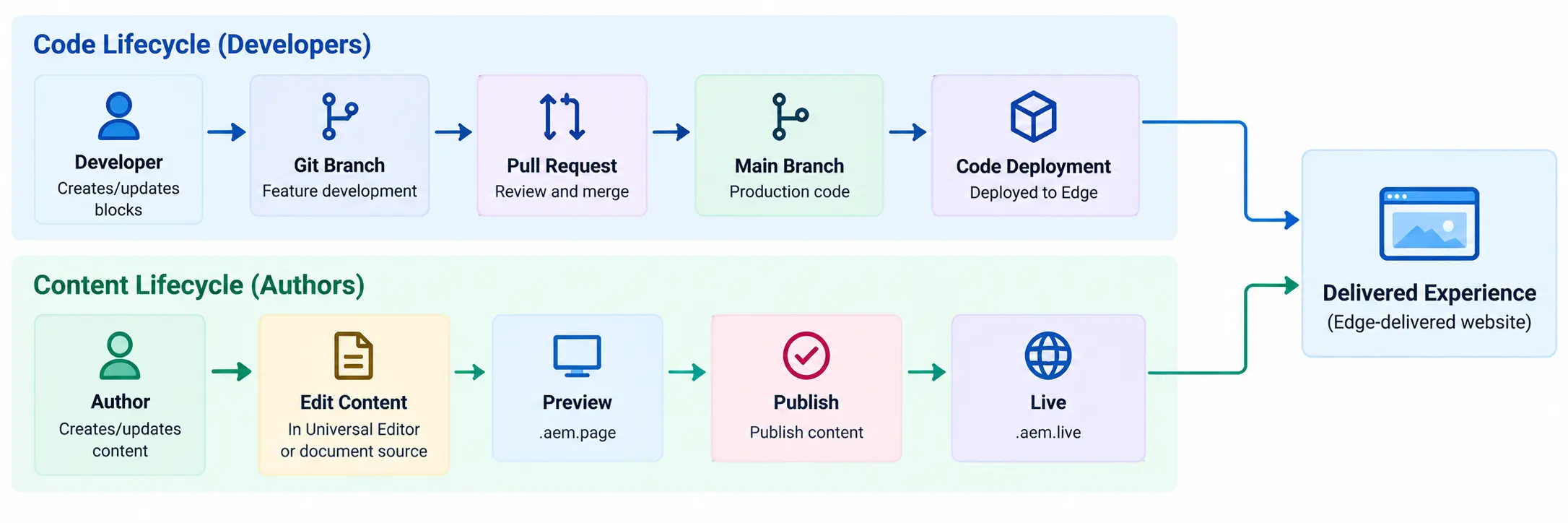
For this series the Universal Editor matters most, because it is closer to the authoring model enterprise AEM teams already know. The author works in an editing interface, and the project defines how components can be created and configured.
On the development side we work with:
- component definitions
- component models
- component filters
- content configuration
- the block implementation
The point I had to internalize is that the Universal Editor configuration does not render the frontend block. It defines the authoring contract. The block code defines the browser behavior and presentation. Both sides have to agree on the content structure.
Behind the scenes, the aem-code-sync GitHub app connects your repository to the Edge network. Your code and your content travel through different paths and are assembled at the edge, which is exactly why the two have separate lifecycles (see Section 10).
9. Why the Content Contract Matters
Suppose the Universal Editor model gives us title, description, image, and CTA, and the block is written against that structure. If someone later changes the model to title, subtitle, desktop image, mobile image, primary CTA, and secondary CTA, the frontend contract has changed. The JavaScript may still load without errors, but the assumptions inside the block are no longer valid.
This is why I do not treat component models as "just authoring configuration." They are part of the contract between content and frontend code. We work through this properly when we build a Universal Editor component later in the series.
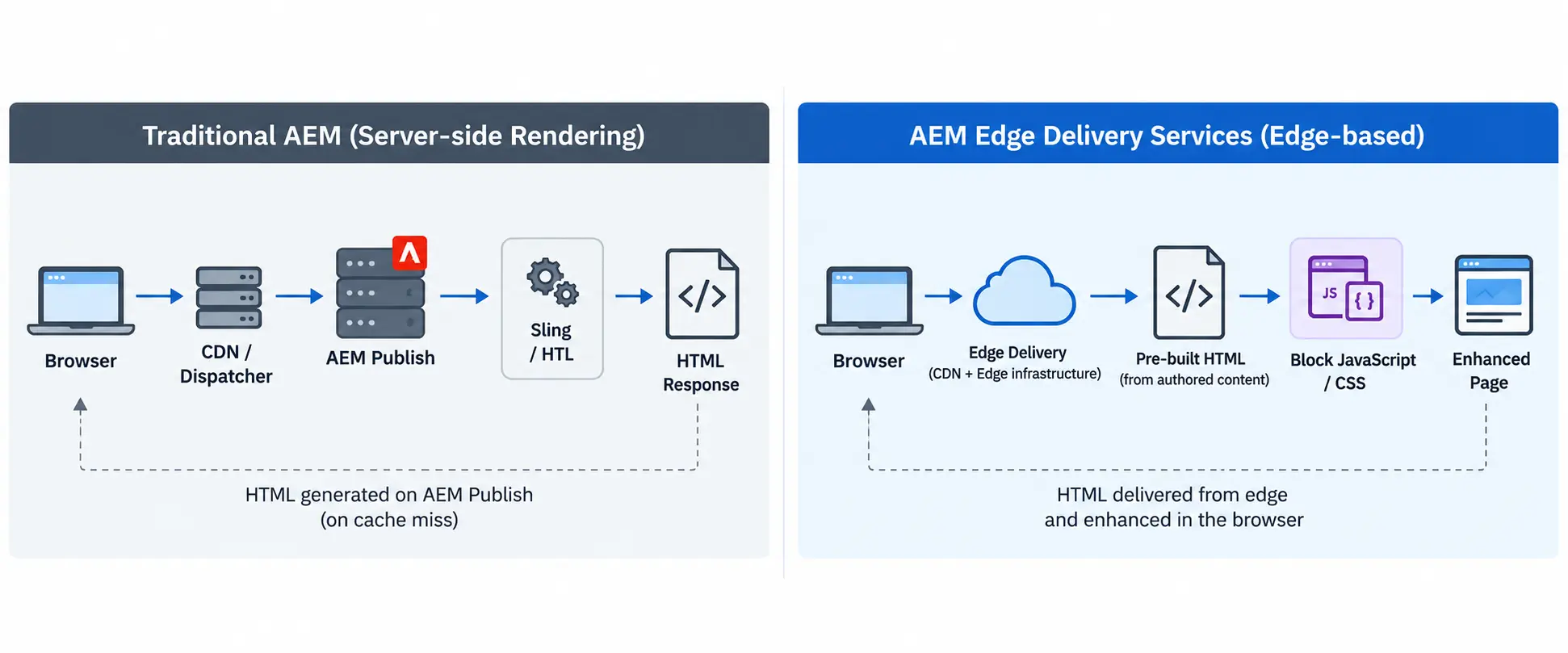
10. Code and Content Have Different Lifecycles
This is another difference worth understanding before you start building.
Project code lives in Git. Developers change block JavaScript, block CSS, global JavaScript and CSS, authoring configuration, and project configuration. Content authors manage the actual page content. These are separate activities:
- Publishing a page does not deploy new block JavaScript.
- Deploying a new version of
hero.jsdoes not publish an author's content changes.
That separation is useful when debugging. If an author publishes a new Hero and it still behaves incorrectly, there are two independent questions:
- Is the correct content published?
- Is the expected block implementation deployed?
Checking only one side sends you in the wrong direction.
11. Preview and Live
Two domains show up constantly during EDS development:
.aem.page
.aem.live
.aem.page is preview. .aem.live is the live, published state. A project URL follows this shape:
Preview:  https://main--eds-poc--naveenrapelly34.aem.page
Live:     https://main--eds-poc--naveenrapelly34.aem.live
The exact URL depends on the branch, repository, and owner. I would avoid treating Preview and Live as DEV and PROD environments. They describe content delivery state: Preview lets you validate content before it goes live, and Live is the published state. Publishing in EDS means pushing content from preview to live. It does not deploy code. Code is deployed by pushing to the main branch of the repository. The production site then uses its configured public domain.
12. How the Browser Receives an EDS Page
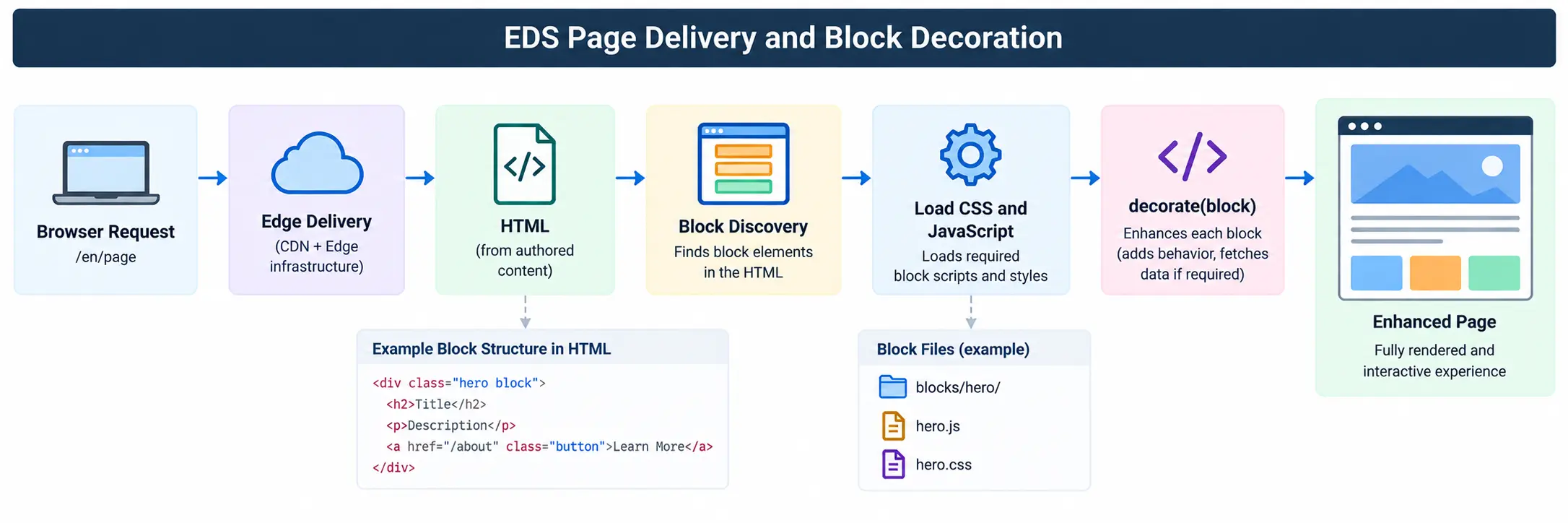
From a developer's point of view the browser flow is straightforward. The browser requests the page and receives HTML through the Edge Delivery infrastructure, so it can start processing immediately. CSS provides presentation, and JavaScript loads the functionality the page needs. When EDS identifies blocks, the matching block implementation decorates them, and the result is an enhanced page.
We refer back to this flow when we debug blocks in Chapter 5.
13. Why This Matters for Performance
Once the delivery flow is clear, the EDS performance model makes more sense. The browser starts from meaningful HTML instead of waiting for a large frontend application to build the page.
This is also why performance became a first-class concern for Adobe. Since Core Web Vitals became a search ranking signal, slow pages have a direct business cost, and poor Lighthouse scores on enterprise brands are a real problem rather than a technical footnote. EDS gives you a strong starting point for those metrics.
A strong starting point is not a guarantee. You can still make an EDS site slow. For example:
import SomeHugeLibrary from 'some-huge-library';
pulled in to solve a small DOM problem, several third-party scripts loaded before the user needs them, every block firing its own API request on load, or a Hero that ships an oversized image. EDS gives you a good architecture, and it is your job to protect it. In practice that means watching JavaScript size, CSS, images, fonts, API calls, third-party scripts, loading order, lazy loading, and layout stability. We cover these in the performance chapter.
14. Progressive Enhancement Makes More Sense in EDS
Progressive enhancement becomes practical in EDS: start with useful content, add presentation, then add behavior where required.
Take a CTA. If it is just navigation, the authored content already produces a normal link, and we do not need JavaScript to recreate navigation. For something interactive, JavaScript enhances the existing structure instead of replacing it. This keeps the block easier to debug, maintain, test, and reason about, and it reduces the amount of JavaScript required for simple content.
15. Project Structure
An EDS project follows a consistent structure. This is not decorative; the framework expects it.
blocks/                       Individual block implementations
scripts/                      Shared and page-level frontend behavior
styles/                       Global and shared styling
icons/                        SVG icons referenced in content
models/                       Shared model configuration where used
component-definition.json     Block registry for the Universal Editor
component-models.json         Model aggregator for the Universal Editor
component-filters.json        Section / container filter rules
fstab.yaml                    Connects the project to its content source
head.html                     Extra tags injected into the document head
helix-query.yaml              Content query configuration
You do not need every file memorized in Chapter 1. The useful mental model is: blocks/ holds block implementations, scripts/ holds shared frontend behavior, styles/ holds global styling, models/ holds model configuration where the project uses it, the component JSON files describe how components appear in authoring, and fstab.yaml connects the project to its content. We inspect the real repository in the next chapter rather than memorizing file names here.
16. Conventions Matter
EDS leans heavily on convention. Suppose we create:
blocks/
└── hero/
    ├── hero.js
    └── hero.css
The authored block name and the project implementation have to resolve to each other. A block header of "Hero" in the document maps to the class hero, which maps to blocks/hero/hero.js and blocks/hero/hero.css. If those do not line up, the Hero can appear in the HTML while its JavaScript or CSS never loads.
This produces one of the most common debugging mistakes: a developer opens hero.js, starts changing selectors, and spends half an hour debugging decorate() when hero.js was never loaded in the first place. Before changing code, verify:
- Is the block present in the DOM?
- What is the actual block name?
- Does the folder exist with that exact name?
- Are the file names correct?
- Did the JavaScript request happen?
- Did the CSS request happen?
- Did
decorate()execute?
That habit is worth building early, and we use it throughout the series.
17. A Simple Block Debugging Example
Suppose we create a Hero and nothing happens. The first thing I do is inspect the page. If I see:
<div class="hero block">
  ...
</div>
then the content reached the page and EDS recognized the block. Next I check the Network panel for hero.js and hero.css. If hero.js never loads, changing its code is pointless. If it loads but the block still misbehaves, I check the console and add a temporary log:
export default function decorate(block) {
  console.log('hero decorate', block);
}
Now the problem is narrowed down to a specific stage, which is far more reliable than rewriting the block on a guess.
18. External APIs Change the Boundary Again
Not every block is static content. Suppose we build a Product Availability block. The authored page provides the heading, description, and product identifier, but availability comes from an enterprise API. The block now has two sources: authored content and runtime data.
That does not make AEM the owner of product availability. If SAP, a commerce platform, or another backend owns that information, the EDS implementation should respect that ownership. We come back to this when we discuss API integration and edge functions. For Chapter 1 the point is simple: a block can combine authored content with runtime behavior, but each piece of data should still have a clear owner.
19. EDS Does Not Mean Everything Belongs in the Browser
Because EDS development is frontend-oriented, it is easy to push too much logic into JavaScript. That is a mistake, because browser code is public. If a block needs private API credentials, privileged backend access, sensitive business logic, secure tokens, or protected service communication, that logic does not belong in the block. The browser should only receive what it is allowed to know.
Later in the series we separate browser logic, edge-function logic, enterprise API logic, and AEM responsibilities. That boundary matters for both security and maintainability.
20. What Changes for an AEM Developer
The biggest change is not syntax. It is where you look when something happens.
In traditional AEM, debugging might involve CRX/DE, Sling resolution, Sling Models, OSGi configuration, error logs, HTL, and Dispatcher. In EDS, most day-to-day block debugging moves toward browser DevTools: Elements, Network, Console, JavaScript, CSS, DOM structure, API responses, Git, and authoring configuration.
AEM knowledge still helps. Content architecture, authoring, publishing, governance, integrations, and enterprise requirements remain valuable. The frontend implementation mindset is what changes.
21. What I Would Not Carry Over From Traditional AEM
The main thing I avoid is recreating traditional AEM architecture inside EDS. I do not start every requirement by asking "what is the EDS equivalent of a Sling Model?" Sometimes there is no equivalent because the requirement no longer needs that layer. I also avoid building large JavaScript abstractions just because the traditional implementation had a large Java service layer.
Start from the actual EDS requirement instead:
- What content do we have?
- What HTML reaches the browser?
- What enhancement is required?
- Does this need JavaScript?
- Does this need runtime data?
- Does anything need a backend?
- Who owns that data?
Then choose the implementation.
22. What Changes for an Architect
At the architecture level the questions are broader than block development. For an EDS implementation I want clear answers to:
- Where is content authored?
- Who owns each type of content?
- Which content is delivered through EDS?
- Which data comes from enterprise systems?
- What logic can safely run in the browser?
- What needs a server-side or edge integration layer?
- How are APIs protected?
- How is content localized?
- How are blocks governed?
- How is caching handled?
- How are releases managed?
- How are failures monitored?
- How do we keep frontend code from growing without control?
These decisions matter more as the site grows. A ten-page POC survives unclear boundaries. A large multi-market implementation usually does not.
23. The Mental Model I Use
After the initial concepts settle, it is easier to split the platform into responsibilities:
- Authoring — creating and managing content.
- Content model — the structure and contract of that content.
- Git repository — the frontend implementation and project configuration.
- Edge Delivery — delivering the web experience through the edge network.
- Browser — rendering the document and running the enhancement code.
- Enterprise systems — the business data they already own.
- Integration layer — connecting browser-facing experiences to protected or complex backend services where required.
Not every project needs every layer. The point is to keep the boundaries visible.
24. Common Misunderstandings
"EDS is just a CDN in front of AEM." No. The delivery layer is only one part of the change. The frontend development model, block architecture, authoring options, code lifecycle, and rendering approach are all different.
"EDS requires React." No. Blocks are built with HTML, CSS, and JavaScript. If a specific requirement justifies a framework, that is a separate architecture decision, and it comes with a performance cost you have to account for.
"EDS replaces AEM." That framing is not useful. AEM can still provide authoring, content management, governance, and other enterprise capabilities. The better question is which responsibilities belong to AEM and which belong to the EDS implementation.
"EDS guarantees a high Lighthouse score." No. EDS gives you a performance-oriented foundation. You can still damage it with large JavaScript bundles, poor image handling, blocking third-party scripts, unnecessary API calls, or badly designed blocks.
"Every AEM component should become an EDS block." Not necessarily. Migration is a good time to review what a component actually does. Some become blocks, some are simplified, some are merged, and some functionality belongs elsewhere. A one-to-one migration tends to carry old architectural decisions into a new delivery model without asking whether they are still needed.
Key Takeaways
- EDS uses a different development and delivery model from traditional AEM.
- A block is the main frontend development unit, built with HTML, CSS, and JavaScript.
- Block JavaScript enhances delivered content through the DOM; it does not build the page from scratch.
- A block is not an AEM component with a new name.
- Authoring configuration and frontend implementation are separate responsibilities.
- The Universal Editor defines how authors work with component content; the block defines how that content behaves in the browser.
- Content structure is the contract between authoring and frontend code.
- Code deployment and content publishing are separate lifecycles.
- Preview (
.aem.page) and Live (.aem.live) describe content delivery state, not DEV and PROD. - EDS provides a performance-oriented starting point, but implementation choices can still make the site slow.
- Add JavaScript for behavior and enhancement, not automatically for every piece of content.
- Project and block naming conventions matter; most "block not loading" issues are naming, registration, or JSON problems, not code bugs.
- Browser DevTools become one of the main debugging tools for an EDS developer.
- Runtime business data should keep coming from the system that owns it.
- Private credentials and protected backend logic do not belong in block JavaScript.
- Traditional AEM knowledge still helps, especially for content architecture, authoring, governance, and integrations.
- Do not recreate traditional AEM architecture inside EDS without checking whether those layers are still required.
What Comes Next
Now that the development and delivery model is clear, the next step is to build the project environment.
In Chapter 2 — Setting Up an AEM Edge Delivery Services Project, we work through the setup itself:
- creating the project repository
- understanding the initial repository
- connecting the project with Adobe services
- installing and configuring aem-code-sync
- understanding
fstab.yaml - setting up the local development environment
- running
aem up - connecting the content source
- previewing the first page
- tracing the first complete code and content flow
From Chapter 2 onward we move from architecture into implementation.
Enjoyed this chapter?
Get an email when I publish the next chapter. No spam — just new technical deep-dives.
Comments
Share feedback or questions about this blog post.
No comments yet. Be the first to share your thoughts.