AEM Sling Servlet Complete Guide
A complete guide to AEM Sling Servlets, including configuration, lifecycle, types, and real-world examples.
Content Objective
- What is Sling Servlets?
- Java Servlet Life Cycle
- Lifecycle of an AEM Servlet
- The Key difference between a JAVA Servlet and an AEM Servlet
- What are Sling Servlets?
- Sling Servlet Configuration and Constraints
- Restrictions on Sling Servlets
- Types of Sling Servlets
- Step-by-Step Flow and Architecture of Sling Servlets
- Servlet Registration
- A Sling servlet can be registered in two ways
- Important Properties in Servlet Annotations
- Resource Type vs Path-Based Servlets
- Real-Time Example for Creating Path-Based Servlet
- Requirement
- Approach to Implement the Requirement
- Implement the logic for Dynamic Pages
- let’s Understand the code
- Real-Time Example for Creating Resource Type Servlet
- Requirement
What is a Servlet?
A servlet is a Java class designed to enhance the functionality of servers by handling client requests and generating responses, typically in web-based applications. Think of it as a bridge between a web server and the backend logic determining what the user sees or does. While servlets can handle many tasks, they’re primarily used to add dynamic features to web servers.
Java Servlet Lifecycle
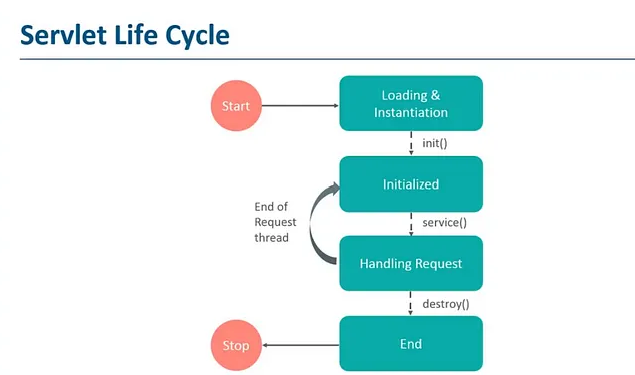
Loading and Instantiation
- The servlet container loads the servlet class when the application starts or when the servlet is accessed for the first time.
- The servlet class is loaded into memory.
- An instance of the servlet is created using the default no-argument constructor.
Initialization (init method)
- The
init()method is called once after the servlet instance is created. - The servlet is initialized with configuration data from
web.xmlor annotations. - This is where resources such as database connections are typically set up.
Request Handling (service method)
- For every client request, the container invokes the
service()method. - The
service()method determines the request type (GET, POST, etc.) and dispatches it todoGet(),doPost(), etc. - The servlet processes the request and generates a response.
Destruction (destroy method)
- The servlet container shuts down or the servlet is explicitly removed.
- The destroy() method is called to release resources.
- Any cleanup operations, such as closing database connections, occur here.-
Lifecycle of an AEM Servlet
AEM servlets are managed differently due to AEM’s reliance on the OSGi framework and Sling models. These servlets are primarily designed to work in the context of AEM components and the JCR (Java Content Repository).
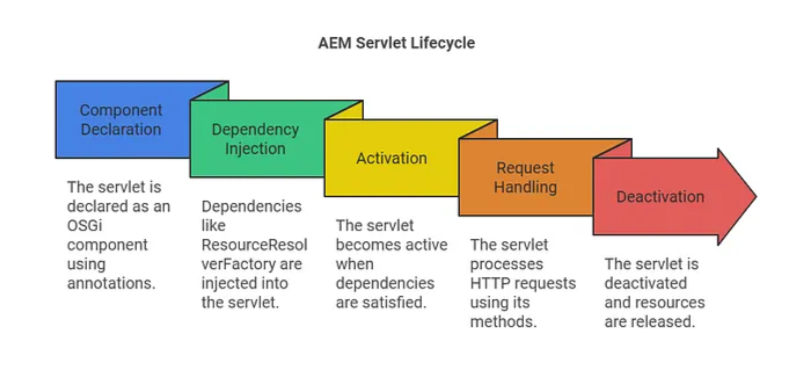
Component Declaration
- A servlet is declared as an OSGi component using annotations like
@Component,@Service,@SlingServletPaths, and@SlingServletResourceTypes. - The OSGi container discovers and registers the servlet as a service.
- The servlet is registered based on resource type, path, or selector.
Dependency Injection
- Before initialization, OSGi injects required dependencies into the servlet.
- Services such as
ResourceResolverFactoryorSlingHttpServletRequestcan be injected. - This allows the servlet to interact with AEM’s resource tree and JCR.
Activation (@Activate method)
- The servlet becomes active once its dependencies are satisfied.
- The optional
@Activatemethod can initialize configuration or resources when the servlet is activated.
Request Handling
- The Sling framework dispatches HTTP requests to the servlet based on the registered path, resource type, or selector.
- The servlet processes the request (usually within the
doGet()ordoPost()methods). - The servlet interacts with AEM’s resource tree and JCR to dynamically render content or perform backend logic.
Deactivation (@Deactivate method)
- The servlet is deactivated when the bundle is stopped or unregistered.
- Any resources initialized during activation are released.
- The servlet is effectively removed from the OSGi container
Key Differences Between Java Servlets and AEM Servlets
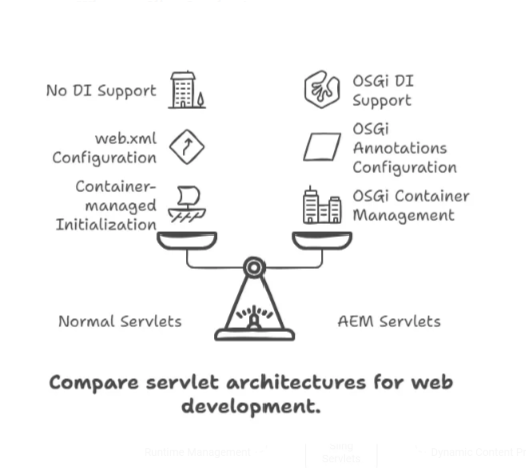
- Java Servlets are general-purpose server-side components for web applications.
- AEM Servlets are OSGi-managed Sling components designed for AEM and JCR content.
- AEM Servlets integrate with Sling resolver and AEM content models.
- AEM Servlets use annotations and service properties for registration.
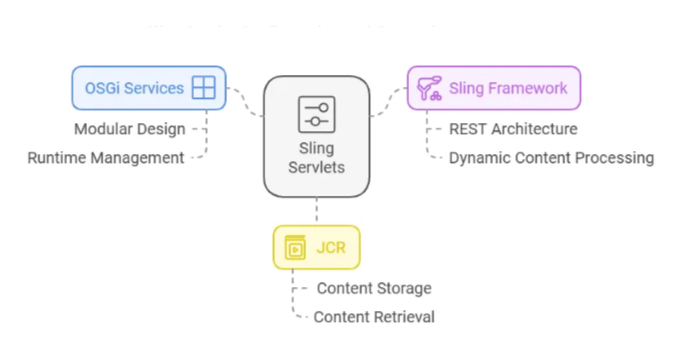
What are Sling Servlets?
- Sling Servlets are server-side components used in Sling-based applications to handle HTTP requests and generate responses. They are an integral part of Adobe Experience Manager (AEM) development.
- These servlets are registered as OSGi services, which means they are modular and can be dynamically managed at runtime. OSGi serves as the backbone for AEM, built on top of Sling and JCR (Java Content Repository).
- Sling itself is a REST-based framework that simplifies access to JCR content over the web. Sling Servlets leverage this framework to process dynamic content and implement custom business logic in AEM.
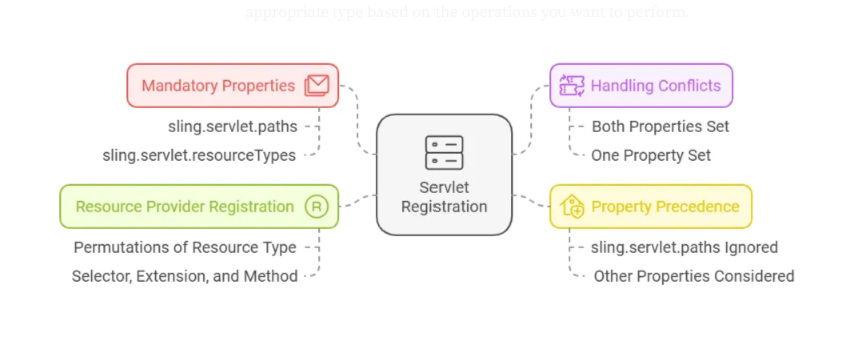
Sling Servlet Configuration and Constraints
Mandatory Properties
- Either
sling.servlet.pathsorsling.servlet.resourceTypesmust be set. - If neither is set, the servlet service is ignored.
Handling Conflicts
- If both
sling.servlet.pathsandsling.servlet.resourceTypesare set, the servlet is registered by both methods.
Property Precedence
- If
sling.servlet.pathsis set, othersling.servlet.*properties are ignored for path-based registration.
Resource Provider Registration
- If
sling.servlet.pathsis not set, Sling registers the servlet for every combination of resource type, selector, extension, and method.
Types of Sling Servlets
In Sling Servlets, there are two types of servlets, Each servlet is designed for different HTTP methods. When creating a servlet, it’s important to select the appropriate type based on the operations you want to perform.

SlingSafeMethodsServlet
- Use this servlet for read-only HTTP methods: GET, HEAD, and OPTIONS.
- It extends the basic
HttpServletbehavior with Sling-specific handling. - Ideal for fetching data without modifying server state.
SlingAllMethodsServlet
- Extends
SlingSafeMethodsServletand supports POST, PUT, DELETE, and other methods. - Use it when you need both read and write operations.
Step-by-Step Flow and Architecture of Sling Servlets
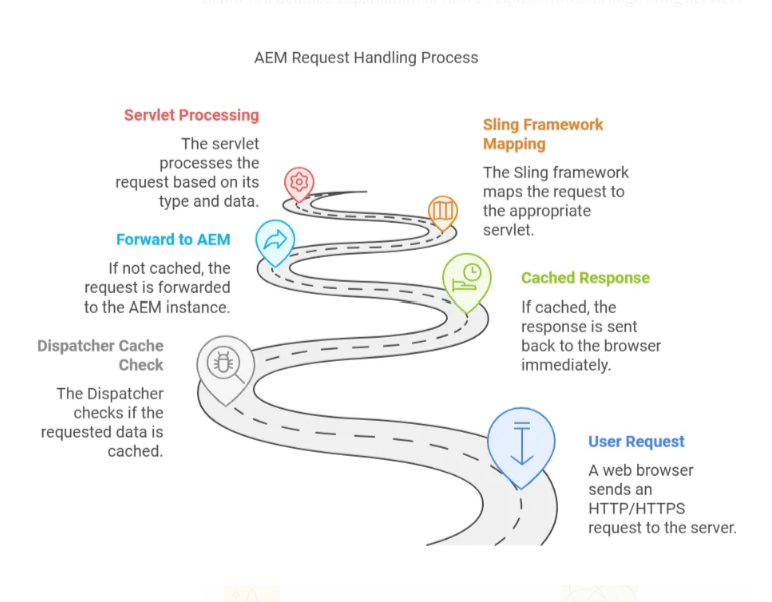
Step 1: Request from Web Browser
- The process starts when a web browser or End User sends a request to the server using HTTP or HTTPS. _ This request could either be to retrieve data (GET request) or to submit data (POST request).
Step 2: Sling Intercepts the Request
- The Sling framework identifies that the request is directed to AEM and uses its built-in URL mapping mechanisms to handle it.
- This ensures that the correct servlet or resource processes the request.
Step 3: Resolve the Resource
- Sling resolves resources using path-based or resource-type mappings.
Path-Based Mapping
- The servlet is registered with
sling.servlet.pathsor@SlingServletPaths. - For example, a URL like
/bin/exampledirectly maps to the servlet responsible for processing it.
Resource Type Mapping
- The servlet is registered with
sling.servlet.resourceTypesor@SlingServletResourceTypes. - Example: a request to
/content/examplematches a resource type such asexample/components/content.
Step 4: Match the Servlet
The Sling Servlet Resolver determines the appropriate servlet to handle the request by checking
- The paths property for path-based mapping.
- The resource types property for resource type-based mapping.
Step 5: Dispatcher Caching
- Before reaching AEM, the request first goes to the Dispatcher, which checks if the requested data is already cached.
- If cached, the response is sent back to the browser immediately. Otherwise, the Dispatcher forwards the request to the AEM instance for further processing.
Step 6: Servlet Processing
The servlet receives the request and processes it based on the request type and data
- It might validate or apply business logic to the incoming data.
- The servlet may save the processed data to a database or retrieve data from the database to send it back to the browser.R.
Step 7: Data Formats and Response
- Communication between the browser and server happens in predefined formats such as JSON, XML, or binary.
- Once the servlet finishes processing, it sends the response back to the browser in the same format, ensuring smooth communication and display
Servlet Registration
@Component
- In AEM, the
@Componentannotation is used to register a Sling Servlet as an OSGi service. - OSGi allows different parts of the application to be treated as services.
- By adding this annotation, you’re telling AEM to treat your servlet as a service that can process specific HTTP requests based on its configuration.
A Sling Servlet Can Be Registered in Two Ways
Using Resource Types
- We use the
sling:resourceTypeproperty of the node. - This allows us to map a servlet to a specific resource type.
- When the resource type matches, the servlet runs for requests on that resource.
Using Paths
- The servlet is registered directly to a specific path.
- When you hit that exact path in the browser, the servlet is executed.
Important Servlet Annotation Properties
Important properties to know when configuring servlets with the above methods:
sling.servlet.paths: defines the exact path used to access the servlet.sling.servlet.resourceTypes: maps a resource to a specific servlet.sling.servlet.methods: specifies which HTTP methods the servlet handles (GET, POST, DELETE, etc.).sling.servlet.selectors: defines selectors used with resource-type servlets.sling.servlet.extensions: allows the servlet to handle specific extensions liketxt,json, orhtml.
Resource Type vs Path-Based Servlets
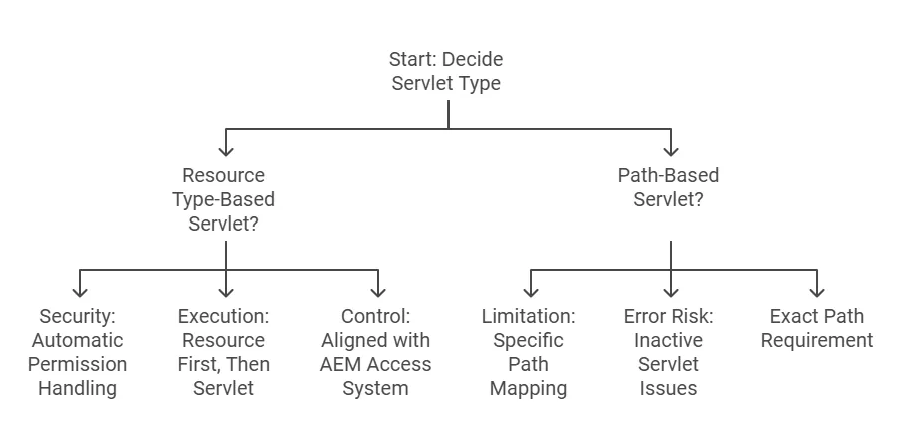
Resource Type-Based Servlets
- Security: Sling handles permissions for resource type-based servlets, so only users with access to the resource can trigger the servlet.
- How it works: The system resolves the resource first, then calls the servlet.
- Control: This method is easier to manage within AEM’s access control system.
Path-Based Servlets
- Limitations: Path-based servlets are mapped to specific URLs, not resource types.
- Flexibility: They are less flexible with suffixes and selectors.
- Risk: If the servlet is inactive or the path is incorrect, requests can fail.
- Precision: Paths must be exact, or the servlet may not be triggered.
Real-Time Example: Path-Based Servlet
Requirement
- The business team has requested to create dynamically new pages in the AEM site structure. For example, when a specific action is triggered (e.g., a form submission or a scheduled task), a new page should be created under a specific section of the website. The page should use a predefined template, have a meaningful name, and include metadata like the page title and page name. Additionally, the solution should allow input parameters of parent path, page name, and page title.
Approach to Implement the Requirement
Step 1: Understand the Requirement
- The business needs a way to programmatically create pages in the AEM content structure.
- The pages should be created under a specific parent path dynamically provided via input.
- Use a specific template.
- Have a meaningful page name and page title dynamically provided via input
Step 2: Choose the Right Option for Implementation
To meet this requirement, we can use an AEM servlet. Servlets allow us to handle incoming HTTP requests (like GET or POST) and perform actions like creating pages dynamically. Step 3: Plan the Implementation
To create the pages dynamically, we need to:
- Use the ResourceResolver to interact with the AEM repository.
- Use the PageManager to create pages dynamically.
- Handle exceptions and ensure proper resource cleanup.
Implement the logic for DynamicPages
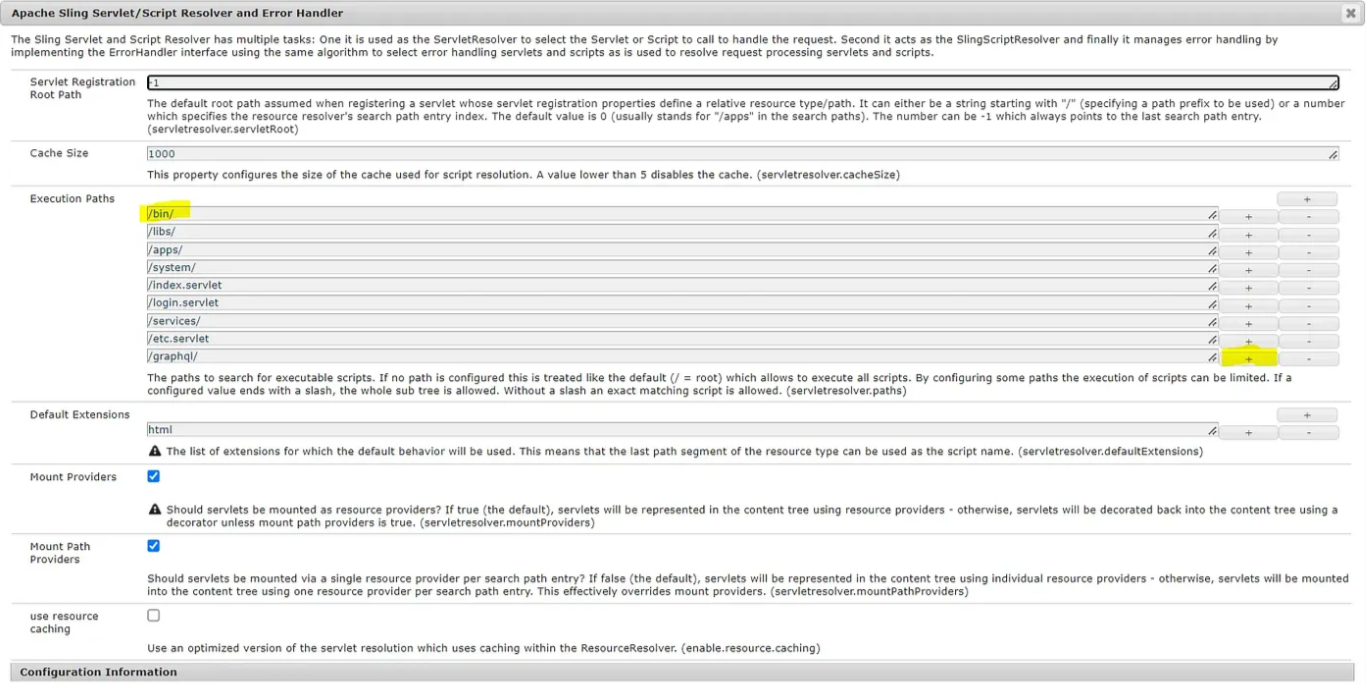
_ Before Creating Servlets Go to http://localhost:4502/system/console/configMgr and Search for “Servlet/Script Resolver” You will find servlet path is added inside the execution path field, if not then first you need to add this.
- below is the screenshot for reference
- creating a servlet named
CreateDynamicPages.javawhich extendsSlingAllSafeMethodServlet
Example Code
import com.day.cq.wcm.api.PageManager;
import com.day.cq.wcm.api.Page;
import org.apache.sling.api.SlingHttpServletRequest;
import org.apache.sling.api.SlingHttpServletResponse;
import org.apache.sling.api.resource.ResourceResolver;
import org.apache.sling.api.servlets.HttpConstants;
import org.apache.sling.api.servlets.SlingAllMethodsServlet;
import org.osgi.framework.Constants;
import org.osgi.service.component.annotations.Component;
import org.slf4j.Logger;
import org.slf4j.LoggerFactory;
import javax.servlet.Servlet;
import java.io.IOException;

@Component(service = Servlet.class,
        property = {
                Constants.SERVICE_DESCRIPTION + "=Create Page Servlet",
                "sling.servlet.methods=" + HttpConstants.METHOD_GET,
                "sling.servlet.paths=" + "/bin/createDynamicPages"
        })
public class CreateDynamicPages extends SlingAllMethodsServlet {
        private static final Logger log = LoggerFactory.getLogger(CreateDynamicPages.class);

        @Override
        protected void doGet(SlingHttpServletRequest request, SlingHttpServletResponse response)
                throws IOException {
                log.info("----------< Executing Create Page Servlet >----------");
                try (ResourceResolver resourceResolver = request.getResourceResolver()) {
                        PageManager pageManager = resourceResolver.adaptTo(PageManager.class);
                        if (pageManager == null) {
                                log.error("PageManager is not available");
                                response.getWriter().write("Error: PageManager is not available");
                                return;
                        }
                        String parentPath = request.getParameter("parentPath");
                        String pageName = request.getParameter("pageName");
                        String templatePath = "/conf/aem-debugcode/Generic/settings/wcm/templates/generic-template";
                        String pageTitle = request.getParameter("pageTitle");
                        if (parentPath == null || pageName == null || pageTitle == null) {
                                response.getWriter().write("Error: Missing required parameters");
                                return;
                        }
                        Page newPage = pageManager.create(parentPath, pageName, templatePath, pageTitle);
                        if (newPage != null) {
                                log.info("Page created successfully: {}", newPage.getPath());
                                response.getWriter().write("Page created successfully: " + newPage.getPath());
                        } else {
                                log.error("Failed to create page");
                                response.getWriter().write("Error: Failed to create page");
                        }
                } catch (Exception e) {
                        log.error("Error while creating page: {}", e.getMessage(), e);
                        response.getWriter().write("Error: " + e.getMessage());
                }
        }
}
Example URL
http://localhost:4502/bin/createDynamicPages?parentPath=/content/aem-debugcode/us/en&pageTitle=LandingPage&pageName=landPage
let’s Understand the code
- The servlet receives incoming requests at a specific URL (e.g., /bin/createDynamicPages?parentPath=/content/aem-debugcode/us/en&pageTitle=LandingPage&pageName=landPage).
- Extract parameters from the request
- Use request.getParameter(“parentPath”), request.getParameter(“pageName”)and request.getParameter(“pageTitle”) to get user inputs.
- Use the ResourceResolver from the incoming request to gain access to the JCR (Java - Content Repository), which stores all content in AEM.
- Use the PageManager to create a page with the dynamically provided parent path page name and page title.
- Build a response message indicating the page creation status, including the path of the created page.
- Close the ResourceResolver properly to avoid memory leaks.
Real-Time Example: Resource Type Servlet
Requirement
- The business team has requested a solution to dynamically fetch and display the list of child pages for a specific page in the AEM site structure
Approach to Implement the Requirement
- Accept a pagePath parameter as input to specify the parent page.
- Default to the path /content/aem-debugcode/us/en if no pagePath parameter is provided.
- Retrieve all child pages under the specified parent page and return their titles and paths in a structured format.
- Support response formats in JSON or plain text (txt).
Example Code
import java.io.IOException;
import java.util.Iterator;
import javax.json.Json;
import javax.json.JsonArrayBuilder;
import javax.json.JsonObjectBuilder;
import javax.servlet.Servlet;
import javax.servlet.ServletException;
import org.apache.sling.api.SlingHttpServletRequest;
import org.apache.sling.api.SlingHttpServletResponse;
import org.apache.sling.api.resource.ResourceResolver;
import org.apache.sling.api.servlets.SlingSafeMethodsServlet;
import org.apache.sling.servlets.annotations.SlingServletResourceTypes;
import org.osgi.service.component.annotations.Component;
import com.day.cq.wcm.api.Page;
import com.day.cq.wcm.api.PageManager;


@Component(service = Servlet.class)
@SlingServletResourceTypes(resourceTypes = "aem-debugcode/components/page",
        selectors = "list", extensions = {"txt", "json"})
public class AccessComponentsServlet extends SlingSafeMethodsServlet {
    @Override
    protected void doGet(SlingHttpServletRequest request, SlingHttpServletResponse response)
            throws ServletException, IOException {
        ResourceResolver rr = request.getResourceResolver();
        String pagePath = request.getParameter("pagePath");
        if (pagePath == null) {
            pagePath = "/content/aem-debugcode/us/en";
        }
        PageManager pm = rr.adaptTo(PageManager.class);
        Page page = pm.getPage(pagePath);
        Iterator<Page> childPages = page.listChildren();
        JsonArrayBuilder jsonObj = Json.createArrayBuilder();
        while (childPages.hasNext()) {
            JsonObjectBuilder jsonBuilder = Json.createObjectBuilder();
            Page selectedPage = childPages.next();
            jsonBuilder.add("title", selectedPage.getTitle());
            jsonBuilder.add("path", selectedPage.getPath());
            jsonObj.add(jsonBuilder);
        }
        response.getWriter().write(jsonObj.build().toString());
    }
}
Example URL
http://localhost:4502/content/aem-debugcode/us/en/jcr:content.list.txt
OUTPUT:
[
  {
    "title": "My Account",
    "path": "/content/aem-debugcode/us/en/my-account"
  },
  {
    "title": "Catalog Page",
    "path": "/content/aem-debugcode/us/en/products"
  },
  {
    "title": "Reset Password",
    "path": "/content/aem-debugcode/us/en/reset-password"
  },
  {
    "title": "Search Results",
    "path": "/content/aem-debugcode/us/en/search"
  },
  {
    "title": "Test Page",
    "path": "/content/aem-debugcode/us/en/test-page"
  },
  {
    "title": "New Page",
    "path": "/content/aem-debugcode/us/en/new-page"
  },
  {
    "title": "New Page1",
    "path": "/content/aem-debugcode/us/en/new-page1"
  },
  {
    "title": "New Page1",
    "path": "/content/aem-debugcode/us/en/new-page10"
  },
  {
    "title": "LandingPage",
    "path": "/content/aem-debugcode/us/en/landPage"
  }
]
Summary
This guide covers the architecture, lifecycle, registration, and implementation patterns for AEM Sling Servlets. Use the examples above to create dynamic page creation servlets and resource-type servlets that return structured results.