Understanding AEM Component Architecture
Learn how all AEM concepts work together. Understand component authoring, component rendering, component anatomy, and why architects think about components as rendering pipelines. Discover the complete lifecycle from author to browser.
Content Objective
In this chapter, you'll understand:
- The complete journey of a component from authoring to rendering
- Why authoring and rendering are completely separate processes
- How resourceType connects content in the repository to code in /apps
- Component anatomy and internal structure
- Why dialogs only exist for authoring, not rendering
- Common troubleshooting strategies used by experienced developers
- Why architects think about components as rendering pipelines
Where We Are
In the previous chapters, you've learned the individual pieces:
- Chapter 1: How requests flow through Dispatcher to AEM
- Chapter 2: How ResourceResolver finds content
- Chapter 3: How Components are resolved and scripts are located
- Chapter 4: How request paths are decomposed (selectors, extensions, suffixes)
- Chapter 5: How Sling Models adapt resources into Java objects
- Chapter 6: How HTL generates the final HTML
You know how each piece works. But most people don't understand how they connect. When you ask an AEM developer "How does a component render?", many start describing individual pieces without connecting them.
This chapter is different. We're going to follow a real example all the way through and see exactly how everything connects.
Following a Real Example: Adding a Title
Let's follow exactly what happens when an author places a Title component on a page:
- The author drags a Title component onto the page
- They type: "Welcome To AEM"
- They click Save
A few seconds later the title appears on the page.
Looks simple. But what actually happened inside AEM?
What Really Happens When a Component Is Added
Almost any AEM website contains a collection of content blocks: header, navigation menu, hero banner, title, image, carousel, teaser, and footer.
To an end user, these appear to be part of a single web page.
However, AEM does not treat a page as one large piece of content.
Instead, AEM treats a page as a collection of smaller reusable building blocks called components.
Each component has a specific responsibility and can be reused across many pages.
This approach allows authors to build complex pages without requiring developers to create a new template for every business requirement.
The Authoring Phase
When an author saves a component to a page, AEM does not generate and store HTML.
Instead, AEM stores structured content inside the JCR repository.
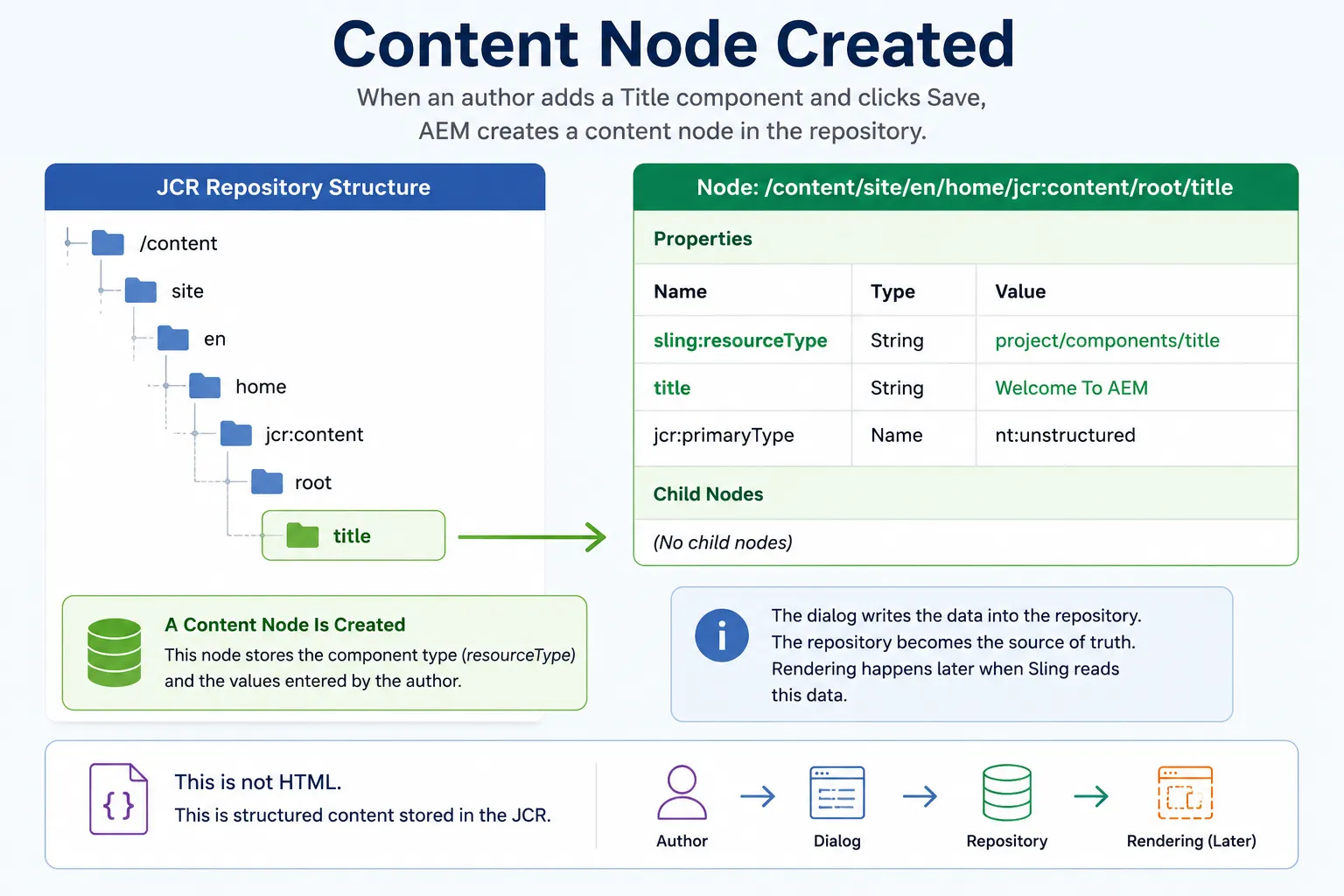
A simplified example might look like this:
/content/site/en/home/jcr:content/root/title
│
├── sling:resourceType = project/components/title
└── title = Welcome To AEM
This is important to understand:
When authors create content, they're not creating web pages. They're storing data that can later be rendered in different ways.
Components vs Content: Know the Difference
Many new AEM developers mix these up.
Components = Code (lives in /apps)
/apps/project/components/title
Content = Data (lives in /content)
/content/site/en/home/jcr:content/root/title
The component knows how to render. The content is what gets rendered.
This separation is why AEM scales. One Title component can render thousands of different title values across thousands of pages.
The Role of resourceType
The content in the repository has two pieces of information:
- The actual value:
title = Welcome To AEM - The component reference:
sling:resourceType = project/components/title
That sling:resourceType property is the glue. It tells Sling which component should eventually render this content.
The dialog collects the content but doesn't store anything else. Its job is done. The repository becomes the single source of truth.
At this point, nothing has been rendered yet.
Why resourceType Is Everything
In many ways, sling:resourceType plays a role similar to a class reference in object-oriented programming.
The content node contains the data, while the resourceType tells Sling which implementation should handle that data.
When a component is added to a page, AEM does not store references to HTL files, Sling Models, or Java classes. Instead, it stores a single property:
sling:resourceType = project/components/title
When Sling later encounters this content node, it uses the resourceType value to locate the corresponding component definition under /apps.
From there, Sling can find:
- HTL scripts
- Sling Models
- Client-side assets
- Inherited functionality through resourceSuperType
This is why resourceType is one of the most important properties in AEM. It acts as the bridge between content stored in the repository and code stored in the application.
Real Production Example: Missing Components After Migration
Consider a situation where content is migrated from one environment to another, but the corresponding component code is not deployed.
The content node still exists in the repository and all authored values are still available.
However, Sling cannot resolve:
sling:resourceType = project/components/title
because the component implementation does not exist under /apps.
The result is often:
- Empty components
- Missing content
- Script resolution errors
- Components rendering correctly in one environment but not another
This is one of the first things experienced AEM developers check when troubleshooting rendering issues.
Components Are More Than Just HTML
A component isn't just its HTML output. There are multiple layers working together:
- Content — Author-entered data in the repository
- Configuration — How the component behaves
- Business Logic — Usually Sling Models
- Presentation — HTML from HTL
- Styling — CSS via Clientlibs
- Behavior — JavaScript via Clientlibs
All of these together make a complete, reusable component.
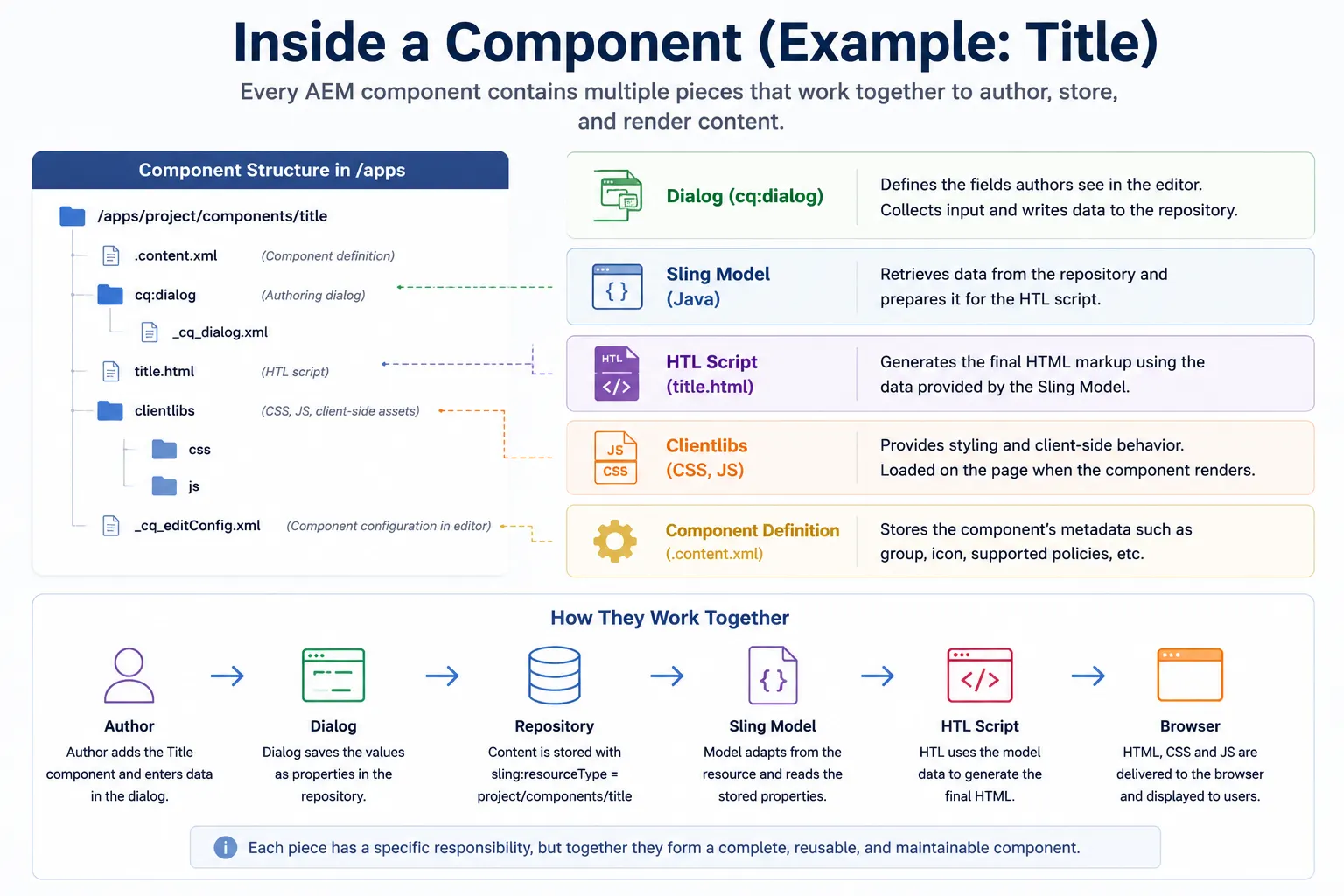
Looking Inside a Real Component
Here's what a simple Title component actually contains:
/apps/project/components/title

├── .content.xml              (metadata)
├── cq:dialog                 (authoring interface)
├── title.html                (renders HTML)
├── _cq_editConfig.xml        (edit bars and config)
└── clientlibs/
    └── css/
        └── title.css
    └── js
        └── title.js         (styling)
Each piece does one thing:
- cq:dialog — Collects input from authors
- title.html — Generates the HTML
- .content.xml — Component metadata
- _cq_editConfig.xml — Edit configuration
- clientlibs — CSS and JavaScript
The Sling Model (Java code) usually lives elsewhere:
core/src/main/java/com/project/core/models/TitleModel.java
The Dialog Is Just an Authoring Tool
This is one of the most misunderstood concepts. New developers think the dialog is somehow part of the component itself.
It's not.
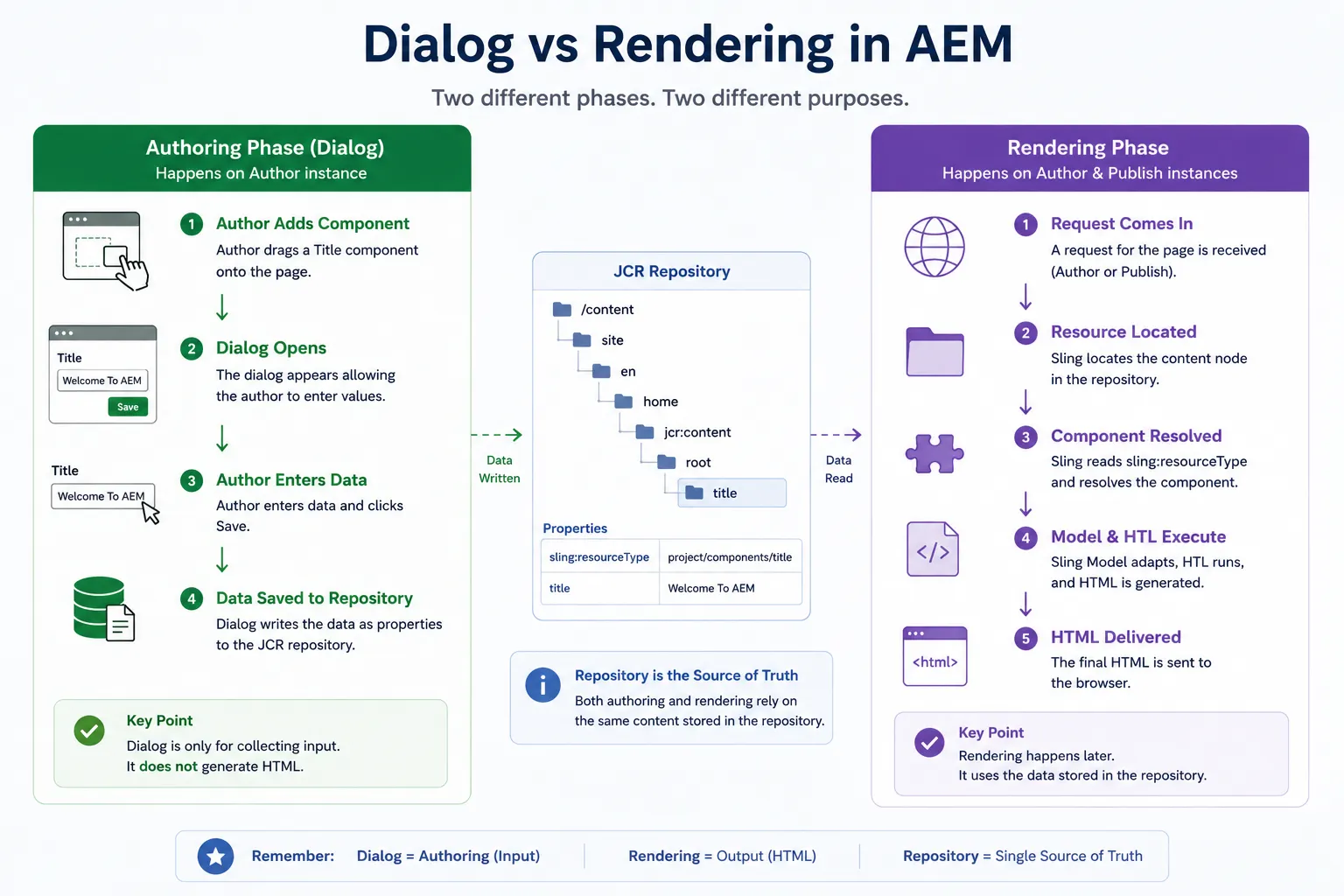
The dialog's only job is to collect input from authors and store it in the repository.
When an author enters a title and clicks Save, the dialog doesn't generate any HTML. It doesn't participate in rendering. Its job ends the moment the content is stored.
The rendering happens later when Sling reads that stored content and renders it.
Simple flow:
Author → Dialog → Data Stored in Repository
(Rendering happens separately, much later)
Components Behave Differently on Author vs Publish
The component code is the same. The content is the same. The rendering pipeline is fundamentally the same, but Author includes additional capabilities designed for page editing and content creation.
But Author has extra features that Publish doesn't:
- Edit bars
- Component placeholders
- Dialogs
- Drag-and-drop editing
- WCM Mode capabilities
These features help authors create. Publish strips all of this out and sends only the HTML to visitors.
This is why sometimes a component renders correctly on Author but looks different on Publish. It could be:
- Permissions differences
- Content not replicated
- Client libraries not loading
- Environment-specific configurations
What Actually Happens When a Visitor Requests a Page
So far we've been on the authoring side. Now let's see what happens when someone visits the page.
A visitor requests:
/content/site/en/home.html
Here's what Sling does:
- Locates the page resource
- Reads all child resources (title, image, etc.)
- For each resource, reads the
sling:resourceType - Finds the corresponding component in
/apps - If there's a Sling Model, adapts the resource to it
- Runs the HTL script to generate HTML
- Sends the final HTML to the browser
The browser never sees Sling Models, HTL files, or repository content. It only sees the final HTML.
How AEM Assembles a Complete Page
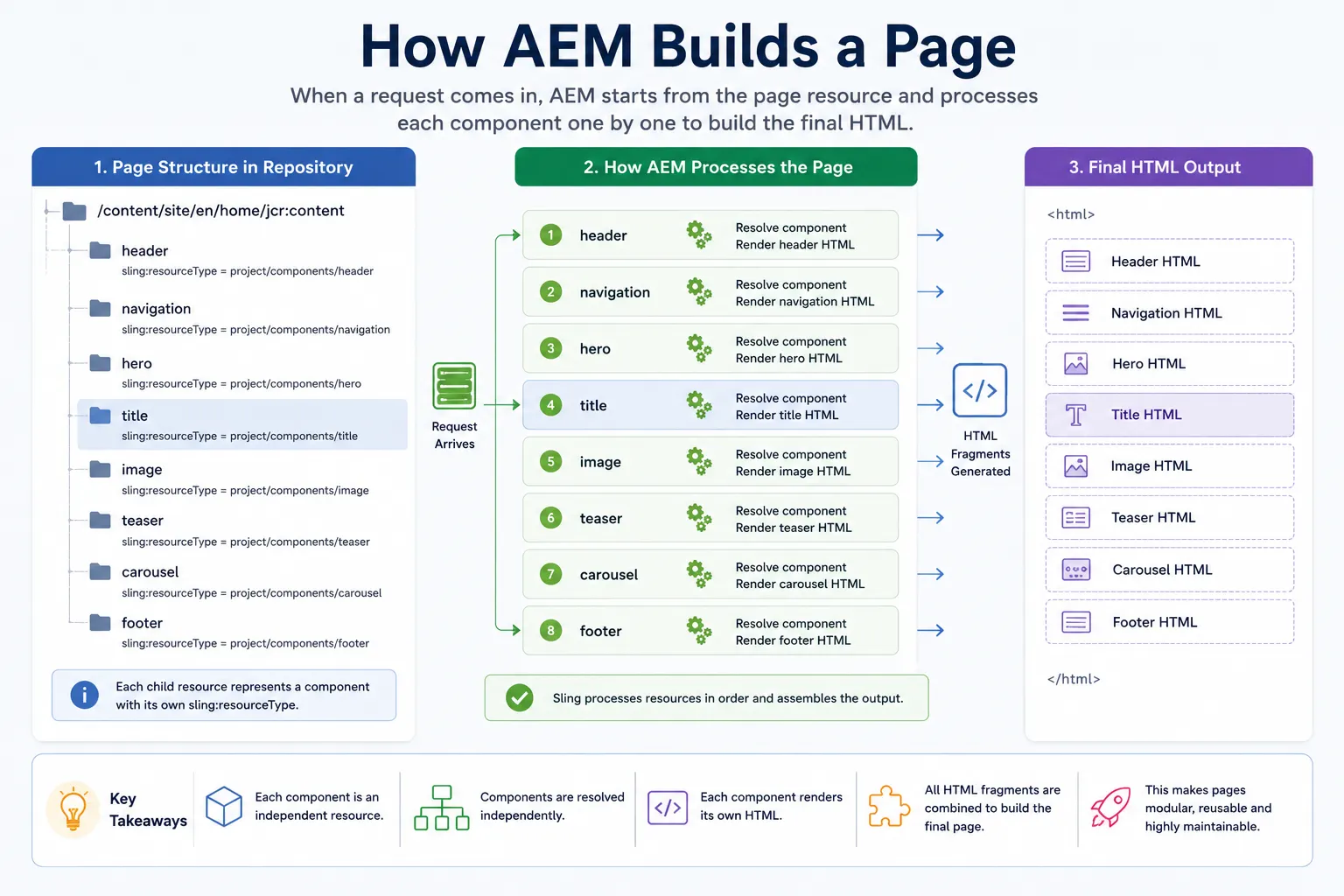
A real page has multiple components stacked together. During rendering, Sling processes each one:
/content/site/en/home/jcr:content

├── header
├── navigation
├── hero
├── title
├── image
├── teaser
└── footer
For each component, Sling:
- Finds the right implementation
- Executes the rendering logic
- Generates its HTML
The final page is the combined HTML output of all these individual components.
This is what makes AEM flexible yet organized. Authors can build complex pages, but developers keep code organized in reusable components.
How Component Resolution Happens Internally
To an end user, a page appears to be a single HTML document.
Internally, AEM treats each component as an independent resource.
Each child resource contains its own sling:resourceType value.
During rendering:
- Sling traverses the page hierarchy.
- Each resource is processed independently.
- Sling reads the resourceType.
- The appropriate component implementation is resolved.
- The component rendering lifecycle executes.
- HTML is generated for that component.
The final page delivered to the browser is simply the combined output of many independently rendered components.
This component-based rendering model is one of the reasons AEM supports highly flexible layouts while still enabling large-scale component reuse.
Component Inheritance: Reusing Existing Components
You don't always build components from scratch. Many components inherit from existing ones using sling:resourceSuperType.
A custom Title component might inherit from the Core Component Title, for example. Instead of copying everything, you create your own and only override what's different.
This saves work and keeps your codebase clean.
When Sling cannot find a script, dialog, or configuration in the current component, it continues traversing the sling:resourceSuperType chain until a matching implementation is found.
Real Example: Extending Core Component Title
Instead of copying the entire Core Title implementation, you create your own component that points to it:
<jcr:content
  jcr:primaryType="cq:Component"
  sling:resourceSuperType="core/wcm/components/title/v3/title"
/>
Now your custom component inherits all Core Title functionality but can override specific parts.
Benefits:
- Core updates automatically inherited
- You only maintain your changes
- Less technical debt
- Better long-term sustainability
Why Clientlibs Matter
Rendering HTML isn't enough. Take a Carousel component.
The HTML might render fine, but without CSS the carousel looks broken. Without JavaScript it doesn't slide.
Clientlibs solve this by packaging CSS and JavaScript alongside the component. When AEM renders the page, it includes the necessary client-side assets so the component actually works in the browser.
This keeps everything organized and self-contained.
Clientlibs also help prevent duplicate CSS and JavaScript downloads by grouping assets into reusable categories that can be be included across multiple pages and components.
The Complete Journey: Title Component From Authoring to Browser
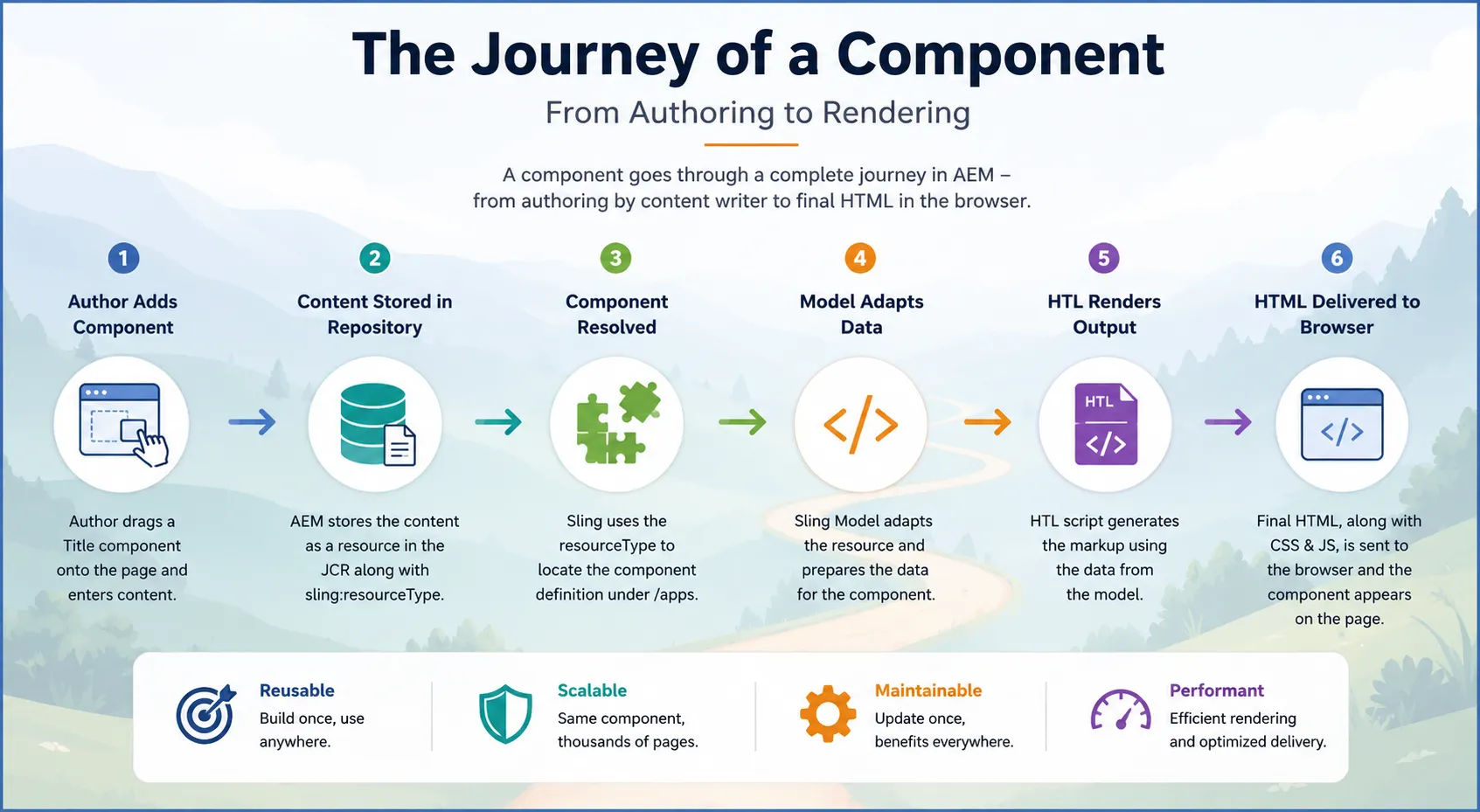
Let's trace our Title component all the way through:
Author enters: "Welcome To AEM"
          ↓
Dialog stores in repository
          ↓
Visitor requests: GET /content/site/en/home.html
          ↓
Sling locates resource
          ↓
Sling reads: sling:resourceType = project/components/title
          ↓
Component resolver finds: /apps/project/components/title
          ↓
Sling Model adapts resource to TitleModel
          ↓
Model retrieves title value from repository
          ↓
HTL script executes: <h1>Welcome To AEM</h1>
          ↓
Browser receives HTML
That simple component involved every concept you've learned.
Two Separate Worlds: Authoring vs Rendering
Think of these as two completely separate processes happening at different times:
Authoring (When authors work):
Author → Dialog → Save Content
Rendering (When visitors visit):
Request → Resource → resourceType → Sling Model → HTL → HTML
These lifecycles are related but totally separate. Understanding this makes AEM much easier to think about.
Troubleshooting: Debugging Components
When a component doesn't render correctly, experienced developers don't start by opening the HTL file.
Instead, they validate each stage of the rendering pipeline in order:
- Resource exists? — Check error.log, browse repository
- resourceType present? — Verify the property is set
- Component path exists? — Check /apps/
- Model adapting? — Test model instantiation
- HTL executing? — Look for script errors
- Clientlibs loading? — Check page source
By following the same order Sling uses, you find problems faster.
| Check | What to Verify | Common Issue |
|---|---|---|
| Resource exists | Is content in repository? | Not replicated to Publish |
| resourceType set | Does resource have the property? | Typo or missing |
| Component path | Does /apps/ exist? | Not deployed |
| HTL script | Does title.html exist? | Missing file |
| Script resolution | Right selector/extension? | Wrong request path |
| Model adapts | Can resource adapt to Model? | Wrong annotations |
| Injections work | Are @ValueMapValue fields populated? | Property names don't match |
| Clientlibs load | Are CSS/JS in page source? | Categories missing |
| Permissions | Can user read content? | Access denied |
| Logs | Any errors in error.log? | Java exceptions |
Why Experienced Developers Troubleshoot in This Order
Experienced AEM developers follow this sequence because every stage depends on the stage before it.
Think about the rendering pipeline:
Resource Exists?
      ↓
resourceType Present?
      ↓
Component Exists?
      ↓
Model Adapting?
      ↓
HTL Executing?
      ↓
Clientlibs Loading?
For example:
- If the resource does not exist, HTL is irrelevant.
- If the resourceType is incorrect, Sling cannot locate the component.
- If the component cannot be resolved, the model will never execute.
- If the model fails to adapt, HTL may not receive the required data.
- If the HTML renders correctly but styling is missing, the issue may be in Clientlibs.
By validating the pipeline in the same order Sling executes it, root causes can usually be identified much faster.
How Architects Think About Components
Architects don't see components as folders or files.
They see them as rendering pipelines.
Here's the mental model:
Content (Repository)
    ↓
resourceType (Pointer)
    ↓
Component Implementation (/apps)
    ↓
Sling Model (Business Logic)
    ↓
HTL (Presentation)
    ↓
Clientlibs (Styling & Behavior)
    ↓
HTML (Output)
Key insight: The repository doesn't store references to HTL files or Java classes. It only stores a sling:resourceType value.
That single property is all that connects content to implementation. This design keeps content independent from code, which is why AEM can scale.
Experienced architects rarely start with HTL or Java code. Instead, they follow the same rendering chain Sling uses internally. By validating each stage in order, root causes become much easier to identify.
What You Should Take Away
- Components are building blocks, not monolithic pages
- Content and code are separate — components implement, content stores data
sling:resourceTypeconnects content to implementation- Authoring and rendering are separate lifecycles
- Dialog only exists for authoring; it doesn't participate in rendering
- Author and Publish environments are different
- Inheritance through
resourceSuperTypereduces duplication - Clientlibs package CSS/JavaScript with components
- Troubleshoot by tracing the rendering pipeline
- Architects think in rendering pipelines, not code folders
What Happens Next?
In this chapter, we tied together everything you've learned about request flow, resources, components, Sling Models, and HTL.
The foundation is solid. Now you're ready for the more advanced topics:
- Chapter 8: Understanding Templates — How page blueprints are defined
- Chapter 9: Layout Container & Responsive Grid — How pages become responsive
- Chapter 10: Style System — How design consistency is enforced without duplicate components
- Chapter 11: Template Policies Deep Dive — How governance scales across multi-site implementations
You now understand not just individual AEM concepts, but how they work together at scale.
That's the real skill.
Understanding individual concepts is important. Understanding how content, resource resolution, component resolution, Sling Models, HTL, and Clientlibs work together is what separates an AEM developer from an AEM architect.
Want to See This Applied to a Real Problem?
Read Real-World Scenario — When and Why You Actually Reach for an AEM Component for honest criteria on when a component earns its complexity versus when it's overkill, plus the dialog-bloat and resourceSuperType gotchas that show up once components are actually in production.
Enjoyed this chapter?
Get an email when I publish the next chapter. No spam — just new technical deep-dives.
Comments
Share feedback or questions about this blog post.
No comments yet. Be the first to share your thoughts.