Understanding Selectors, Extensions, Suffixes, and Request Path Decomposition in AEM
Master URL decomposition in Sling. Learn how selectors, extensions, and suffixes control script resolution and behavior. Understand headless AEM, Dispatcher caching with selectors, and how to troubleshoot complex URL-based issues in production.
Content Objective
In this chapter, you'll understand:
- How Sling breaks down URLs into logical parts
- What selectors do and how they change script resolution
- How extensions determine what format you're serving (HTML, JSON, etc.)
- How suffixes enable dynamic content and routing
- How headless AEM leverages URL decomposition
- How URL patterns impact dispatcher caching
- How to troubleshoot URL-based rendering and servlet issues
How Sling Understands a URL
Let's start with a real example:
/content/site/en/home.print.a4.html/products/mobile
Most developers see this as a single string.
But Sling sees something completely different.
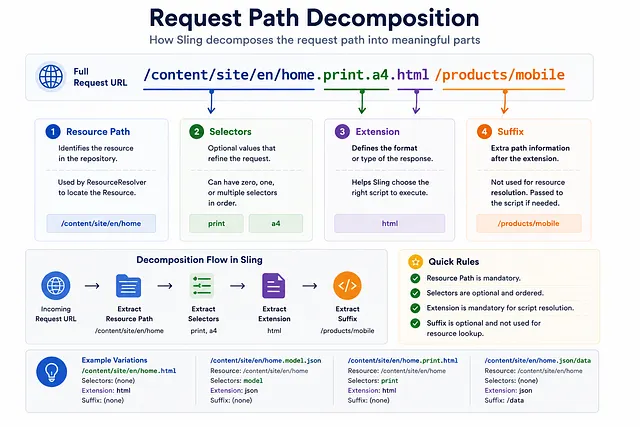
Sling decomposes this URL into:
Resource Path:  /content/site/en/home
Selectors:      print, a4
Extension:      html
Suffix:         /products/mobile
This immediate parsing is fundamental to how Sling handles requests.
How Sling Breaks Down a URL
When a request reaches Sling, the URL is not treated as a simple string.
Sling parses the request and separates it into multiple logical parts:
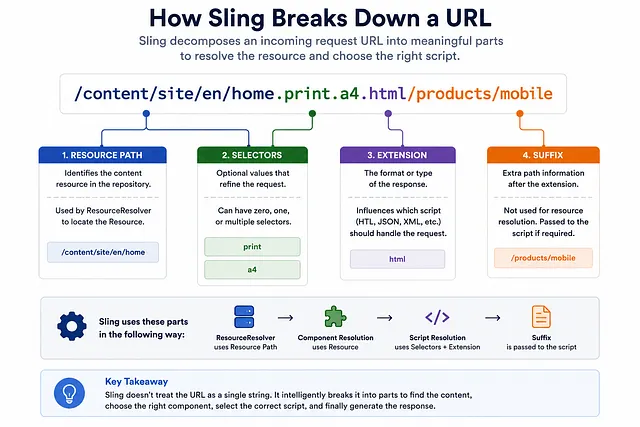
These values are then stored internally and later exposed through the RequestPathInfo API.
Request arrives
 ↓
URL parsed
 ↓
Parts extracted
 ↓
Resource Resolution begins
 ↓
Script Resolution uses selectors + extension
 ↓
Component rendered or servlet executed
What Is Resource Path?
The resource path is the foundation:
/content/site/en/home
This is what ResourceResolver uses to find content.
Remember from earlier chapters: without a resource path, Sling cannot:
- Locate the resource
- Read properties
- Render components
- Execute servlets
The resource path is non-negotiable.
What Are Selectors?
Understanding Selectors
Selectors are the dots that appear between the resource path and extension.
Example:
/home.model.json
Selector:
model
Another example:
/home.print.a4.html
Selectors:
print
a4
Important Concept: Selectors Are Ordered
Sling sees:
Selector 1: print
Selector 2: a4
not:
Selector 1: a4
Selector 2: print
Order matters. If you request:
/home.a4.print.html
Sling treats a4 and print in that specific order.
Common Selectors Used in AEM
| Selector | Purpose | Common Usage |
|---|---|---|
| model | JSON export | /home.model.json (SPA Editor) |
| Print-friendly view | /home.print.html | |
| export | Custom export format | /content.export.csv |
| children | Child resource listing | /folder.children.json |
| wcmmode | Edit mode indicator | /home.wcmmode.edit.html |
| format | Alternate format | /home.format.pdf.html |
Request Path Decomposition
What Is Extension?
Extensions determine the response format:
.html
.json
.xml
.pdf
Extension often influences Script Resolution.
As we learned in Chapter-3, the extension helps Sling decide which script should handle the request.
Extension and Script Resolution
Example 1:
Request:  /home.html
Script:   title.html
Example 2:
Request:  /home.model.json
Handler:  JSON model exporter
Example 3:
Request:  /home.xml
Script:   sitemap.xml (if available)
The extension tells Sling: "I want this response in this format."
Sling then searches for a matching script or servlet that can produce that format.
What Is Suffix?
The suffix is often overlooked but critically important for advanced use cases.
Understanding Suffix
The suffix is everything after the extension:
/content/site/en/home.html/products/mobile
Breaking it down:
Resource:   /content/site/en/home
Extension:  html
Suffix:     /products/mobile
Why Suffixes Exist
A servlet or model can use the suffix to load additional content dynamically without changing the resource being rendered.
This pattern is commonly used when:
- A single page needs to display different content based on the URL
- You want clean, REST-like URLs without query parameters
- You need to pass additional context to the rendering
Real Example: Product Page
Without suffix:
/content/site/products.html?productId=123
With suffix:
/content/site/products.html/products/mobile
The page is always /content/site/products (same resource), but the suffix determines which product displays.
In the Sling Model:
@Model(adaptables = SlingHttpServletRequest.class)
public class ProductPageModel {

  @Inject
  private SlingHttpServletRequest request;

  public String getProductPath() {
    String suffix = request.getRequestPathInfo().getSuffix();
    return suffix;  // /products/mobile
  }
}
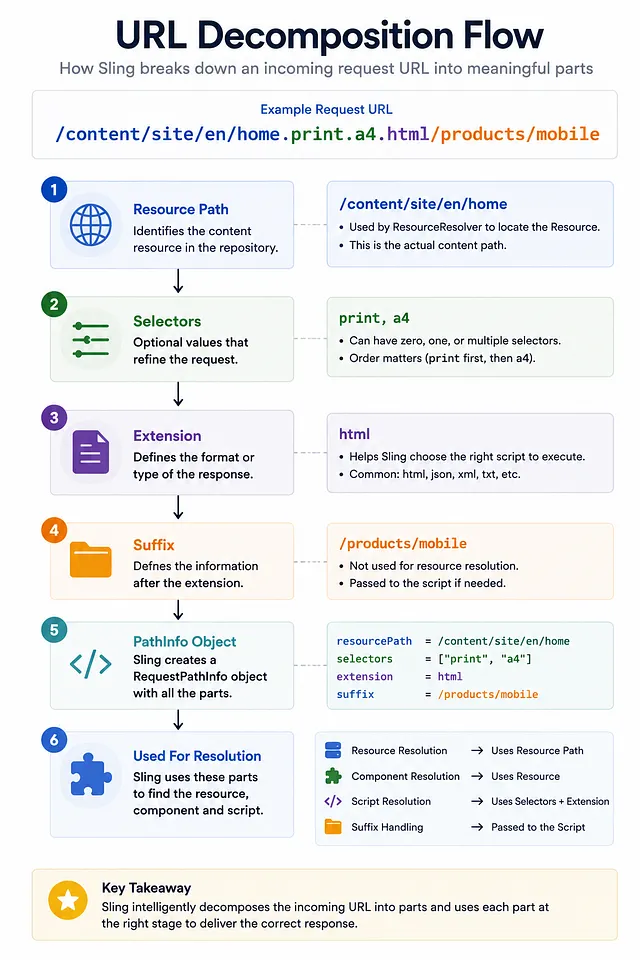
URL Decomposition Flow
Here's the complete flow of how Sling processes a complex URL:
Accessing URL Parts in Code
This is where theory connects to practice.
In a Servlet
@SlingServlet(
  resourceTypes = "company/components/page",
  selectors = "export",
  extensions = "json",
  methods = "GET"
)
public class ExportServlet extends SlingSafeMethodsServlet {

  @Override
  protected void doGet(SlingHttpServletRequest request,
                       SlingHttpServletResponse response) {

    RequestPathInfo pathInfo = request.getRequestPathInfo();

    String resourcePath = pathInfo.getResourcePath();     // /content/site/en/home
    String[] selectors = pathInfo.getSelectors();         // ["export"]
    String extension = pathInfo.getExtension();           // "json"
    String suffix = pathInfo.getSuffix();                 // null or additional path

    // Use these values to determine behavior
  }
}
In a Sling Model
@Model(adaptables = SlingHttpServletRequest.class)
public class DynamicPageModel {

  @Inject
  private SlingHttpServletRequest request;

  @PostConstruct
  protected void init() {
    RequestPathInfo pathInfo = request.getRequestPathInfo();

    String[] selectors = pathInfo.getSelectors();
    String extension = pathInfo.getExtension();
    String suffix = pathInfo.getSuffix();

    // Load different content based on suffix
    if (suffix != null) {
      String product = suffix.replaceFirst("/", "");  // "products/mobile"
      loadProductDetails(product);
    }
  }

  private void loadProductDetails(String path) {
    // Custom logic to load product data
  }
}
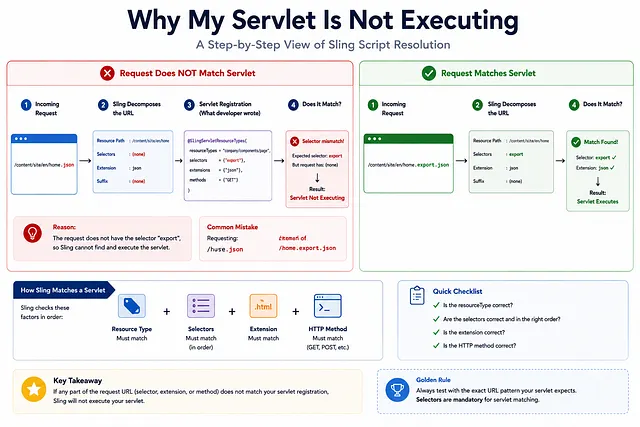
Real Production Scenario: Why Is My Servlet Not Executing?
One of the most common production issues:
Situation:
Developer defines a servlet:
@SlingServletResourceTypes(
  resourceTypes = "company/components/page",
  selectors = "export",
  extensions = "json"
)
public class PageExportServlet extends SlingSafeMethodsServlet {
  // implementation
}
They test with request:
/home.json
Servlet never executes.
Developer debugs the servlet code, finds nothing wrong, and gets frustrated.
Problem:
The servlet is configured to listen for:
Selectors: export
Extension: json
But the request URL is:
/home.json
Which has:
Selectors: (none)
Extension: json
Solution:
The correct URL should be:
/home.export.json
Which provides:
Selectors: export
Extension: json
This is a very common issue because many developers don't fully understand URL decomposition.
How Headless AEM Uses URL Decomposition
Headless AEM relies heavily on URL decomposition for flexible content delivery.
SPA Editor and JSON Export
Request:
/content/site/en/home.model.json
Decomposed as:
Resource Path:  /content/site/en/home
Selector:       model
Extension:      json
Sling finds:
JSON model exporter for this resource type
Result:
{
  "title": "Home",
  "description": "Welcome to our site",
  "children": [...]
}
The SPA Frontend then consumes this JSON to render components independently.
Multiple Formats from Single Resource
Same resource, different formats:
/home.html              → HTML page (traditional)
/home.model.json        → JSON model (SPA)
/home.wcmmode.edit.html → Edit mode view (Author)
All from the same resource at /content/site/en/home.
This flexibility is why URL decomposition is so powerful.
Selectors and Dispatcher Caching
In production environments, Dispatcher caching rules often include selectors as part of the cache key.
For example, these are treated as different cached responses:
/home.html
/home.print.html
/home.model.json
Understanding selectors becomes critical when troubleshooting caching issues because:
- The same page can produce multiple responses depending on the selector
- Dispatcher may cache each variant separately
- Cache invalidation may affect all selectors or just specific ones
- You need to invalidate the correct URL pattern
Dispatcher Cache Configuration
Example caching rules:
# Cache HTML views
/0001 { /glob "*.html*" /type "allow" }

# Cache JSON exports
/0002 { /glob "*.json*" /type "allow" }

# Don't cache print variants (maybe)
/0003 { /glob "*.print.html" /type "deny" }
Different selectors = different cache entries.
URL Troubleshooting Checklist
When URLs or selectors don't work as expected:
| Problem | What to Check |
|---|---|
| Servlet not executing | Do selectors and extension match the request? |
| Wrong content rendered | Is resource path resolving correctly? |
| Cache not working | Are selectors consistent in URLs being cached? |
| Suffix ignored | Is code actually reading RequestPathInfo.getSuffix()? |
| Extension not recognized | Is the script/servlet registered for that extension? |
| Order matters for selectors | Did you test /home.a4.print.html vs /home.print.a4.html? |
| Query params vs suffix | Should you use suffix instead of query parameters? |
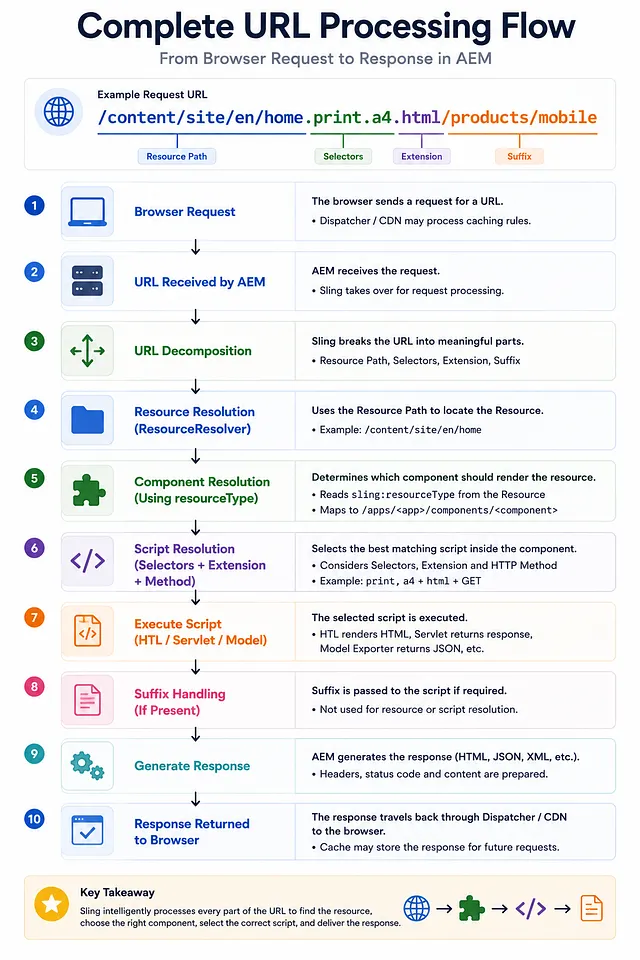
Complete URL Processing Flow
Here's how Sling processes a complete request with all URL parts:
Why Architects Care About URL Decomposition
Experienced AEM developers rarely look at a URL as a single string.
Instead, they immediately decompose it into:
- Resource Path
- Selectors
- Extension
- Suffix
This makes troubleshooting significantly faster because each part influences a different stage of Sling processing:
- Resource Path affects Resource Resolution
- Selectors and Extension affect Script Resolution
- Suffix provides additional context to the application
- Query Parameters add flexibility to behavior
Understanding which stage is responsible for a problem often reduces debugging time dramatically.
Common issues originating from URL decomposition:
- Wrong selector in configuration
- Missing extension in servlet annotation
- Incorrect suffix parsing
- Servlet selector mismatch
- JSON exporter not executing
- Caching wrong URL pattern
Key Takeaways
- Sling decomposes URLs into resource path, selectors, extension, and suffix
- Resource Path is what ResourceResolver uses to find content
- Selectors influence script resolution and can trigger different handlers
- Extension determines response format (html, json, xml, etc.)
- Suffix provides additional context without changing the resource
- Order matters for selectors (first.second.extension is different from second.first.extension)
- URL decomposition enables flexible content delivery and headless AEM
- Dispatcher caches different selectors as separate cache entries
- Troubleshooting should consider all URL parts, not just the resource path
What Happens Next?
In this chapter, we learned how Sling decomposes URLs and how each component influences rendering and script resolution.
We've now covered the complete Sling request pipeline from browser to Dispatcher to AEM Publish:
- Chapter 1: Request flow and Dispatcher caching
- Chapter 2: Resources and ResourceResolver
- Chapter 3: Component resolution and resource types
- Chapter 4: URL decomposition and script selection
At this point, you understand the infrastructure behind every page request in AEM.
From here, you're ready to explore:
- Advanced Sling Models — Adapters and business logic
- HTL Deep Dive — Template language and expressions
- Custom Servlets — Building REST APIs in AEM
- Replication and Content Sync — Publishing workflows
- Performance Optimization — Caching strategies and tuning
The foundation is solid. The advanced topics will build naturally on top of it.
Enjoyed this chapter?
Get an email when I publish the next chapter. No spam — just new technical deep-dives.
Comments
Share feedback or questions about this blog post.
No comments yet. Be the first to share your thoughts.