Understanding Sling Models in AEM
Learn how Sling Models bridge content and presentation. Understand adaptation, dependency injection, model lifecycle, and why they're essential for maintainable AEM components. Discover how Sling Models enable both traditional and headless AEM.
Content Objective
In this chapter, you'll discover:
- What Sling Models are and the problem they solve
- How adaptation transforms Resources into usable Java objects
- When to use Resource adaptables vs Request adaptables
- How to master dependency injection techniques
- The model lifecycle and why @PostConstruct matters
- Why separation of concerns keeps your code maintainable
- How to troubleshoot adaptation and injection issues
The Journey So Far
In previous chapters of this series, we followed a request through several stages of the Sling framework.
We learned:
- Chapter 1: How requests reach AEM through Dispatcher
- Chapter 2: How Resource Resolution locates content
- Chapter 3: How Component Resolution finds the correct component
- Chapter 4: How Script Resolution determines which script executes
At this point, Sling has successfully:
- Located the resource (content)
- Identified the component (rendering logic)
- Found the script (HTL file)
But there's a gap we haven't addressed yet:
Key question:
- How does HTL actually get the data it displays?
A Simple Example
Consider a Title component.
- An author enters a title through the component dialog:
"Welcome To AEM" - The content is stored in the repository
- HTL eventually renders that title on the page:
<h1>Welcome To AEM</h1>
Something has to connect those pieces — retrieve the stored value, maybe validate or transform it, and hand it to HTL in a shape the template can work with.
That something is Sling Models.
Sling Models provide a clean way to adapt Sling objects (Resources and Requests) into Java objects that can be used by HTL.
Instead of writing Java code inside presentation templates, business logic is moved into dedicated model classes that are easier to maintain, test, and reuse.
Where Sling Models Fit in the Rendering Pipeline
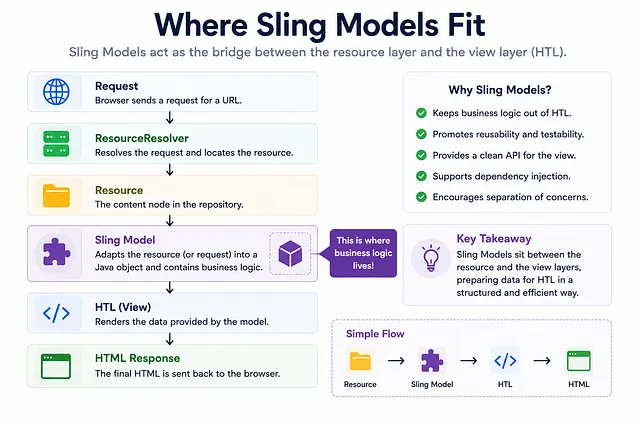
Sling Models sit between the resource layer and the presentation layer.
What Problem Do Sling Models Solve?
Before Sling Models
Before Sling Models became popular, developers often mixed rendering and business logic together.
Templates were responsible not only for displaying data but also for:
- Retrieving data
- Transforming data
- Applying business rules
- Integrating with external services
As applications grew, this approach became difficult to maintain and difficult to test.
Modern Approach: Separation of Concerns
Modern AEM development follows a cleaner separation of responsibilities:
Resources        → Provide content
Sling Models     → Provide business logic
HTL              → Provide presentation
Each layer focuses on a specific responsibility, making components:
- Easier to understand
- Easier to maintain
- Easier to test
- Easier to reuse
A typical rendering flow looks like this:
Resource (Content)
 ↓
Sling Model (Logic)
 ↓
HTL (Presentation)
 ↓
HTML (Output)
This separation is one of the reasons Sling Models became the recommended approach for modern AEM component development.
Why HTL Alone Is Not Enough
Consider a requirement where a title must always be displayed in uppercase.
Wrong approach:
<h1>${properties.jcr:title.toUpperCase()}</h1>
Problems:
- Business logic leaks into presentation
- Template becomes harder to read
- Logic is scattered across multiple templates
- Testing logic requires testing through the view
Correct approach:
@Model(adaptables = Resource.class)
public class TitleModel {

  @ValueMapValue
  private String title;

  public String getDisplayTitle() {
    return title != null ? title.toUpperCase() : "";
  }
}
HTL then remains focused on rendering:
<h1>${model.displayTitle}</h1>
Benefits:
- Business logic in dedicated class
- Easy to test independently
- Easy to maintain
- HTL stays simple
HTL remains focused on rendering while the model remains responsible for preparing the data.
Understanding Adaptation
This is fundamental to how Sling Models work.
What Is Adaptation?
Adaptation is the process of transforming one object type into another.
Example:
Resource resource =
  resourceResolver.getResource("/content/site/en/home/jcr:content/root/title");

TitleModel model =
  resource.adaptTo(TitleModel.class);

if (model != null) {
  String title = model.getTitle();
}
Breakdown:
Resource
  ↓
adaptTo(TitleModel.class)
  ↓
TitleModel (Java Object)
Important: Adaptation Is Not Guaranteed
Adaptation is not guaranteed to succeed.
If Sling cannot find a suitable adapter, adaptTo() returns null.
TitleModel model = resource.adaptTo(TitleModel.class);

if (model == null) {
  // Adaptation failed - Sling couldn't create the model
  // Possible reasons:
  // - Model class doesn't exist
  // - Required fields couldn't be injected
  // - Model registration failed
  // - Resource type doesn't match
}
This is why null checks remain important when working directly with adaptation APIs.
How Sling Creates Adapters
Adaptation does not create random objects.
Instead, Sling uses registered adapters to transform one object type into another.
When you annotate a class with @Model:
@Model(adaptables = Resource.class)
public class TitleModel {
  // ...
}
You're essentially saying: "Register me as an adapter that can transform a Resource into a TitleModel."
Sling then maintains a registry of adapters. When adaptTo() is called:
1. Check if there's a registered adapter
   Resource → TitleModel?
2. If yes, use it
3. If no, return null
Resource Adaptable vs Request Adaptable
One of the most misunderstood concepts in Sling Models.
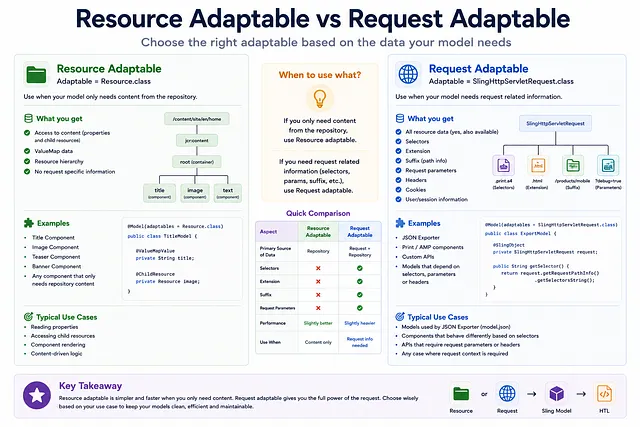
Resource Adaptable: Use When Only Content Is Needed
@Model(adaptables = Resource.class)
public class TitleModel {

  @ValueMapValue
  private String title;

  public String getTitle() {
    return title;
  }
}
Use Resource adaptables when:
- You only need to access content properties
- You don't need request-specific information
- You're rendering simple components
Examples:
- Title Component
- Image Component
- Teaser Component
- Banner Component
Request Adaptable: Use When Request Information Is Needed
@Model(adaptables = SlingHttpServletRequest.class)
public class DynamicPageModel {

  @Inject
  private SlingHttpServletRequest request;

  public String getSelector() {
    return request.getRequestPathInfo().getSelectors()[0];
  }

  public String getSuffix() {
    return request.getRequestPathInfo().getSuffix();
  }
}
Use Request adaptables when:
- You need selectors, extensions, or suffixes
- You need request parameters or headers
- You need the current user information
- You're building dynamic or parameterized components
Examples:
- Product listing (filtered by parameters)
- Search results (with query parameters)
- Headless API endpoints (with selectors/extensions)
- User-specific content (from request context)
Choosing Between Resource and Request
| Aspect | Resource Adaptable | Request Adaptable |
|---|---|---|
| Data Source | Content properties | Request information |
| Use Case | Static content components | Dynamic/parameterized components |
| Access to Selectors | No | Yes |
| Access to Request Parameters | No | Yes |
| Access to Headers | No | Yes |
| Typically Simpler | Yes | No |
Understanding Dependency Injection
Sling Models use annotations to inject dependencies into model fields.
@ValueMapValue - Read Content Properties
Read properties from the Resource's ValueMap:
@Model(adaptables = Resource.class)
public class ArticleModel {

  @ValueMapValue
  private String title;  // Reads jcr:title

  @ValueMapValue(name = "jcr:description")
  private String description;  // Custom property name

  public String getTitle() {
    return title;
  }

  public String getDescription() {
    return description;
  }
}
How it works:
Resource
 ↓
ValueMap
 ↓
@ValueMapValue fields populated
@ChildResource - Access Child Resources
Access resources nested under the current resource:
@Model(adaptables = Resource.class)
public class ContainerModel {

  @ChildResource
  private Resource image;  // Access child resource named "image"

  public Resource getImage() {
    return image;
  }
}
Repository structure:
/content/site/home/jcr:content/root/container
  ├─ image (child resource)
  ├─ title
  └─ description
@OSGiService - Inject Services
Inject OSGi services into your model:
@Model(adaptables = Resource.class)
public class EmailModel {

  @OSGiService
  private EmailService emailService;

  @OSGiService(filter = "slingFilterName=admin")
  private SlingFilter adminFilter;

  public void sendEmail(String to, String subject) {
    emailService.send(to, subject, "Body");
  }
}
This allows models to:
- Access business services
- Call external APIs
- Perform complex operations
- Integrate with AEM services (ResourceResolver, Query API, etc.)
@SlingObject - Inject Sling Objects
Inject commonly used Sling objects:
@Model(adaptables = SlingHttpServletRequest.class)
public class DynamicModel {

  @SlingObject
  private ResourceResolver resourceResolver;

  @SlingObject
  private SlingHttpServletRequest request;

  @SlingObject
  private Resource resource;

  public String getResourcePath() {
    return resource.getPath();
  }

  public Resource loadOtherResource(String path) {
    return resourceResolver.getResource(path);
  }
}
What Happens During Model Creation?
Understanding the model lifecycle is critical.
Model Lifecycle
- Step 1: Resource/Request Found
- Step 2: Model Instance Created
- Step 3: Dependencies Injected (@ValueMapValue, @OSGiService, etc.)
- Step 4: @PostConstruct Method Executed
- Step 5: Model Ready for Use
Example: Complete Lifecycle
@Model(adaptables = Resource.class)
public class ProductModel {

  @ValueMapValue
  private String title;

  @ValueMapValue
  private Double price;

  @OSGiService
  private PricingService pricingService;

  private Double discountedPrice;

  @PostConstruct
  private void init() {
    // This runs AFTER all injections are complete
    if (price != null) {
      // Apply discount logic
      discountedPrice = pricingService.applyDiscount(price);
    }
  }

  public String getTitle() {
    return title;
  }

  public Double getDiscountedPrice() {
    return discountedPrice;
  }
}
Why @PostConstruct Matters
@ValueMapValue
private String title;  // Injected by Sling
↓
@PostConstruct
private void init() {  // Called by Sling after injection
  if (title != null) {
    // Now we can safely use injected fields
    pageTitle = title.toUpperCase();
  }
}
Important: All injections happen before @PostConstruct executes.
This means:
- Injected fields are available in @PostConstruct
- You can validate injections
- You can perform initialization logic
- You can throw exceptions if required fields are missing
Real Component Example: Complete Flow
Let's trace a Title component from author to HTML.
Repository Structure
/content/site/en/home/jcr:content/root/title
  jcr:title = "Welcome To AEM"
  sling:resourceType = "company/components/title"
Sling Model
@Model(adaptables = Resource.class)
public class TitleModel {

  @ValueMapValue
  private String title;

  @PostConstruct
  private void init() {
    if (title != null) {
      title = title.trim();
    }
  }

  public String getTitle() {
    return title != null ? title : "No Title";
  }
}
HTL Template
<h1>${model.title}</h1>
Complete Flow

Common Sling Model Mistakes
Mistake #1: Not Checking for Null After Adaptation
// WRONG
TitleModel model = resource.adaptTo(TitleModel.class);
String title = model.getTitle();  // NullPointerException if adaptation failed!
Correct:
TitleModel model = resource.adaptTo(TitleModel.class);
if (model != null) {
  String title = model.getTitle();
}
Mistake #2: Using @ValueMapValue Without Defaults
// RISKY - throws exception if field is missing
@ValueMapValue
private String optionalField;
Better:
// Safe - uses default value if missing
@ValueMapValue
private String optionalField = "default";
Or specify required:
// Throws if required and missing
@ValueMapValue(required = true)
private String requiredField;
Mistake #3: Not Using @PostConstruct for Validation
// WRONG - relying on getter to handle null
public String getTitle() {
  if (title == null) {
    return "No Title";  // Checked on every call
  }
  return title;
}
Better:
@PostConstruct
private void init() {
  if (title == null) {
    title = "No Title";  // Set once during initialization
  }
}

public String getTitle() {
  return title;  // Always guaranteed to have a value
}
Mistake #4: Mixing Resource and Request Adaptables
// WRONG - trying to use Request object on Resource adaptable
@Model(adaptables = Resource.class)
public class MyModel {

  @Inject
  private SlingHttpServletRequest request;  // Will be null!
}
Correct:
@Model(adaptables = SlingHttpServletRequest.class)
public class MyModel {

  @Inject
  private SlingHttpServletRequest request;  // Will be injected
}
Troubleshooting: Component Shows Empty Output
When a component renders but shows no content:
| Check | What to Verify |
|---|---|
| Resource exists | Did ResourceResolver find the content? |
| Model adapts | Does resource.adaptTo(Model.class) return non-null? |
| Fields injected | Are @ValueMapValue fields being populated? |
| @PostConstruct runs | Does init() execute without errors? |
| HTL uses model | Does HTL access ${model} correctly? |
Debugging Example
@Model(adaptables = Resource.class)
public class DebugModel {

  @ValueMapValue
  private String title;

  @PostConstruct
  private void init() {
    // Add logging to debug
    if (title == null) {
      System.out.println("WARNING: title is null!");
    }
  }

  public String getTitle() {
    return title != null ? title : "(empty title)";
  }
}
Check logs to see if field injection succeeded.
Sling Models and Headless AEM
Sling Models are not limited to HTL rendering.
They're also heavily used by the AEM JSON Exporter.
How Headless AEM Uses Sling Models
When a request like this executes:
/content/site/en/home.model.json
Sling does the following:
Request parsed
 ↓
Extension = json, Selector = model
 ↓
ResourceResolver finds resource
 ↓
Sling adapts resource to model
 ↓
JSON exporter serializes model to JSON
 ↓
Response sent as JSON
Result:
{
  "title": "Welcome To AEM",
  "description": "Our homepage",
  "image": "image.jpg"
}
Same Model, Multiple Outputs
The same Sling Model can support both traditional and headless rendering:
/home.html          → HTL rendering
/home.model.json    → JSON export (Headless)
/home.model.xml     → XML export
For teams building React, Next.js, or mobile applications on top of AEM, Sling Models often become the foundation of the API layer.
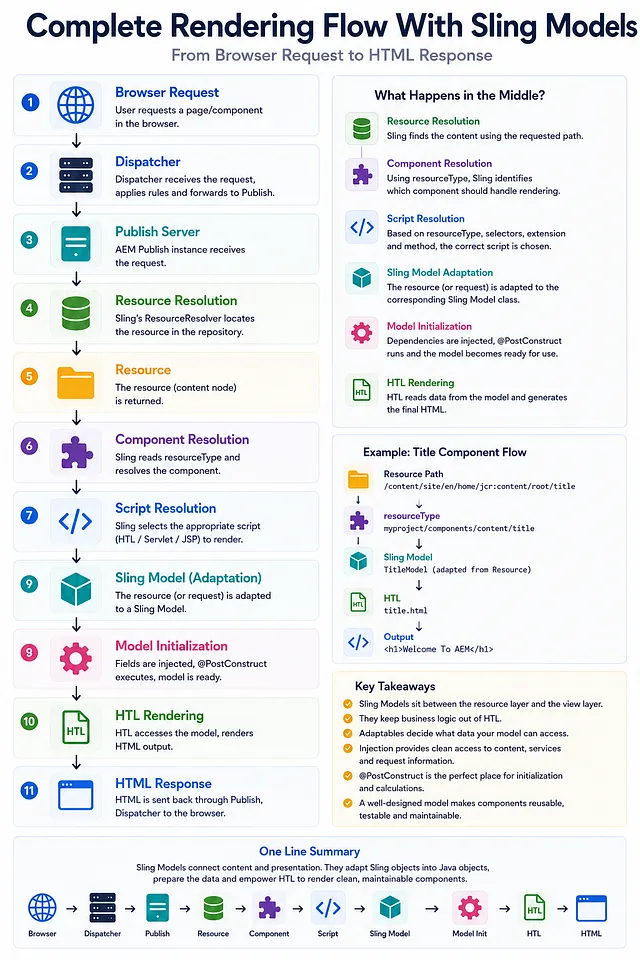
Complete Rendering Flow With Sling Models
Here's the end-to-end flow combining everything we've learned:
Why Architects Care About Sling Models
Experienced AEM developers don't think of Sling Models as simple data containers.
They view Sling Models as the business layer between content and presentation.
Resources        → Content Storage
Sling Models     → Business Logic (HERE)
HTL              → Presentation
Why This Separation Matters
- Maintainability — Logic is centralized in dedicated classes
- Testability — Models can be tested independently of HTL
- Reusability — Same model used for HTL, JSON, XML exports
- Scalability — Complex logic doesn't leak into templates
- Evolution — Business logic can change without touching views
When troubleshooting component rendering issues, architects often verify the model layer before investigating HTL because many rendering problems originate from:
- Adaptation failures
- Injection problems
- Model initialization errors
If the model isn't adapting correctly, there's no point investigating HTL.
Key Takeaways
- Sling Models bridge content and presentation through adaptation
- Adaptation transforms Resources/Requests into Java objects
- Resource adaptables are used when only content is needed
- Request adaptables are used when request information is needed
- @ValueMapValue injects content properties
- @OSGiService injects OSGi services
- @PostConstruct runs after all injections for initialization
- Null checks are essential because adaptation can fail
- Separation of concerns improves maintainability and testability
- Same model can be used for HTL rendering and headless APIs
What Happens Next?
In this chapter, we learned how Sling Models adapt Resources into business objects that HTL can consume.
We've now covered the complete Sling rendering pipeline:
- Chapter 1: Request Flow & Dispatcher
- Chapter 2: Resources & ResourceResolver
- Chapter 3: Component & Script Resolution
- Chapter 4: URL Decomposition
- Chapter 5: Sling Models (Adaptation & Injection)
You now understand the complete architecture behind every page rendered in AEM.
From here, you're ready for advanced topics:
- HTL Deep Dive — Template expressions and controls
- Custom Servlets — Building REST APIs
- Advanced Queries — QueryBuilder and JCR queries
- Workflows & Replication — Content publishing
- Performance Tuning — Caching and optimization
The foundation is complete. The advanced topics will build naturally on top of it.
Want to See This Applied to a Real Problem?
Read Real-World Scenario — When a Sling Model Earns Its Place (and When ValueMap Is Enough) for the null-adaptation and over-injected-model problems that show up once a project has dozens of models, plus honest criteria for when raw resource/ValueMap access is simpler.
Also see Real World Scenarios: The Optional Field That Wasn't Optional for a concrete NullPointerException that comes from a very common gap: an @Optional injected field handled correctly in @PostConstruct's "present" branch, but with no fallback for the "absent" branch — and why the fix belongs in both the initializer and the getter, not just one of them.
Enjoyed this chapter?
Get an email when I publish the next chapter. No spam — just new technical deep-dives.
Comments
Share feedback or questions about this blog post.
No comments yet. Be the first to share your thoughts.