Understanding Resources, ResourceResolver, and ValueMap in AEM
Learn the foundation of Sling and AEM rendering. Understand how Resources abstract content, how ResourceResolver locates them, and how ValueMap provides access to properties. Discover why Resource Resolution is critical for troubleshooting production issues.
Content Objective
In this chapter, you'll learn:
- What Resources are and why Sling built them into the framework
- How ResourceResolver finds content in the repository
- The connection between JCR Nodes and Sling Resources
- How ValueMap gives you access to content properties
- Why Resources are the foundation of everything that renders
- How to troubleshoot rendering issues using Resource Resolution
In the previous chapter, we followed a request from the browser all the way to AEM Publish.
We learned how Dispatcher participates in content delivery, how caching improves performance, and why understanding the request path is critical when troubleshooting production issues.
However, we stopped at an important point:
Key question:
- Once a request reaches AEM Publish, how does Sling know which content should be rendered?
Quick Mental Model
Once a request reaches Publish, this is the core sequence:
Path -> ResourceResolver -> Resource -> ValueMap/Sling Model -> HTL -> HTML
If Resource resolution fails, everything after it fails too.
Consider the following request:
GET /content/company/us/en/home.html
The request contains a path, but Sling still needs to locate the corresponding content stored in the repository.
This is where one of the most important concepts in AEM comes into the picture: Resources.
Everything Is a Resource
If you spend enough time working with AEM, you'll hear a statement repeated frequently:
Core principle:
- Everything is a Resource in AEM.
Most developers memorize this phrase early in their journey.
The challenge is that many developers can repeat it without fully understanding what it means.
Before we talk about Sling Models, HTL, Servlets, or Component Rendering, we need to understand Resources because almost every major feature in Sling is built on top of them.
Why Sling Introduced Resources
AEM stores content inside a JCR repository.
For example, a page might exist at:
/content/company/us/en/home
Internally, this content is stored as nodes and properties.
At first glance, it might seem reasonable for Sling to work directly with JCR nodes.
However, Sling was designed to be independent of any specific storage technology.
Imagine if content came from:
- JCR
- DAM
- Config
- An external service
- A database
If Sling depended directly on repository-specific APIs, it would become tightly coupled to a single implementation.
To solve this problem, Sling introduced an abstraction called a Resource.
Instead of working directly with repository objects, Sling works with Resources.
This allows Sling to interact with content in a consistent way regardless of where that content originates.
Everything Starts With a Resource
Whenever a request reaches Sling, one of the first tasks is locating the corresponding Resource.
The high-level flow looks like this:
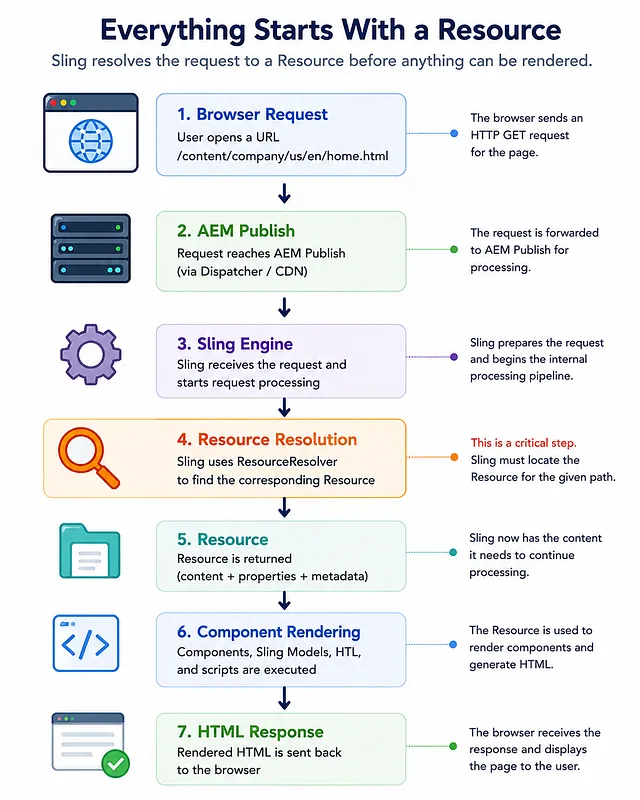
Before any component renders, before any Sling Model executes, and before any HTL template is processed, Sling first needs a Resource.
What Exactly Is a Resource?
Think of a Resource as Sling's representation of content.
For example:
/content/company/us/en/home
can be represented as a Resource object.
The Resource contains information such as:
- Path — The location in the repository
- Resource Type — Which component should render this content
- Properties — Author-authored values (title, description, etc.)
- Child Resources — Nested content (paragraphs, components, etc.)
Instead of exposing repository implementation details, Sling provides a clean and consistent API for accessing content.
This is why developers often work with:
Resource resource;
rather than:
Node node;
in modern AEM applications.
JCR Node vs Resource
One of the most common areas of confusion for new developers is the relationship between JCR Nodes and Resources.
They are related, but they are not the same thing.
| Aspect | JCR Node | Resource |
|---|---|---|
| Part of | JCR API | Sling API |
| Focus | Storage | Rendering |
| Scope | Repository-specific | Repository-independent |
| Represents | Repository structure | Content for Sling |
A simple way to think about it is:
JCR Node
   ↓
Adapted By Sling
   ↓
Resource
Sling uses Resources because they provide a consistent view of content regardless of where the content is stored.
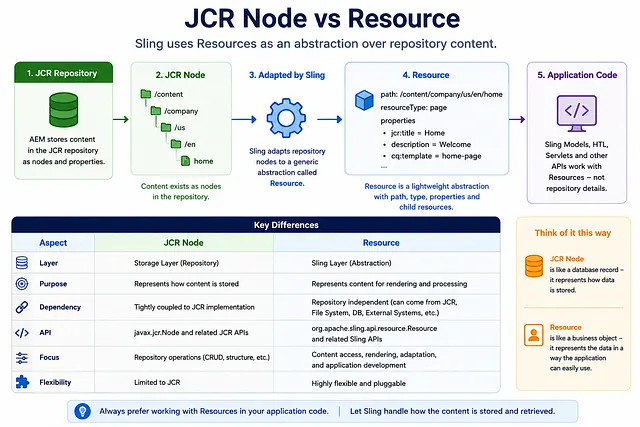
Most application code should interact with Resources rather than directly interacting with repository APIs.
What Does ResourceResolver Actually Do?
Now that we understand Resources, let's look at ResourceResolver.
Suppose Sling receives a request for:
/content/company/us/en/home
How does Sling find the corresponding Resource?
The responsibility belongs to ResourceResolver.
Think of ResourceResolver as a navigation service for content.
Given a path, it locates the corresponding Resource.
Example:
Resource resource =
  resourceResolver.getResource("/content/company/us/en/home");
The result is a Resource object.
At this point, Sling has successfully located the content.
Resource Resolution Flow
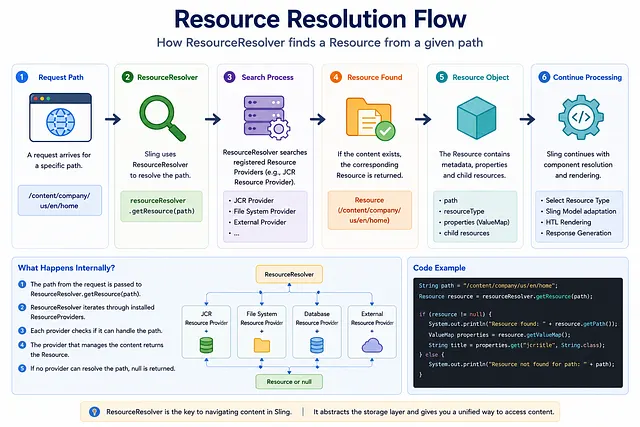
This is one of the most important responsibilities within Sling's request processing pipeline.
Without Resource Resolution, Sling would have no way of locating the content that needs to be rendered.
Why Sling Models Depend on Resources
At this point, another important concept starts making sense.
Most Sling Models look something like this:
@Model(
    adaptables = Resource.class
)
public class HeroModel {
}
Why is Resource.class used?
Because the Resource already represents the content being rendered.
Sling simply adapts the Resource into your model.
Conceptually, the flow looks like this:
Resource
  ↓
adaptTo()
  ↓
Sling Model
For example:
HeroModel model =
  resource.adaptTo(HeroModel.class);
Once adapted, the model can expose business logic and content to HTL.
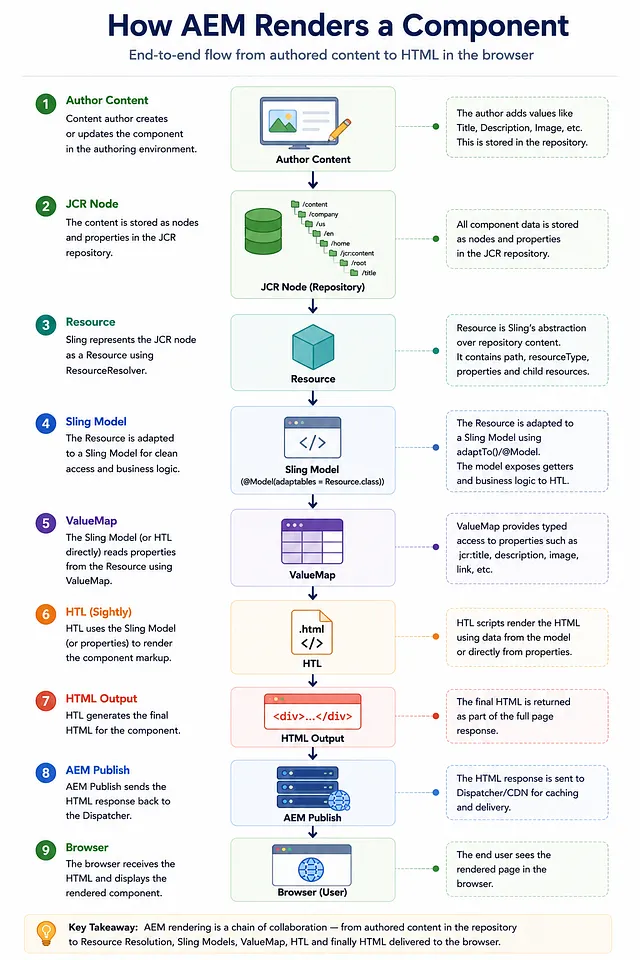
Real Example: Rendering a Title Component
Imagine we have a Title component on a page.
Author enters:
Title = "Welcome To Our Website"
Inside the repository:
/content/company/us/en/home/jcr:content/root/title
  jcr:title = "Welcome To Our Website"
  sling:resourceType = "company/components/title"
When the page renders:
Request
 ↓
ResourceResolver locates Title Resource
 ↓
Sling finds component script (based on resourceType)
 ↓
Sling adapts Resource into Title Sling Model
 ↓
Model reads properties using ValueMap
 ↓
HTL uses model data
 ↓
HTML generated
Let's look at what happens in practice:
- ResourceResolver locates the Title component resource at the path
- Sling identifies which component should render it (using resourceType)
- Sling Model adapts the Resource and reads authored properties
- HTL uses the model data to generate markup
- HTML becomes part of the final page response
Although this flow appears simple, it represents one of the most common rendering patterns used throughout modern AEM projects.
What Is ValueMap?
Resources contain properties.
For example:
jcr:title = "Home"
description = "Welcome to our website"
author = "Naveen"
To access these properties, Sling provides ValueMap.
Example:
ValueMap properties = resource.getValueMap();

String title = properties.get("jcr:title", String.class);
String description = properties.get("description", String.class);
ValueMap provides a simple and convenient way to access content properties.
Key Features of ValueMap
- Type-safe access — Specify the expected type when retrieving values
- Default values — Provide fallbacks if a property doesn't exist
- Automatic conversion — Handles type coercion
Example with defaults:
String title = properties.get("jcr:title", "Default Title");
int views = properties.get("pageViews", 0);
Resource to ValueMap
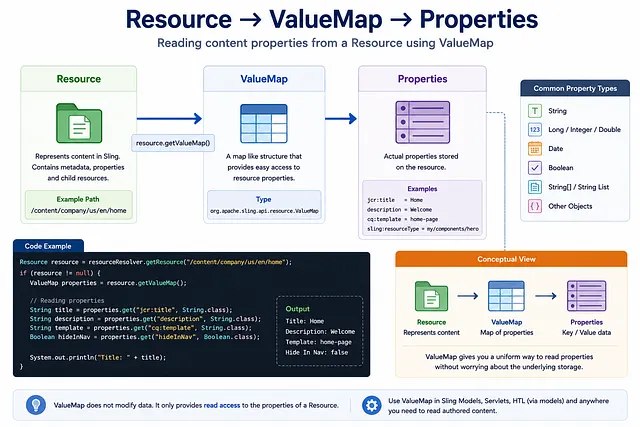
This relationship appears throughout AEM development.
Many Sling Models internally use ValueMap injection to read content authored by users:
@Model(adaptables = Resource.class)
public class ArticleModel {

  @ValueMapValue
  private String title;

  @ValueMapValue
  private String description;
}
How HTL Uses Resources Behind the Scenes
Many developers use HTL expressions like:
${properties.jcr:title}
without thinking about where the properties object actually comes from.
Internally, HTL works with the current Resource being rendered.
The flow looks like this:
Current Resource
 ↓
ValueMap
 ↓
properties object
 ↓
HTL expression
When HTL evaluates:
${properties.jcr:title}
it is effectively reading the jcr:title property from the ValueMap associated with the current Resource.
This is why Resources appear everywhere in AEM, even when developers are not explicitly using the Resource API.
The Resource remains the central object throughout the rendering process.
Real Production Scenario: Component Not Rendering
Imagine a page loads successfully, but one component is missing.
Many developers immediately investigate:
- HTL scripts
- JavaScript
- CSS
- Sling Model logic
However, experienced AEM developers usually start somewhere else.
They first verify whether Sling was able to resolve the correct Resource.
Typical troubleshooting questions include:
- Was the Resource found?
- Did ResourceResolver return null?
- Is the path correct?
- Does the resourceType exist?
- Does the current user have access?
- Is the component available in this environment?
If Resource Resolution fails, the component cannot render regardless of how correct the HTL or Sling Model implementation may be.
Understanding Resource Resolution often reduces troubleshooting time significantly because it helps identify problems before reaching the rendering layer.
Common Scenario: Post-Deployment Component Disappears
A common example occurs after deployments.
Situation:
- Component code is deployed successfully
- Authored content exists on the page
- But the component suddenly disappears
Root causes to investigate:
- Incorrect resourceType — Content references wrong component path
- Component not deployed — Code exists locally but not on server
- Permissions issue — User cannot access component location
- Caching issue — Old cached version still in use
- OSGi bundle not active — Component dependencies not loaded
The issue often appears to be a rendering problem when the actual root cause is Resource Resolution or Component Resolution.
Why Resource Resolution Matters More Than Most Developers Realize
When a request reaches Sling, almost everything begins with Resource Resolution.
If Sling cannot resolve the correct Resource:
- Sling Models cannot adapt content
- HTL cannot render the component
- Component Resolution cannot continue
- Page rendering may fail or show wrong content
This is why experienced AEM developers spend time understanding Resources before diving deeper into Sling Models, HTL, Servlets, or Component development.
Resources are not simply another API.
They are the foundation on which the entire Sling rendering pipeline is built.
Common ResourceResolver Mistakes
As developers gain experience with AEM, certain ResourceResolver mistakes appear repeatedly.
Mistake #1: Assuming a Resource Always Exists
A common mistake is assuming that getResource() always returns a valid Resource.
Resource resource = resourceResolver.getResource(path);
resource.getValueMap();  // NullPointerException if path doesn't exist!
If the path does not exist, getResource() returns null, which can lead to runtime errors.
Always verify that the Resource exists before using it:
Resource resource = resourceResolver.getResource(path);
if (resource != null) {
  ValueMap props = resource.getValueMap();
  // Safe to use
}
Mistake #2: Ignoring Permissions
Sometimes a path exists, but the current user does not have permission to access it.
In these situations, Resource Resolution may behave differently than expected.
The current service user determines what resources are accessible.
Mistake #3: Using Administrative Access
Modern AEM projects should use Service Users instead of administrative sessions.
Using proper service authentication improves security and aligns with Adobe best practices.
Mistake #4: Forgetting ResourceResolver Lifecycle
When obtaining a ResourceResolver programmatically through a service user, it should be properly closed after use:
ResourceResolver resourceResolver = null;
try {
  resourceResolver = resolverFactory.getServiceResourceResolver(serviceUser);
  // Use resourceResolver
} finally {
  if (resourceResolver != null) {
    resourceResolver.close();  // Always close!
  }
}
Failure to close can lead to resource leaks over time.
Why Architects Care About Resources
Many developers view Resources as just another API.
Architects view them differently.
Resources are the foundation of Sling.
They appear throughout AEM:
- Resource Resolution
- Sling Models
- HTL
- Servlets
- Editable Templates
- Policies
- Content Fragments
- Experience Fragments
- Workflow Payloads
Once you understand Resources, many seemingly unrelated AEM concepts start connecting together.
This is often the point where developers stop memorizing APIs and begin understanding how Sling actually works.
The Architect's Troubleshooting Approach
In many production issues, developers focus on the rendering layer too early.
They investigate HTL, Sling Models, JavaScript, or CSS before verifying that the correct Resource was resolved.
Architects typically work in the opposite direction:
- Verify Resource Resolution
- Verify Component Resolution
- Check Sling Models
- Investigate Rendering Layer (HTL, JS, CSS)
Quick Debug Order (Production)
Use this sequence when a component is missing or behaves differently between environments:
- Verify the requested path resolves to a Resource
- Verify
resourceTypepoints to a valid deployed component - Verify current user/service user permissions
- Verify Sling Model adaptation and injected values
- Verify HTL/JS/CSS only after 1-4 are confirmed
This approach helps isolate problems quickly and avoids unnecessary debugging effort.
Key Takeaways
- Resources are Sling's representation of content, not JCR nodes
- Sling works with Resources to remain independent of storage technology
- ResourceResolver is responsible for locating Resources in the repository
- Sling Models commonly adapt from Resources using the adaptTo() method
- ValueMap provides type-safe access to Resource properties
- Resources form the foundation of most Sling and AEM features
- Resource Resolution failures prevent component rendering, regardless of correct code
- Architects troubleshoot from Resource Resolution outward, not from rendering code inward
What Happens Next?
In this chapter, we learned what a Resource is and why Sling uses Resources instead of working directly with repository nodes.
We also explored ResourceResolver and ValueMap, which form the foundation of content access in AEM.
However, we still have not answered an important question:
Key question:
- Once Sling finds a Resource, how does it know which component should render it?
To answer that, we need to understand:
- Resource Types — How components are identified
- Resource Super Types — How component inheritance works
- Component Resolution — How Sling finds rendering scripts
And that is exactly what we will cover in the next chapter.
Enjoyed this chapter?
Get an email when I publish the next chapter. No spam — just new technical deep-dives.
Comments
Share feedback or questions about this blog post.
No comments yet. Be the first to share your thoughts.