Understanding Resource Types, Resource Super Types, and Component Resolution in AEM
Learn how Sling identifies and resolves components. Understand sling:resourceType, sling:resourceSuperType, component resolution, and script resolution. Discover why Core Component proxies reduce maintenance and improve project sustainability.
Content Objective
In this chapter, you'll master:
- What sling:resourceType is and why it's the glue of AEM rendering
- How Component Resolution works to find the right code
- The key difference between Component Resolution and Script Resolution
- How sling:resourceSuperType enables inheritance patterns
- Why Core Component proxies beat copying components every time
- How to troubleshoot rendering failures through resource types
We Found the Resource. Now What?
Imagine a request reaches Sling.
ResourceResolver successfully locates:
/content/company/us/en/home/jcr:content/root/title
Sling now has a Resource.
However, another important question still remains:
Key question:
- Which component should render this content?
The Resource contains content.
But content alone is not enough.
Sling still needs to determine:
- Which HTL file?
- Which Sling Model?
- Which script?
- Which component?
The answer comes from one property: sling:resourceType
This property drives almost every rendering decision in AEM.
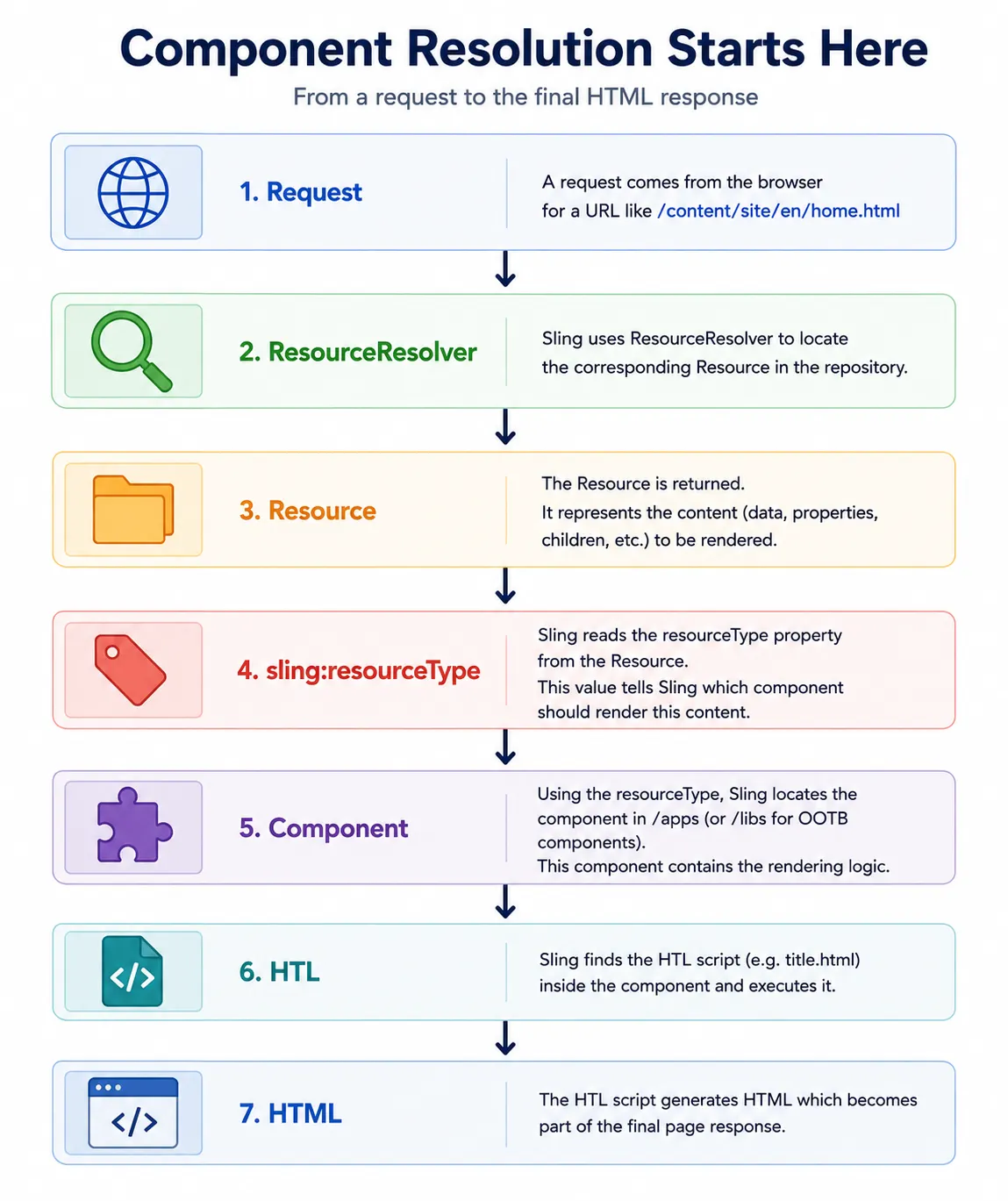
What Is sling:resourceType?
Let's look at a real example.
Repository:
/content/company/us/en/home/jcr:content/root/title
Properties:
jcr:title = "Welcome"
sling:resourceType = "company/components/title"
At this point, Sling has two different pieces of information.
The first is the content itself:
jcr:title = "Welcome"
The second is the instruction that tells Sling how that content should be rendered:
sling:resourceType = "company/components/title"
Think of it this way:
- The content contains the data
- The resourceType contains the rendering logic
Without a resourceType, Sling would know what content exists, but it would not know which component should render that content.
This property tells Sling:
- Do not render me directly.
- Use the component located at /apps/company/components/title
Architect Analogy
Resource = Data
resourceType = Renderer
Or:
Book = Content
resourceType = Reader
The content doesn't know how to display itself. The component does.
Resource Type Mapping
Here's how Sling maps resourceType to an actual component:
Content Resource
/content/company/us/en/home/jcr:content/root/title
│
├─ sling:resourceType
│  company/components/title
│
├─ Maps to
│  /apps/company/components/title
│
├─ Contains script
│  title.html
│
└─ Result
   HTML Output
Breaking it down:
- Resource — Contains the content
- sling:resourceType — Points to the component
- Component — Contains rendering logic
- HTL — Generates HTML output
How Sling Finds the HTL File
This is where people start understanding component resolution.
Suppose:
sling:resourceType = company/components/title
Sling searches:
/apps/company/components/title/title.html
When Sling reads:
sling:resourceType = company/components/title
it converts that value into a component path:
company/components/title
becomes:
/apps/company/components/title
Sling then searches that component folder for scripts that can handle the current request.
For a standard page request, Sling typically looks for:
title.html
If the script is found, rendering continues. If no matching script can be located, the component cannot render.
Real Production Scenario
Situation:
- Component exists in authored content
- Page loads successfully
- But component is missing from page output
Why?
Because:
resourceType points here: company/components/title
but /apps/company/components/title does not exist
This happens frequently after deployments.
The component code wasn't deployed to the server, or the deployment path is incorrect.
Component Resolution vs Script Resolution
Imagine Sling resolves:
company/components/title
and locates:
/apps/company/components/title
However, the component folder may contain:
title.html
title.json
GET.java
POST.java
Which one should Sling execute?
Script Resolution takes over at this point.
Many developers assume Component Resolution and Script Resolution are the same thing.
They are actually two different stages in the Sling rendering process:
- Component Resolution identifies which component should handle the content
- Script Resolution identifies which script inside that component should handle the request
Understanding the difference makes it much easier to troubleshoot rendering issues and servlet execution problems.
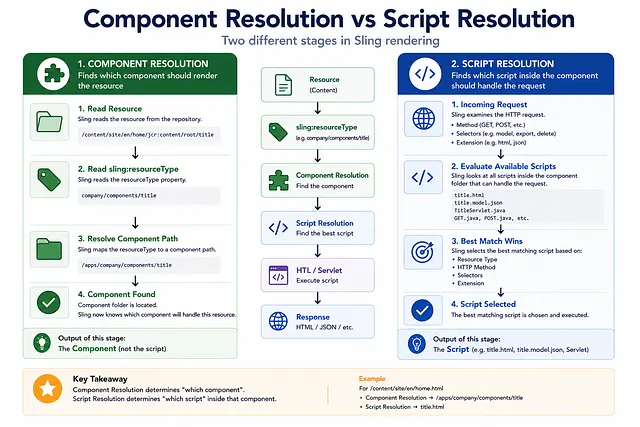
What Is Script Resolution?
Sling uses several factors to determine which script should handle the request:
Resource Type
+
HTTP Method
+
Selectors
+
Extension
Think of Script Resolution as a matching process.
Component Resolution already identified the component that should render the content.
Now Sling must decide which script inside that component should handle the request.
A component may contain:
title.html           (for GET requests with .html extension)
title.model.json     (for model.json exports)
TitleServlet.java    (for custom servlet handling)
All of these belong to the same component, but they serve different request types.
Script Resolution is responsible for selecting the best match based on the incoming request.
Example 1: HTML Request
Request:
/content/site/en/home.html
Sling sees:
Method     = GET
Extension  = html
Result: title.html gets executed
Example 2: JSON Export
Request:
/content/site/en/home.model.json
Sling sees:
Selector   = model
Extension  = json
Result: JSON Exporter gets executed
This is exactly what AEM SPA Editor and Headless AEM use for content delivery.
Example 3: Custom Servlet
Request:
/content/site/en/home.delete.html
Sling sees:
Selector   = delete
Method     = POST
Result: Delete Servlet may be executed
How Sling Chooses a Script
The complete decision process:
Request
 ↓
Resource Located
 ↓
sling:resourceType determined
 ↓
HTTP Method identified
 ↓
Selectors parsed
 ↓
Extension evaluated
 ↓
Best Matching Script Found
 ↓
Script Executed
Real Production Issue: Why Is My Servlet Not Being Called?
A common production issue appears like this:
Developer creates a servlet:
@SlingServletResourceTypes(
  resourceTypes="company/components/page",
  selectors="export",
  extensions="json"
)
public class PageExportServlet extends SlingSafeMethodsServlet {
  // implementation
}
They test with request:
/home.json
Servlet never executes. Developer starts debugging code.
Why?
Because of a selector mismatch:
Expected: /home.export.json
Actual:   /home.json
The servlet is configured to listen for the export selector, but the test request doesn't include it.
Many developers spend hours debugging code when the issue is actually script resolution.
Script Resolution Troubleshooting Checklist
When a servlet or script isn't being called:
- Check
@SlingServletannotations for correct resourceTypes - Verify selectors match the request (e.g.,
.export.json) - Confirm extensions are correct (html, json, xml, etc.)
- Verify HTTP method (GET, POST, DELETE, etc.)
- Check if servlet is registered in OSGi
- Look for script ranking conflicts (multiple scripts for same request)
- Test with exact matching path and selector combination
- Check logs for script resolution errors
What Is sling:resourceSuperType?
Core Components solve this with inheritance.
Say you need a custom Title component:
company/components/customtitle
Instead of creating everything from scratch, you specify:
sling:resourceSuperType = core/wcm/components/title/v3/title
Now Sling says:
Use custom component first.
If something is missing, inherit from Core Component
This inheritance model is one of the reasons Core Components became so successful.
Why Core Component Proxies Are Better Than Copying
The Copying Problem
Bad approach:
1. Copy Core Component entirely
2. Modify code as needed
3. Deploy custom component
The Problem:
Adobe releases update to Core Component
 ↓
Your copied component never gets it
 ↓
You must manually discover changes
 ↓
You must compare, merge, test
 ↓
Maintenance burden increases
The Inheritance Solution
Good approach: Proxy Component
1. Create minimal proxy component
2. Set sling:resourceSuperType = Core Component
3. Override only what you need
4. Deploy proxy
The Benefit:
Adobe releases update to Core Component
 ↓
Your proxy automatically inherits the update
 ↓
You only maintain your customizations
 ↓
Maintenance burden decreases significantly
Resource Super Type Inheritance
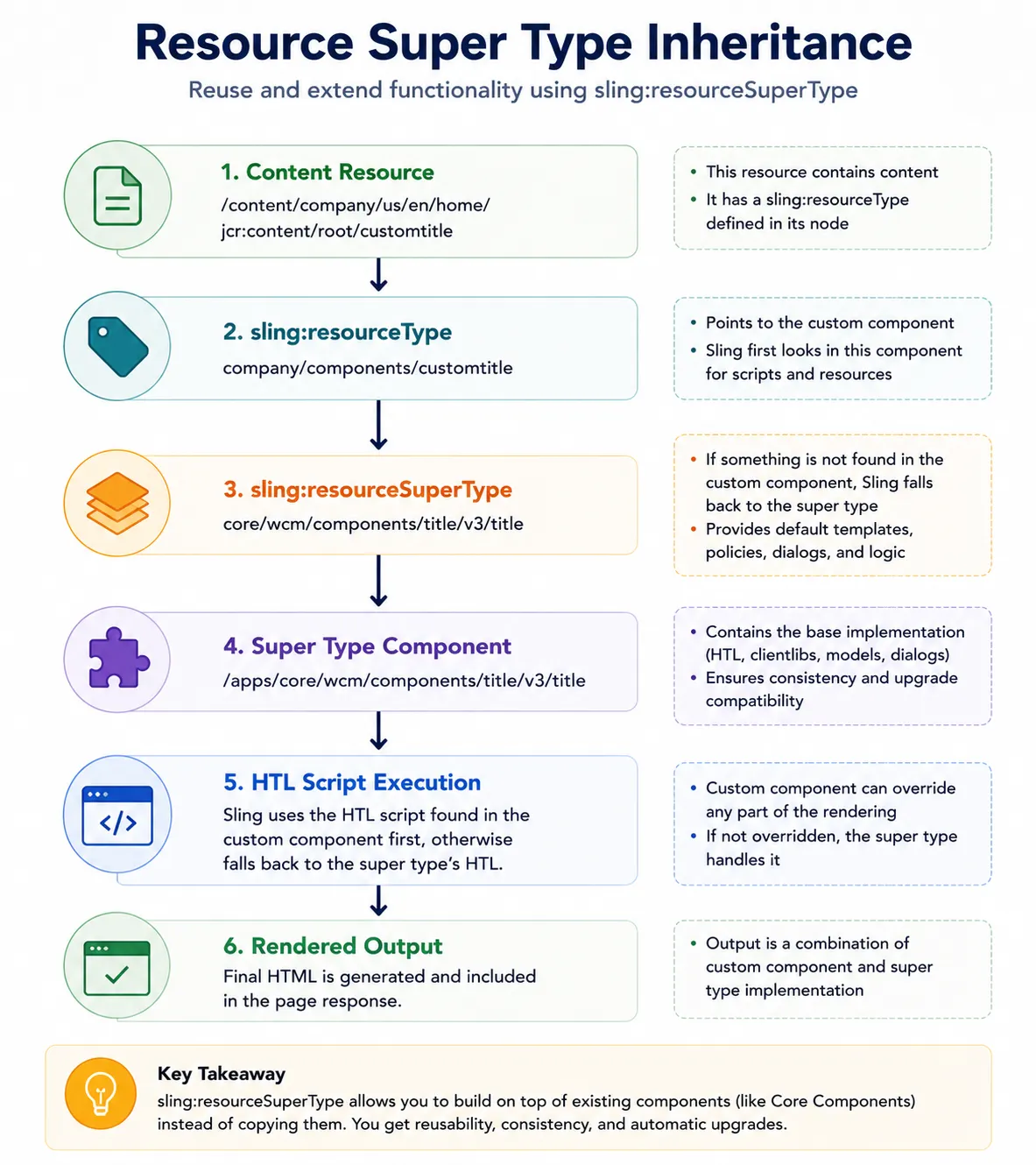
Real Production Example
Many enterprise projects contain:
/apps/company/components/title
but almost no HTL code.
Why?
Because:
sling:resourceSuperType
does most of the work.
This surprises many developers the first time they see it.
The proxy component is just a pointer to the Core Component, with minimal overrides for project-specific customizations.
Copy vs Inheritance
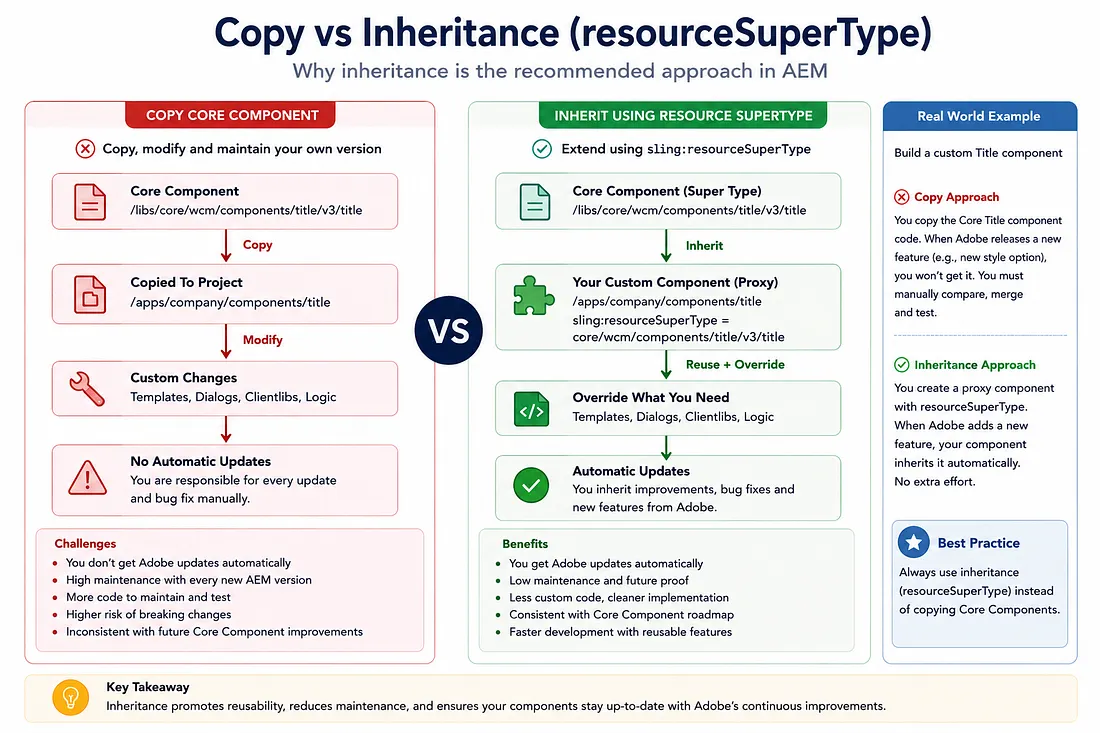
Copy Strategy
Your Component
  ├─ HTL (copied from Core)
  ├─ Sling Models (copied from Core)
  ├─ CSS (copied from Core)
  └─ Custom Modifications
      ├─ New HTL logic
      ├─ New Models
      └─ New Styles

Problem: All Core updates must be manually applied
Inheritance Strategy (Proxy)
Your Component (Minimal)
  ├─ Proxy configuration
  ├─ Custom Modifications
  │   ├─ New HTL override
  │   ├─ New Model
  │   └─ New Styles
  └─ sling:resourceSuperType
      ↓
      Core Component
        ├─ HTL (inherited)
        ├─ Sling Models (inherited)
        └─ CSS (inherited)

Benefit: Core updates automatically inherited
Complete Rendering Flow
At this point we can finally understand the complete rendering journey:
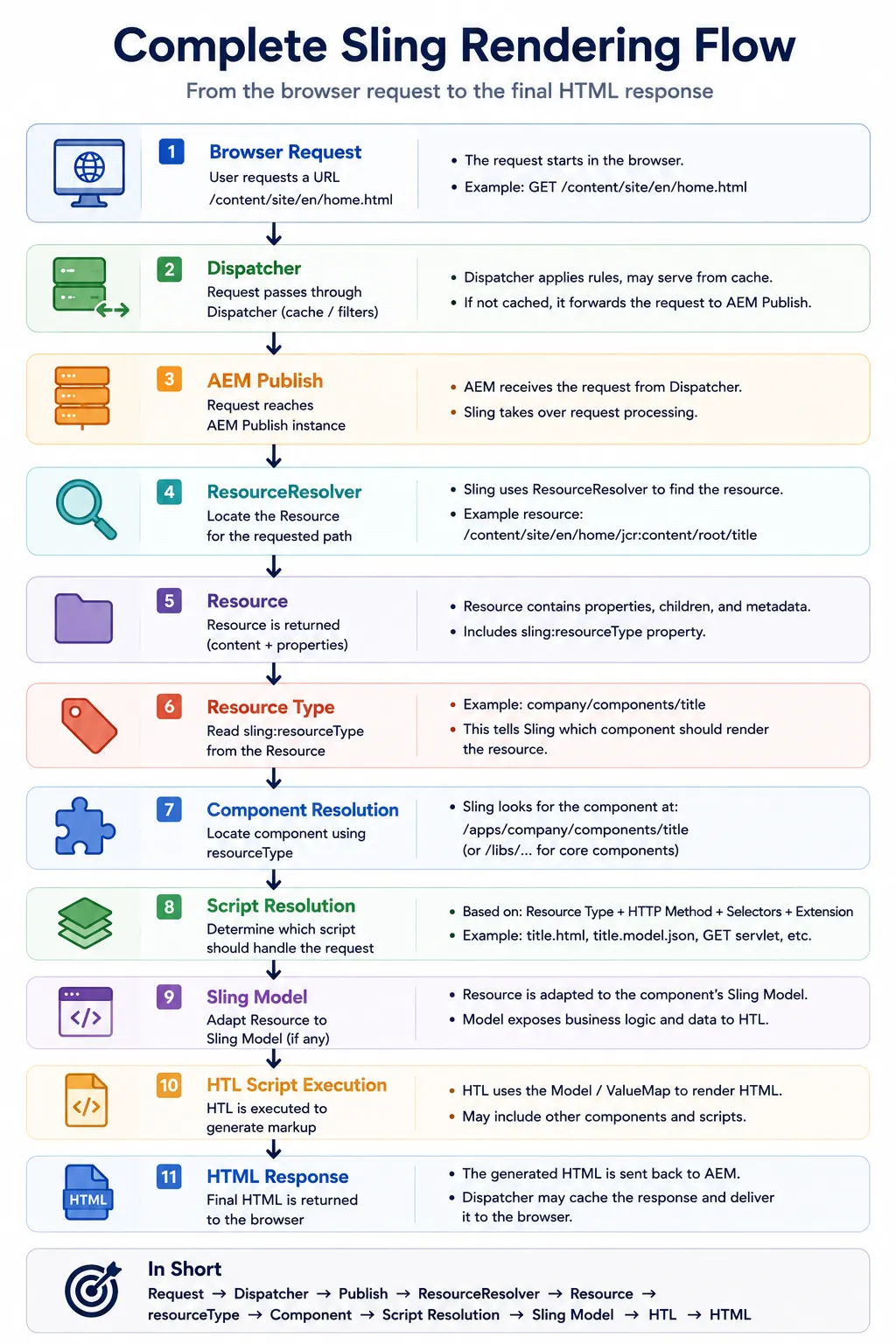
What initially appears to be a simple page request is actually a series of resolution steps working together.
Understanding this chain makes it significantly easier to troubleshoot rendering problems because you can identify exactly where the process breaks down.
Component Resolution Troubleshooting Checklist
When a component doesn't render, follow this checklist:
| Check | What to Verify |
|---|---|
| Resource exists | Did ResourceResolver find the content? |
| resourceType set | Does the resource have sling:resourceType? |
| Component path | Does /apps/{resourceType} exist? |
| Script exists | Does title.html (or equivalent) exist? |
| Script resolution | Do method/selector/extension match? |
| Super type chain | If using resourceSuperType, is chain valid? |
| Permissions | Does current user have access? |
| OSGi status | Are required bundles active? |
| Logs | Are there resolution errors in error.log? |
Why Architects Care About Resource Types
Most developers think:
resourceType = property
Architects think:
resourceType = rendering engine
Without resourceType:
✗ No HTL rendering
✗ No Sling Model adaptation
✗ No Component loading
✗ No Component rendering
✗ Page breaks or shows error
Understanding resource types is often the moment when developers truly understand how Sling rendering works.
Architects rarely troubleshoot rendering problems by starting with HTL.
Instead, they follow the rendering chain:
Resource
 ↓
resourceType
 ↓
Component Resolution
 ↓
Script Resolution
 ↓
Sling Model
 ↓
HTL
 ↓
Response
The earlier a failure occurs in this chain, the less useful it becomes to investigate rendering code.
If Component Resolution fails, there's no point investigating HTL. If Script Resolution fails, there's no point investigating Sling Models.
Key Takeaways
- sling:resourceType is the instruction that tells Sling which component to use
- Component Resolution locates the component folder based on resourceType
- Script Resolution selects which script inside the component should handle the request
- sling:resourceSuperType enables inheritance from parent components (Core Components)
- Core Component proxies are better than copying because they inherit updates automatically
- Script resolution failures are common and often caused by selector or extension mismatches
- Troubleshooting rendering should start with resource resolution, not code investigation
- Architects follow the resolution chain from resource to response, identifying where failures occur
What Happens Next?
In this chapter, we learned how Sling identifies and resolves components through resourceType, and how component inheritance reduces maintenance burden.
However, we haven't yet explored an important aspect of request handling:
Key question:
- How does Sling parse the request path to determine methods, selectors, and extensions?
To answer that, we need to understand:
- Request Path Decomposition — How Sling breaks down a request
- Selectors — How they trigger different script behavior
- Extensions — How they determine response format
- Suffixes — How they pass additional parameters
These concepts are critical for building flexible AEM components and APIs.
In the next chapter, we will explore how Sling dissects request paths and uses selectors, extensions, and suffixes to control rendering behavior.
Enjoyed this chapter?
Get an email when I publish the next chapter. No spam — just new technical deep-dives.
Comments
Share feedback or questions about this blog post.
No comments yet. Be the first to share your thoughts.