What Really Happens When a User Opens an AEM Page?
Understanding the AEM request flow from browser to Dispatcher to Publish. Learn how caching works, why content updates don't appear immediately, and how to troubleshoot production issues like an architect.
Content Objective
In this chapter, you'll discover:
- How a request flows from the browser all the way to AEM Publish
- Why Dispatcher is critical to your architecture and performance
- How caching improves performance and what cache hits vs misses mean
- The mechanics of content invalidation after publishing
- Real production issues hidden in the request pipeline and how to troubleshoot them
When we first start working with AEM, page rendering feels almost magical. A user opens a URL in the browser, and somehow AEM returns a fully rendered page.
Most developers learn how to create components, dialogs, Sling Models, and HTL templates very early in their AEM journey. However, very few spend time understanding what happens before any of those things even come into the picture.
In real-world projects, understanding the request flow is extremely important.
Whenever a page is slow, content is not updating, dispatcher cache behaves unexpectedly, or a page works on one environment but not in publish, the root cause is often hidden somewhere in the request processing pipeline.
Before we start learning about Resources, Sling Models, Resource Types, HTL, or Servlets, we need to understand the journey of a request.
By the end of this chapter, you should be able to explain where Dispatcher fits into the architecture, why caching matters, and how to approach common production issues before looking at component code.
Quick Mental Model
If you remember only one thing from this chapter, remember this path:
Browser -> CDN (optional) -> Dispatcher -> AEM Publish -> Sling Rendering
When users report slow pages or stale content, the issue is often in one of these layers before component code is even involved.
A Simple Example
Imagine a user opens the following URL
https://www.company.com/us/en/home.html
From the user's perspective, the process looks simple:
User → Website → Page Opens
But internally, several systems work together before the page appears in the browser.
A simplified production flow looks like this:
Browser
 ↓
Dispatcher
 ↓
AEM Publish
 ↓
Page Response
At first glance this seems straightforward, but each step plays an important role.
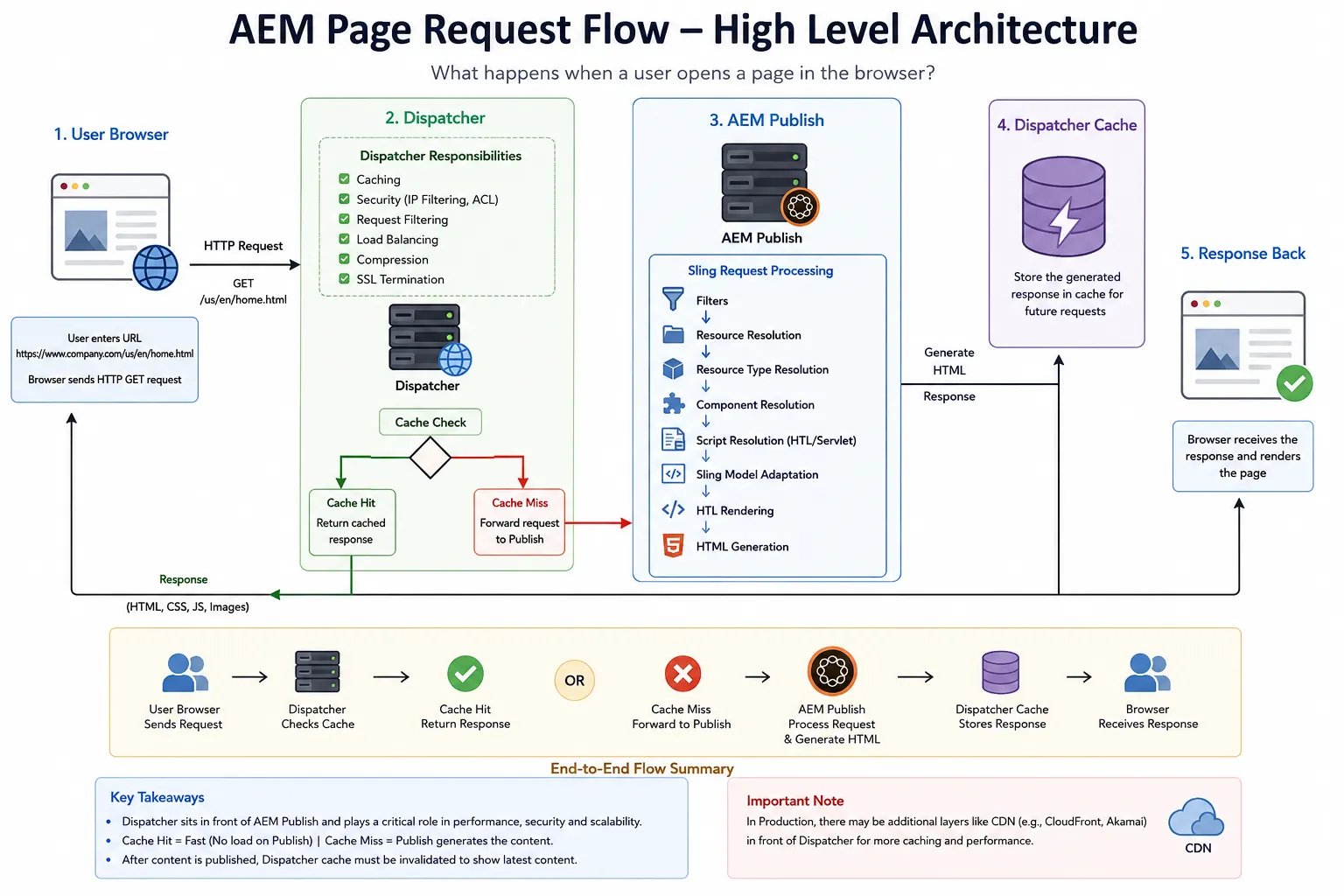
High-Level Architecture: AEM Page Request Flow
Before we dive into Dispatcher, caching, and Sling internals, let's look at the complete request flow at a high level.
The journey of a request from the browser to AEM Publish and back to the user involves multiple layers:
Why Understanding This Flow Matters
Understanding request flow is one of the first steps toward thinking like an AEM architect because it helps you understand not only how pages are rendered, but also how content is delivered, cached, secured, and troubleshooted in production environments.
Many developers spend months learning components, dialogs, Sling Models, and HTL before understanding how a request reaches those components in the first place.
The reality is that most production issues are not caused by component code.
They are caused by problems in:
- Caching
- Request routing
- Replication
- Cache invalidation
- Infrastructure
Understanding the request path allows developers to troubleshoot issues much faster and communicate more effectively with DevOps, architects, and platform teams.
Step 1: The Browser Sends a Request
When a user enters a URL or clicks a link, the browser sends an HTTP request.
For example:
GET /us/en/home.html
This is called a GET request because the browser wants to retrieve information.
In most AEM websites, page rendering starts with a GET request.
The browser is essentially saying:
- Give me the HTML representation of this page.
At this stage, the browser knows nothing about AEM, Sling Models, HTL, Components, Templates, or Resources. It simply wants a response.
Step 2: The Request Reaches Dispatcher
In production environments, requests usually do not go directly to AEM Publish.
Instead, they first reach Dispatcher:
Browser
 ↓
Dispatcher
 ↓
Publish
Many new developers think Dispatcher is just a cache.
Caching is certainly one of its biggest responsibilities, but Dispatcher does much more than that.
It acts as:
- A caching layer — Stores previously rendered responses
- A security layer — Filters out harmful requests
- A request filtering layer — Prevents unauthorized access
- A load-balancing layer — Distributes traffic
Because Dispatcher sits in front of Publish, it helps protect AEM from unnecessary traffic.
Why Dispatcher Exists
Imagine a homepage that receives thousands of visits every hour.
Without caching, every request would reach AEM Publish:
1000 Requests → 1000 Publish Renderings (Very Slow!)
This would create unnecessary load on the system and slow down response times.
Instead, Dispatcher can store previously generated responses and return them directly:
Browser → Dispatcher Cache → Response (Very Fast!)
In this case, AEM Publish is never contacted. The response is significantly faster.
Cache Hit vs Cache Miss
Understanding this concept is critical for every AEM developer.
When a request reaches Dispatcher, one of two things happens:
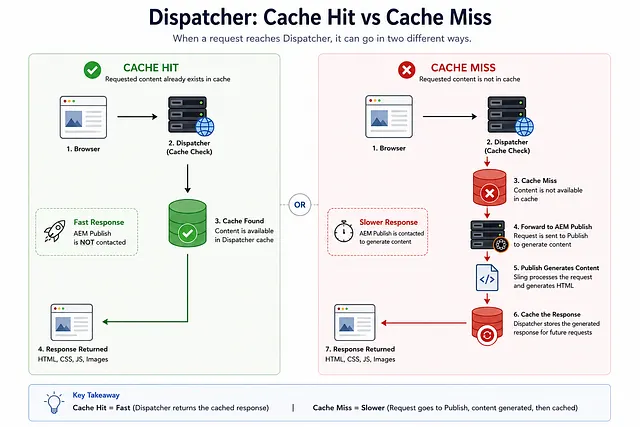
Quick Comparison
- Cache hit: response is served from Dispatcher cache, Publish is not contacted.
- Cache miss: Dispatcher forwards request to Publish, receives rendered response, then caches it.
Cache Hit
The requested page already exists in cache. This is the ideal scenario.
The response is extremely fast because:
- AEM Publish does not need to render the page again
- The response is served directly from disk
- Dispatcher returns the cached HTML immediately
Cache Miss
The requested page is not available in cache. Now AEM Publish must generate the page.
Process:
- Dispatcher forwards the request to Publish
- Publish renders the page using Sling, Resources, Components, and HTL
- The response is sent back to Dispatcher
- Dispatcher caches the response for future requests
- Browser receives the page
Cache miss requests take significantly longer because rendering must occur.
What Happens When Content Changes?
A common question from new developers is:
If Dispatcher is caching pages, how do users see updated content after a publish?
Enter cache invalidation.
Say an author updates the homepage and publishes the changes.
If the old cached version remains in Dispatcher, users will continue seeing outdated content.
To prevent this, AEM triggers a cache flush process after publishing:
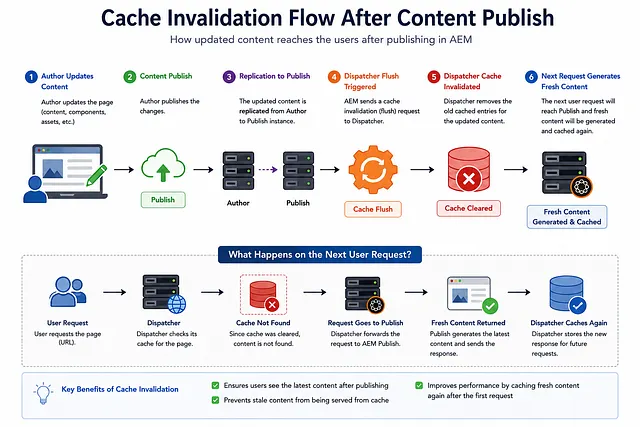
This is one of the most important concepts to understand when troubleshooting content update issues.
Many production issues that appear to be rendering problems are actually caching problems.
Real Production Scenario: Content Published But Not Visible
One of the most common tickets in AEM projects looks like this:
"I published the page, but I still see the old content."
Many developers immediately start checking:
- HTL
- Sling Model
- Component code
However, the issue is often unrelated to rendering.
A better troubleshooting approach is to verify each layer involved in content delivery rather than immediately investigating rendering code:
- Verify the publish action succeeded
- Check if content reached Publish instance
- Validate cache invalidation occurred
- Verify Dispatcher cache was cleared
- Check CDN cache status
- Clear browser cache and test
Start with the publish action, then validate cache invalidation, content delivery, and cache refresh mechanisms.
Troubleshooting Checklist
When content is not visible after publishing:
- Check if replication was successful (check replication agents)
- Verify content exists on Publish instance
- Confirm Dispatcher cache invalidation occurred
- Check Dispatcher cache status and logs
- Verify CDN has invalidated cache (if using CDN)
- Clear browser cache with Ctrl+Shift+Delete
- Try incognito/private browsing mode
- Check if issue exists on different publish instance
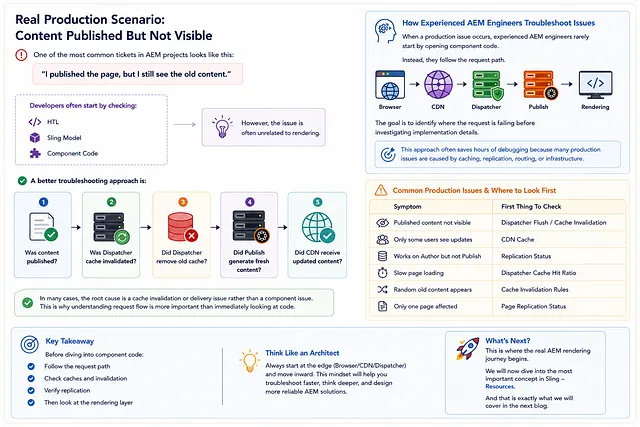
In many cases, the root cause is a cache invalidation issue rather than a component issue.
This is why understanding request flow is more important than immediately looking at code.
Another Real Scenario
Author says:
"I updated the homepage 10 minutes ago but visitors still see old content."
Possible causes (none involve Sling Models):
- Dispatcher cache not cleared
- CDN cache still active
- Replication queue stuck
- Publish content not updated
- Browser cache serving old version
Notice that none of these involve Sling Models. This is why architects always start from the request path before looking at component code.
A Typical Production Request
In real production environments there is often another layer in front of Dispatcher.
A CDN such as CloudFront, Akamai, or Fastly may serve cached responses before requests even reach Dispatcher:
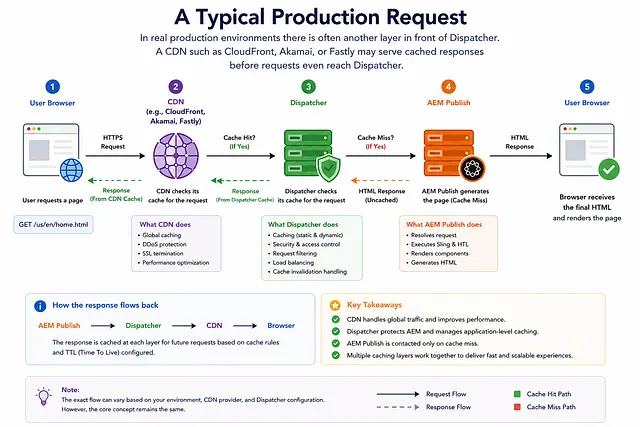
This means that troubleshooting content visibility issues may involve:
- Browser Cache
- CDN Cache
- Dispatcher Cache
- Publish Content
In large enterprise implementations, CDN cache hit rates are often significantly higher than Dispatcher cache hit rates, meaning many requests never reach AEM infrastructure at all.
This also means invalidating CDN cache is critical after content updates.
How Experienced AEM Engineers Troubleshoot Issues
When a production issue occurs, experienced AEM engineers rarely start by opening component code.
Instead, they follow the request path:
Browser
  ↓
CDN
  ↓
Dispatcher
  ↓
Publish
  ↓
Rendering
The goal is to identify where the request is failing before investigating implementation details.
This approach often saves hours of debugging because many production issues are caused by:
- Caching
- Replication
- Routing
- Infrastructure
rather than component code.
Common Misconceptions About Dispatcher
Misconception #1: Dispatcher is only a cache
Not true.
Dispatcher also provides:
- Security filtering
- Request validation
- Load balancing
- Caching
- Compression
Caching is only one responsibility.
Misconception #2: Content is published, therefore users immediately see changes
Not necessarily.
The request may still be served from:
- Dispatcher cache
- CDN cache
- Browser cache
Content must be published, cache invalidated, and client caches refreshed before updates are visible.
Misconception #3: Clearing browser cache fixes every issue
Many AEM developers have heard "Try Ctrl + F5."
Sometimes the problem exists on:
- Dispatcher
- CDN
- Publish
and not in the browser. Browser cache refresh won't help in these cases.
Misconception #4: Every request reaches AEM Publish
Actually, a healthy production environment tries to avoid that.
Ideal scenario:
Browser
  ↓
Dispatcher Cache
  ↓
Response (AEM Publish not contacted)
AEM Publish should render pages only when necessary (cache misses).
If Dispatcher cache hit rate is low, investigate why:
- Is cache configuration correct?
- Are cache invalidation rules too aggressive?
- Is content changing too frequently?
- Are personalization rules preventing caching?
Layer-First Debugging Order
Use this order when content is stale or behavior differs between environments:
- Browser cache and request details
- CDN cache status and purge events
- Dispatcher cache files/rules and logs
- Publish content availability and replication status
- Sling/component rendering only after layers 1-4 are verified
What Happens Next?
At this point, the request has successfully reached AEM Publish.
Sling takes over from here.
The request enters the Sling Request Processing Engine, which is responsible for:
- Resolving content from the repository
- Identifying which component to render
- Finding the appropriate rendering script (HTL, JSP)
- Executing Sling Models
- Generating the final HTML response
This is where the real AEM rendering journey begins.
Once the request reaches Sling, a fundamental question must be answered:
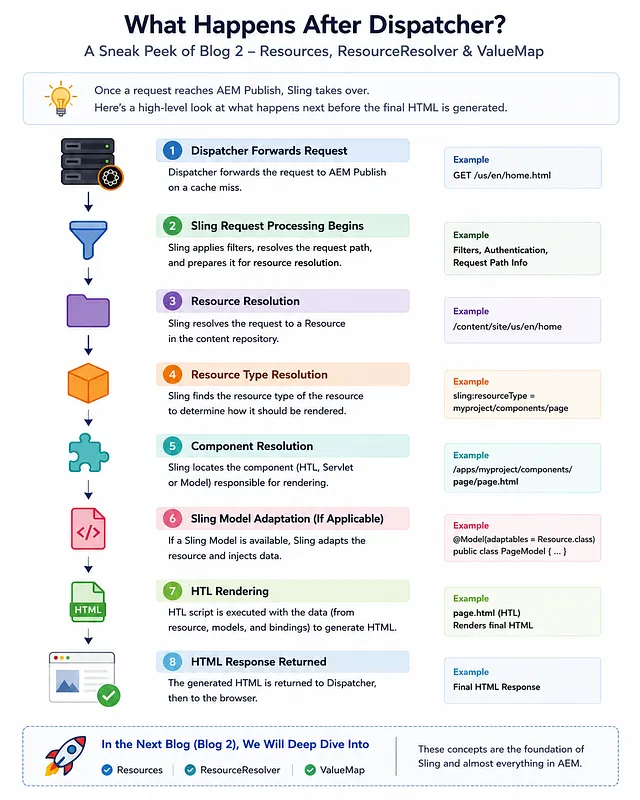
How does AEM know which content to load?
To answer that, we need to understand the most important abstraction in Sling: The Resource.
In the next chapter, we will explore Resources, ResourceResolver, and ValueMap, which form the foundation of almost every feature in AEM.
Key Takeaways
- Every page request starts with an HTTP request from the browser
- In production environments, requests typically pass through Dispatcher before reaching AEM Publish
- Dispatcher improves performance through caching and also provides security and request filtering
- A request results in either a cache hit or cache miss
- Cache invalidation is required whenever content is updated
- Most page rendering issues should first be investigated from a request flow and caching perspective
- The request reaches Sling only after passing through Dispatcher
- Understanding request flow is more valuable than immediately investigating component code
- Experienced engineers troubleshoot from request path outward, not from component code inward
Next Steps
In the next chapter, we will move beyond the request itself and explore:
- Resources — How AEM accesses content
- ResourceResolver — How Sling finds and retrieves resources
- ValueMap — How to work with resource properties
These concepts form the foundation of Sling and AEM rendering, and understanding them is essential for every AEM developer.
Enjoyed this chapter?
Get an email when I publish the next chapter. No spam — just new technical deep-dives.
Comments
Share feedback or questions about this blog post.
No comments yet. Be the first to share your thoughts.