Experience Fragment Architecture — Reusable Experiences Across Channels
Understand how Experience Fragments help AEM teams create reusable, presentation-driven experiences across pages and channels, how they differ from Content Fragments, and where they fit in a real project architecture.
Content Objective
We've spent the last few chapters looking at Content Fragments.
We started with structured content, then looked at models, references, reuse, and finally how that content should be organized and governed.
Now there is another AEM concept that often creates confusion:
Experience Fragments.
The confusion is understandable.
Both Content Fragments and Experience Fragments are reusable. Both can be used across different parts of an AEM implementation. And both can help reduce duplication.
But they solve a different problem.
Imagine a marketing team is running a summer campaign.
The same promotional experience needs to appear on:
- The homepage
- Product category pages
- Landing pages
- A campaign microsite
At first, an author can build the banner directly on each page.
That works until the campaign changes.
The headline changes from:
"20% OFF"
to:
"30% OFF"
Now someone has to find every page where the banner was created and update it.
The problem isn't really the banner.
The problem is that the same authored experience has been copied in multiple places.
This is where Experience Fragments become useful.
Instead of rebuilding the same experience on every page, we can create it once and reuse it where needed.
But before we get into how Experience Fragments work, we need to answer one basic question:
What are we actually trying to reuse — content or an experience?
That distinction is the key to understanding when to use a Content Fragment and when an Experience Fragment makes more sense.
Why Experience Fragments Exist
Let's continue with the campaign example.
The marketing team doesn't just want to reuse the words "Summer Sale."
They want to reuse the complete experience:
┌─────────────────────────────────┐
│        SUMMER SALE              │
│                                 │
│     [ Promotional Image ]       │
│                                 │
│     Save 30% on selected        │
│     products                    │
│                                 │
│          [ Shop Now ]           │
└─────────────────────────────────┘
That experience has more than content.
It has components.
It has layout.
It has authoring configuration.
It may also have styling and other presentation-related decisions.
If we store only the text and image as structured data, the consuming page still has to decide how those pieces should be assembled.
That's exactly what we want with a Content Fragment.
But in this case, the marketing team has already created the experience they want to reuse.
They don't want every page to rebuild it.
They want to author it once and reuse the same authored experience.
This is where Experience Fragments fit into the architecture.
An Experience Fragment gives that group of components its own place in AEM so it can be authored independently and then referenced from other pages.
So the relationship becomes:
Content Fragment
        │
        └── "Here is the business content."

Experience Fragment
        │
        └── "Here is the authored experience."

Page
        │
        └── "Place this experience here."
This distinction is important.
A Content Fragment helps us separate content from presentation.
An Experience Fragment lets us reuse a presentation-driven experience.
That doesn't mean an Experience Fragment should replace normal component development.
If the requirement is simply a reusable button, card, or image component, creating an Experience Fragment for it would add unnecessary complexity.
The value of an Experience Fragment appears when the thing being reused is a meaningful editorial experience made up of multiple components.
Where the Experience Fragment Lives
Now that we know why we need an Experience Fragment, let's look at where AEM actually stores it.
This is one of those things that becomes useful when you're debugging an implementation.
If an author creates a normal page, we expect the content somewhere under:
/content/<project>/
A Content Fragment is different. It is stored as an asset under:
/content/dam/
An Experience Fragment has its own location:
/content/experience-fragments/
For example:
/content/experience-fragments/
└── my-project/
    └── en/
        ├── promotions/
        │   └── summer-sale/
        └── footer/
            └── global-footer/
That separation tells us something about how AEM treats these three types of content.
Page
/content/<project>/
        │
        └── Complete page experience

Content Fragment
/content/dam/
        │
        └── Structured content

Experience Fragment
/content/experience-fragments/
        │
        └── Reusable authored experience
If you open an Experience Fragment in the repository, you're not going to find a simple set of fields like you would expect from a Content Fragment.
Instead, you'll find a component structure.
For example:
summer-sale
└── jcr:content
    └── root
        ├── title
        ├── image
        ├── text
        └── button
The exact node structure depends on the project and component implementation, but the important point is that the fragment contains an authored AEM component tree.
That is why an Experience Fragment feels much closer to a small page than to a structured content object.
This also explains why the repository location matters when debugging.
If an author says:
- "The campaign banner is wrong on every page."
You don't necessarily start by opening each page.
You can trace the page's Experience Fragment reference back to:
/content/experience-fragments/...
and inspect the fragment itself.
The page is using the experience.
The Experience Fragment owns the reusable experience.
That separation is what allows one authored experience to be used in multiple places without copying the component structure onto every page.
How Experience Fragments Are Used on a Page
Now we have the Experience Fragment stored separately from the page.
The next question is simple:
How does a page actually use it?
Let's go back to the summer campaign.
The marketing team has created the Experience Fragment:
/content/experience-fragments/
└── my-project/
    └── en/
        └── promotions/
            └── summer-sale/
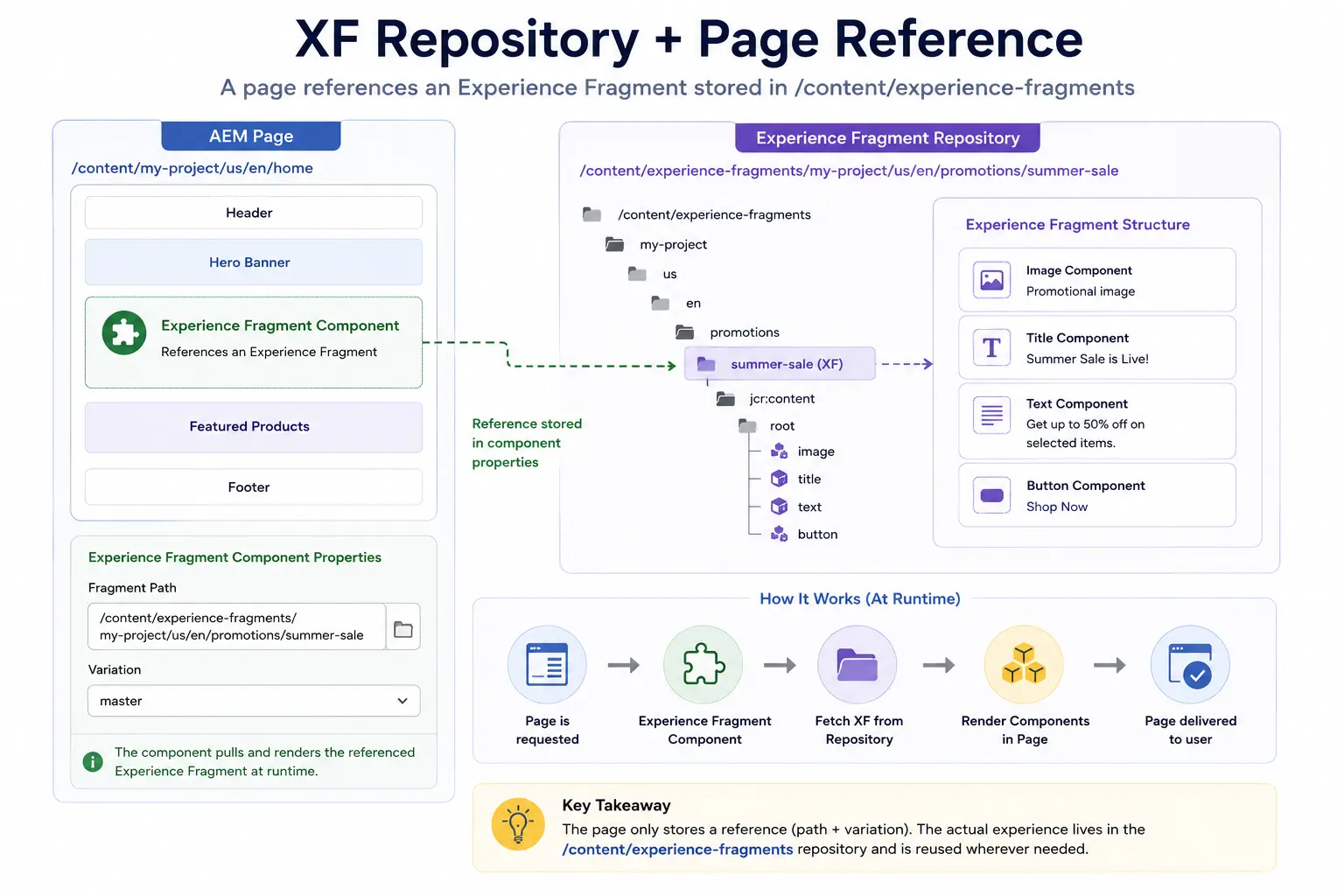
The homepage doesn't need to recreate the banner.
Instead, the page contains an Experience Fragment component that points to the reusable experience.
Conceptually, the page looks like:
Homepage
│
├── Header
├── Hero
├── Product List
├── Experience Fragment Component
│       │
│       └── Summer Sale XF
│
└── Footer
The important part here is the relationship.
The page owns the location where the experience appears.
The Experience Fragment owns the experience itself.
So if the same campaign is required on several pages:
                         Summer Sale XF
                              │
                ┌─────────────┼─────────────┐
                ↓             ↓             ↓
             Homepage     Category Page   Landing Page
Each page references the same reusable experience.
This is different from copying the components onto every page.
With copying:
Homepage
└── Banner copy

Category Page
└── Banner copy

Landing Page
└── Banner copy
Now there are three separate pieces of content to maintain.
With an Experience Fragment:
Summer Sale XF
      │
      ├── Homepage
      ├── Category Page
      └── Landing Page
There is one authored experience being reused.
That becomes especially useful when the experience changes.
If the marketing team changes the headline or image in the Experience Fragment and publishes it, pages referencing that fragment can consume the updated experience without an author having to edit each page individually, subject to the publish and caching flow.
This is the main architectural benefit:
The page decides where the experience is used; the Experience Fragment owns the reusable experience.
And this is where Experience Fragments start becoming more than just a convenient authoring feature.
They give the content architecture a way to separate page composition from reusable, presentation-driven experiences.
Variations: When the Same Experience Needs to Change
The campaign example works well when the same experience is used everywhere.
But real projects are rarely that simple.
The same campaign may need to look different depending on where it is being delivered.
For example, the website might use:
Summer Sale
[Large promotional image]
Save 30% on selected products
[Shop Now]
But an email may need a different structure.
A social channel may need a different image ratio and shorter copy.
An AMP experience may have its own technical restrictions.
We could create completely separate experiences for each case.
But then we're back to maintaining multiple versions of the same campaign.
This is where Experience Fragment variations become useful.
A single Experience Fragment can have different variations for different delivery requirements:
Summer Sale
│
├── master
├── email
├── social
└── amp
The variations represent the same underlying experience, but they can be adapted for their specific context.
For example:
Master
  → Full website experience

Email
  → Email-compatible structure

Social
  → Social-friendly layout and content

AMP
  → AMP-specific constraints
The important point is that a variation isn't simply another copy with a different name.
It exists because the delivery context has different requirements.
That distinction matters when designing the architecture.
If two versions are completely unrelated, they probably shouldn't be forced into variations of the same Experience Fragment.
But if they represent the same campaign or business experience and only the delivery requirements differ, variations can give the team a cleaner way to manage them.
A Practical Example
Suppose the marketing team changes the campaign message from:
20% OFF
to:
30% OFF
The website version and email version may both need that business change.
At the same time, their layouts may remain different.
So we can think about the relationship like this:
              Summer Sale
                   │
        ┌──────────┼──────────┐
        ↓          ↓          ↓
      Web        Email      Social
        │          │          │
     Layout A    Layout B   Layout C
The business experience is related.
The presentation requirements are different.
That is the real reason variations are useful.
They allow the architecture to acknowledge that reuse does not always mean identical output.
A common mistake is to assume that every variation should remain identical to the master variation.
In practice, variations may need their own content or presentation adjustments depending on the channel.
The architectural decision is therefore not:
- "How can we make every channel look exactly the same?"
It is:
- "What should remain consistent across channels, and what genuinely needs to vary?"
That is where Experience Fragment design starts becoming an architectural decision rather than just an authoring feature.
Experience Fragment Templates
There is another decision that becomes important once Experience Fragments are used across a larger project.
If authors can create any combination of components inside an Experience Fragment, the team can quickly end up with inconsistent experiences.
For example, an email Experience Fragment shouldn't allow authors to drop components that depend on JavaScript or modern browser-only layouts.
Similarly, a promotional Experience Fragment may need a specific structure so that every campaign follows the same design rules.
This is where templates come into the picture.
Instead of giving authors a completely open canvas, the project can define Experience Fragment templates that provide the starting structure and allowed components.
Conceptually:
Experience Fragment Templates
│
├── Web Experience
│     ├── Container
│     ├── Title
│     ├── Image
│     └── Button
│
├── Email Experience
│     ├── Email Container
│     ├── Text
│     ├── Image
│     └── CTA
│
└── Campaign Experience
      ├── Hero
      ├── Promotional Content
      └── CTA
The exact templates will depend on the project.
The important architectural idea is that the template provides guardrails for the experience.
Without those guardrails, authors may build something that looks correct in the author environment but doesn't work correctly in its intended delivery context.
For example, an email Experience Fragment may contain a component that depends on external CSS or JavaScript.
That might work perfectly on a website.
It doesn't necessarily make sense in an email.
So the template and its policies become part of the governance model.
The author gets enough freedom to build the experience, while the project controls the boundaries of what can be created.
This is similar to the way we discussed editable templates and policies earlier in the series.
The difference is what we're governing.
With page templates, we're governing the structure and authoring capabilities of pages.
With Experience Fragment templates, we're governing the structure and capabilities of reusable experiences.
That distinction becomes useful when the same AEM implementation supports several delivery contexts.
How the Experience Fragment Is Rendered
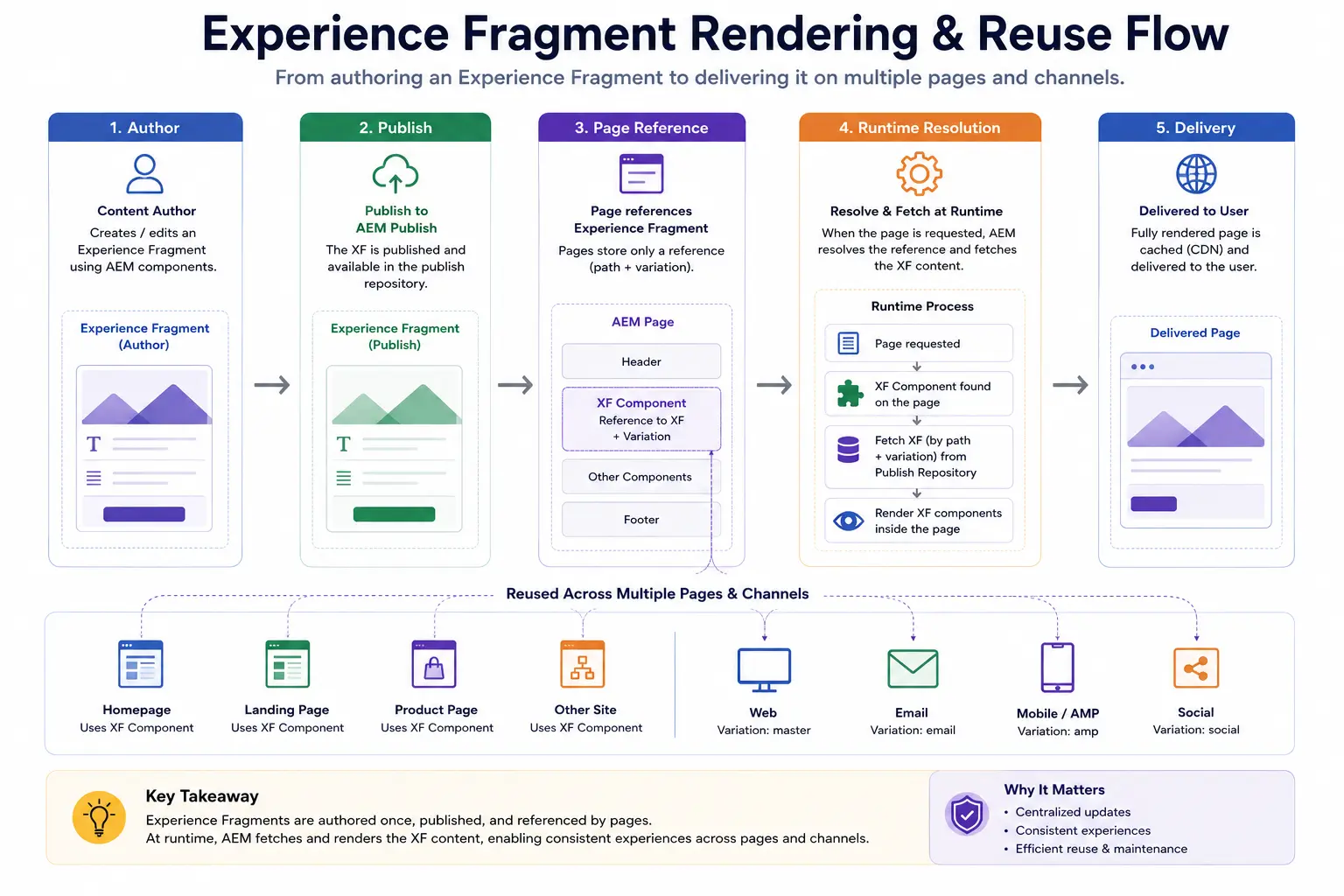
So far, we've looked at how an Experience Fragment is created and how a page references it.
Now let's look at what happens when the page is actually rendered.
Suppose the homepage contains an Experience Fragment component that references:
/content/experience-fragments/
└── my-project/
    └── en/
        └── promotions/
            └── summer-sale
When a visitor requests the homepage, AEM doesn't copy the Experience Fragment into the page's repository structure.
The page still has its own component structure.
The Experience Fragment component resolves the referenced fragment and renders that experience as part of the page.
Conceptually:
Browser Request
      ↓
AEM Page
      ↓
Experience Fragment Component
      ↓
Referenced Experience Fragment
      ↓
XF Component Tree
      ↓
Rendered HTML
      ↓
Browser
This is important when debugging because the content being displayed may not actually be stored under the page where you're seeing it.
For example:
/content/my-project/us/en/home
        │
        └── Experience Fragment Component
                    │
                    ↓
        /content/experience-fragments/
        my-project/en/promotions/summer-sale
So if an author says:
"I changed the banner on the homepage, but the same banner is wrong on three other pages."
you should first ask whether those pages are referencing the same Experience Fragment.
If they are, the problem may be inside the XF rather than inside any of the individual pages.
This is one of the practical differences between copying a component and referencing an Experience Fragment.
With copied components:
Page A
└── Banner

Page B
└── Banner

Page C
└── Banner
Each page owns its own copy.
With an Experience Fragment:
             Summer Sale XF
                    │
          ┌─────────┼─────────┐
          ↓         ↓         ↓
       Page A     Page B     Page C
The pages reference the same reusable experience.
That relationship is what gives Experience Fragments their value in larger AEM implementations.
It also means that caching and publishing need to be considered carefully.
A change to an Experience Fragment can affect multiple pages, so the team needs to understand how that change moves through the publish and caching layers.
We'll come back to that when we look at production issues.
Multi-Channel Delivery
The website is usually where Experience Fragments are first introduced, but enterprise projects often need to reuse the same campaign experience beyond the website.
Think about the summer campaign again.
The marketing team may need the campaign in:
Website
   ↓
Email
   ↓
Social Media
   ↓
Marketing Platforms
Creating each version independently creates another content maintenance problem.
The message may start as:
Summer Sale Save 30% on selected products
If the marketing team later changes the campaign message, every channel needs to be checked.
Experience Fragment variations can help when the same business experience needs different presentation or delivery requirements.
For example:
Summer Sale
│
├── Web
│
├── Email
│
└── Social
The important point is that these are not necessarily identical outputs.
The web version may have a full layout and interactive components.
The email version may need email-compatible HTML and styling.
The social version may focus more heavily on imagery and shorter copy. So the architecture becomes:
                    Campaign
                       │
                       ↓
              Experience Fragment
                       │
          ┌────────────┼────────────┐
          ↓            ↓            ↓
        Web          Email        Social
          │            │            │
      Web layout   Email rules   Social format
This gives the marketing team a common place to manage the campaign while still allowing each delivery context to have its own requirements.
In real projects, the exact integrations depend on the AEM version, Adobe products being used, and the organization's marketing stack.
For example, an implementation may integrate AEM with platforms such as Adobe Campaign, Adobe Journey Optimizer, Marketo, or other marketing systems.
The important architectural idea is not the specific integration.
It is the separation between:
the reusable experience and the channel that consumes it.
That separation becomes especially useful when the organization has many channels and wants to avoid maintaining completely independent versions of the same campaign.
Real-World Use Cases
The value of Experience Fragments becomes much clearer when we look at the kinds of problems they solve in real projects.
Use Case 1: Global Footer
Imagine an organization with multiple country websites.
The footer contains:
- Legal information
- Navigation links
- Copyright information
- Regulatory text
The legal team updates the disclaimer twice a year.
If every site has its own copy of the footer, the content team has to find and update each one.
With an Experience Fragment, the footer can be maintained as a reusable experience.
Conceptually:
Global Footer XF
       │
       ├── US Site
       ├── UK Site
       ├── Germany Site
       └── India Site
The important part is that the team is no longer managing the same authored experience independently on every page.
However, regional differences still need to be modeled carefully.
If the legal text is genuinely different for each region, the architecture should provide the appropriate variations or separate experiences rather than forcing all regions to share identical content.
The goal is not simply "one fragment everywhere."
The goal is to reuse what is genuinely common while allowing required differences.
Use Case 2: Promotional Campaign
Consider an e-commerce site running a major seasonal promotion.
The campaign needs to appear on: Homepage Category Pages Landing Pages Campaign Pages
The marketing team creates the campaign experience once.
The relevant pages reference the appropriate Experience Fragment.
If the campaign artwork or CTA changes, the team updates the reusable experience instead of manually rebuilding the same component structure across dozens of pages.
The architecture might look like:
Black Friday Campaign XF
          │
    ┌─────┼─────┐
    ↓     ↓     ↓
  Home  Category Landing
If the campaign also requires email or social delivery, appropriate variations can be created where the delivery requirements are genuinely different.
Use Case 3: Legal or Regulatory Content
Another common enterprise use case is reusable legal content.
For example, a financial services website may have a regulatory notice that needs to appear in several experiences.
The notice may contain more than plain text.
It might include:
- Heading
- Supporting text
- Links
- Disclaimer
- Call-to-action
If that complete authored block needs to be reused in multiple locations, an Experience Fragment can provide a central place to manage it.
The advantage is not simply saving an author a few clicks.
The bigger advantage is reducing the number of places where a regulated experience can become inconsistent.
That is where Experience Fragments become valuable from an architecture perspective.
We are not just reusing a banner.
We are controlling a reusable piece of the digital experience.
Experience Fragment vs Content Fragment
By this point, the difference should be easier to see.
The important question is not:
"Which one is better?"
The better question is:
"What are we actually trying to reuse?"
If the requirement is structured business content that may be consumed by different applications, a Content Fragment is usually the better fit.
If the requirement is a reusable, authored experience made up of AEM components and layout, an Experience Fragment is usually a better fit.
A practical comparison looks like this:
| Question | Content Fragment | Experience Fragment |
|---|---|---|
| Primarily represents structured content? | Yes | No |
| Contains authored AEM components? | No | Yes |
| Has presentation/layout? | No | Yes |
Stored under /content/dam? | Yes | No |
Stored under /content/experience-fragments? | No | Yes |
| Commonly consumed through GraphQL? | Yes | Not the primary use case |
| Can be reused across pages? | Yes, through the consuming experience | Yes, directly as a reusable experience |
| Supports variations for different delivery contexts? | Content is shaped by the consuming application | Yes, through Experience Fragment variations |
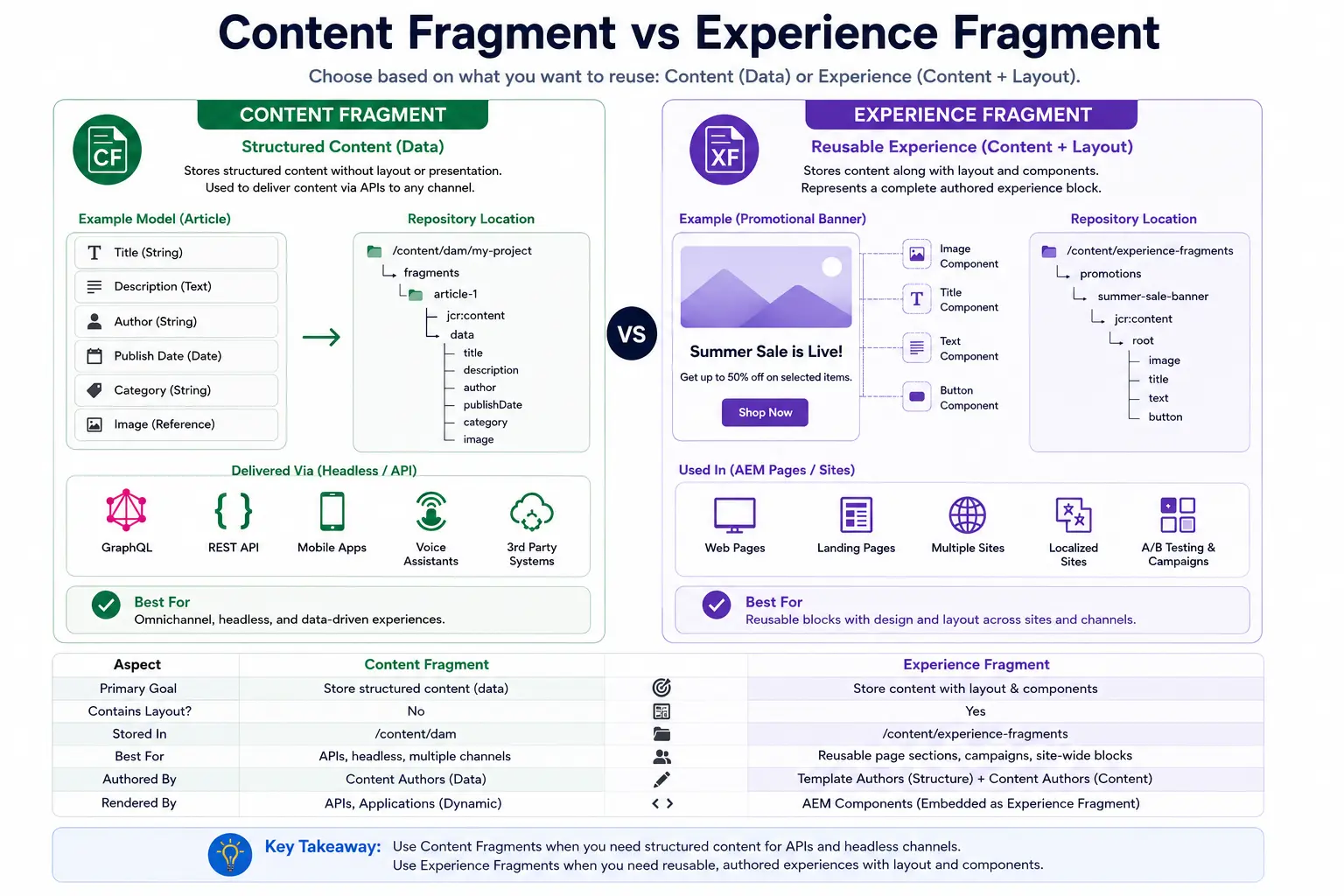
A simple decision rule is:
Need reusable structured business content?
                ↓
        Content Fragment

Need reusable authored experience
with components and presentation?
                ↓
        Experience Fragment
The distinction becomes particularly important in headless projects.
Suppose a mobile application needs product information.
The application doesn't need AEM's page layout.
It needs structured data that it can render using its own UI.
A Content Fragment makes sense.
Now suppose the marketing team wants the same fully authored promotional block to appear across several AEM pages.
The page needs the components, layout, and authoring decisions that were created in AEM.
An Experience Fragment makes more sense.
So the decision is not really about choosing between two competing AEM features.
They solve different architectural problems.
Content Fragment
        ↓
"What is the business content?"

Experience Fragment
        ↓
"What is the reusable authored experience?"
Once that distinction is clear, it becomes much easier to decide where each belongs in an AEM architecture.
Production Troubleshooting
Experience Fragments look simple when everything is working.
The problems usually appear when the fragment is shared across many pages, channels, or environments.
A few issues are worth knowing before using XFs heavily in production.
Problem: XF Changes Are Not Showing on Pages
Imagine an author updates the summer campaign Experience Fragment and publishes it.
The author opens the page expecting to see the new version.
But the old content is still being displayed.
The first thing to understand is that the page and the Experience Fragment are separate pieces of content.
So debugging should start by checking the complete path:
Experience Fragment
        ↓
Published?
        ↓
Page references the correct XF?
        ↓
Publish environment has the latest version?
        ↓
Cache serving an older response?
If the Experience Fragment itself has not been published, the page cannot display the expected published version.
If it has been published, the next thing to investigate is caching and invalidation.
This is especially important when the same XF is referenced by many pages.
A change to one Experience Fragment can affect many rendered pages, so the caching strategy needs to account for that dependency.
The key lesson is:
- Don't debug only the page when the content being rendered is owned by an Experience Fragment.
Trace the reference back to the fragment and then follow the publish and caching flow.
Problem: Authors Cannot Find the Experience Fragment Template
Another common issue appears before the fragment is even created.
An author goes to create an Experience Fragment but cannot find the expected template.
Instead of assuming the template is broken, check the configuration around the project.
The investigation should include:
Project Configuration
        ↓
Experience Fragment Template Configuration
        ↓
Template Availability
        ↓
Author Permissions
The exact configuration depends on the AEM project setup.
The important point is that Experience Fragment templates are governed by configuration and permissions just like other authoring capabilities.
If the template is not available for the expected content path, authors may not see it even though the template exists.
Problem: The Experience Looks Correct on the Website but Not in Another Channel
This is particularly common when variations are involved.
For example:
Web Variation
      ↓
Looks correct

Email Variation
      ↓
Rendering problems
The mistake is assuming that because the web variation works, the email variation should work automatically.
Different channels have different technical constraints.
Email clients, for example, do not support the same HTML and CSS capabilities as modern browsers.
So the variation needs to be designed for its actual delivery environment.
The debugging process should therefore start with the target channel:
Which variation?
       ↓
Which delivery channel?
       ↓
What does that channel support?
       ↓
Which components are being used?
       ↓
Does the template enforce the required constraints?

This is why template governance matters.
A good Experience Fragment template can prevent authors from building experiences that are technically unsuitable for their target channel.
A Better Way to Debug XFs
When an Experience Fragment doesn't behave as expected, avoid immediately changing the page.
Start with the relationship:
Page
  ↓
Experience Fragment Component
  ↓
Referenced XF
  ↓
Variation
  ↓
Published Content
  ↓
Cache / Delivery Layer
This gives the team a much clearer debugging path.
The more widely an Experience Fragment is reused, the more important this becomes.
One incorrect XF can affect many pages.
That's one of the benefits of reuse, but it is also one of the operational responsibilities that comes with it.
Why Architects Care
At first, an Experience Fragment looks like a convenient way to reuse a banner.
At an enterprise level, the architectural value is much bigger.
The real problem is where the responsibility for a reusable experience should live.
Without an Experience Fragment, the same experience can end up being authored independently across many pages:
Homepage
   └── Campaign Experience

Category Page
   └── Campaign Experience

Landing Page
   └── Campaign Experience

Product Page
   └── Campaign Experience
Now every copy has its own lifecycle.
A change to the campaign means finding every location where that experience was created.
With an Experience Fragment:
              Campaign Experience
                       │
          ┌────────────┼────────────┐
          ↓            ↓            ↓
      Homepage     Category      Landing
The reusable experience has its own lifecycle.
That gives architects a few things to think about.
Reuse vs Coupling
Reuse is valuable, but not everything should become an Experience Fragment.
If a small piece of UI can be handled cleanly by a reusable component, creating an XF for it may introduce unnecessary dependency and authoring complexity.
The question should be:
- Is this a meaningful authored experience that needs to be managed independently?
If the answer is yes, an Experience Fragment may be a good fit.
##Governance
Once an XF is referenced by many pages, changing it can have a much larger impact than changing content on one page.
That means teams need to understand:
Who owns the XF?
       ↓
Where is it used?
       ↓
Who can modify it?
       ↓
How is it reviewed?
       ↓
How is it published?
A reusable experience should therefore have clear ownership and lifecycle rules.
Channel Strategy
Architects also need to think about whether the organization genuinely needs different variations.
Creating variations simply because the feature supports them can make the content model harder to maintain.
The better approach is to identify the actual delivery requirements:
Same experience?
       ↓
Reuse directly

Same business experience,
different delivery requirements?
       ↓
Consider variations

Completely different experience?
       ↓
Keep it separate
The Architectural Trade-Off
Experience Fragments reduce duplication, but they also create dependencies.
One XF can be used by many pages.
That is the benefit.
But it also means one change can affect many pages.
So the architectural decision is not simply:
- "Can we reuse this?"
It is:
- "Should this experience have a shared lifecycle?"
That is the question that matters when deciding whether something belongs in an Experience Fragment.
Summary
Experience Fragments solve a different problem from Content Fragments.
A Content Fragment gives us structured business content that can be consumed and presented by different experiences.
An Experience Fragment gives us a way to create and reuse a complete authored experience made from AEM components.
The main things to remember are:
-
Reuse the experience, not just the content
If the reusable item includes components, layout, and authoring decisions, an Experience Fragment may be a better fit than copying that structure across pages.
-
The page and the experience have different responsibilities
The page decides where the experience appears.
The Experience Fragment owns the reusable experience.
-
Variations are useful when the delivery context is different
Web, email, or another channel may need different presentation or technical constraints. Variations allow those differences to be managed without treating every version as an unrelated experience.
-
Repository location matters
Experience Fragments live under:
text/content/experience-fragments/
This is different from Content Fragments, which are managed under the DAM.

5. **Reuse also creates dependencies**

A single Experience Fragment can affect many pages.

That is one of its biggest benefits, but it also means teams need to think about ownership, publishing, caching, and change impact.

6. **Not everything should become an Experience Fragment**

A small reusable UI element may be better implemented as a component.

An Experience Fragment makes more sense when the team needs to manage a meaningful, presentation-driven experience independently.

The important architectural question is therefore not:

- "Can we reuse this?"

It is:

**"Does this experience need its own lifecycle and need to be reused across multiple experiences?"**


## What's Next?

We've now seen where Experience Fragments fit into the content architecture.

Content Fragments help us manage structured business content.

Experience Fragments help us manage reusable authored experiences.

But there is another problem when an organization operates multiple sites and regions.

The same business may have:

```text
Global Website
   ↓
US Website
   ↓
UK Website
   ↓
Germany Website
   ↓
India Website
The sites may share a large amount of content, but they may also need their own language, branding, navigation, legal information, or regional content.
Copying everything into separate sites creates another maintenance problem.
So the next architectural question becomes:
How do we manage multiple sites and languages while still reusing content and keeping regional differences under control?
That leads us to Multi Site Manager (MSM).
In the next chapter, we'll look at how MSM works, how it relates to site structure and content inheritance, and where architects need to be careful when designing multi-site AEM implementations.
Enjoyed this chapter?
Get an email when I publish the next chapter. No spam — just new technical deep-dives.
Comments
Share feedback or questions about this blog post.
No comments yet. Be the first to share your thoughts.