Content Fragment Architecture — Models, References, and API Delivery
Deep dive into AEM Content Fragment architecture. Learn how to design Content Fragment Models, work with structured and unstructured content, handle fragment references, manage versioning, and deliver content via GraphQL and JSON APIs.
Content Objective
In this chapter, you'll understand:
- What Content Fragment Models are and how they define content structure
- The difference between structured and unstructured content in fragments
- How fragment references connect content across the repository
- How versioning and workflow apply to Content Fragments
- How to deliver fragments via GraphQL and JSON APIs
- Real production examples from news sites and e-commerce platforms
- How architects think about fragment model design at scale
Where We Are
In the previous chapter, we established when to use Content Fragments versus Pages versus Assets. The short version: when your content needs to go beyond a single web page — to a mobile app, a voice assistant, a partner API — Content Fragments are your answer.
Now we go deeper. Understanding what Content Fragments are is one thing. Knowing how to design them well is what separates a working implementation from one that causes pain two years later.
I've seen projects spend weeks restructuring Content Fragment Models because the original design didn't consider reuse, references, or future API requirements. Fixing a model after hundreds of fragments exist is much harder than designing it properly from the beginning. I've seen teams redesign their entire content model a year into a project because the original model didn't account for reuse, references, or API delivery.
Let's see how Content Fragments are actually designed so you don't run into those problems later.
Content Fragment Architecture
Understanding Content Fragment Models
What a Model Is
A Content Fragment Model is the schema for your content. Before you can create a Content Fragment, you need a model that defines what fields it contains, what types those fields are, and which ones are required.
Think of it exactly like a database table definition — except instead of SQL, you define it through the AEM UI under:
Tools → Assets → Content Fragment Models
Where Models Are Stored
Content Fragment Models are stored under:
/conf/[project]/settings/dam/cfm/models
This is important because:
-
Models are configuration
-
Fragments are content
-
Models live in /conf.
-
Fragments live in /content/dam.
-
Understanding this separation makes troubleshooting much easier.
Defining a Model
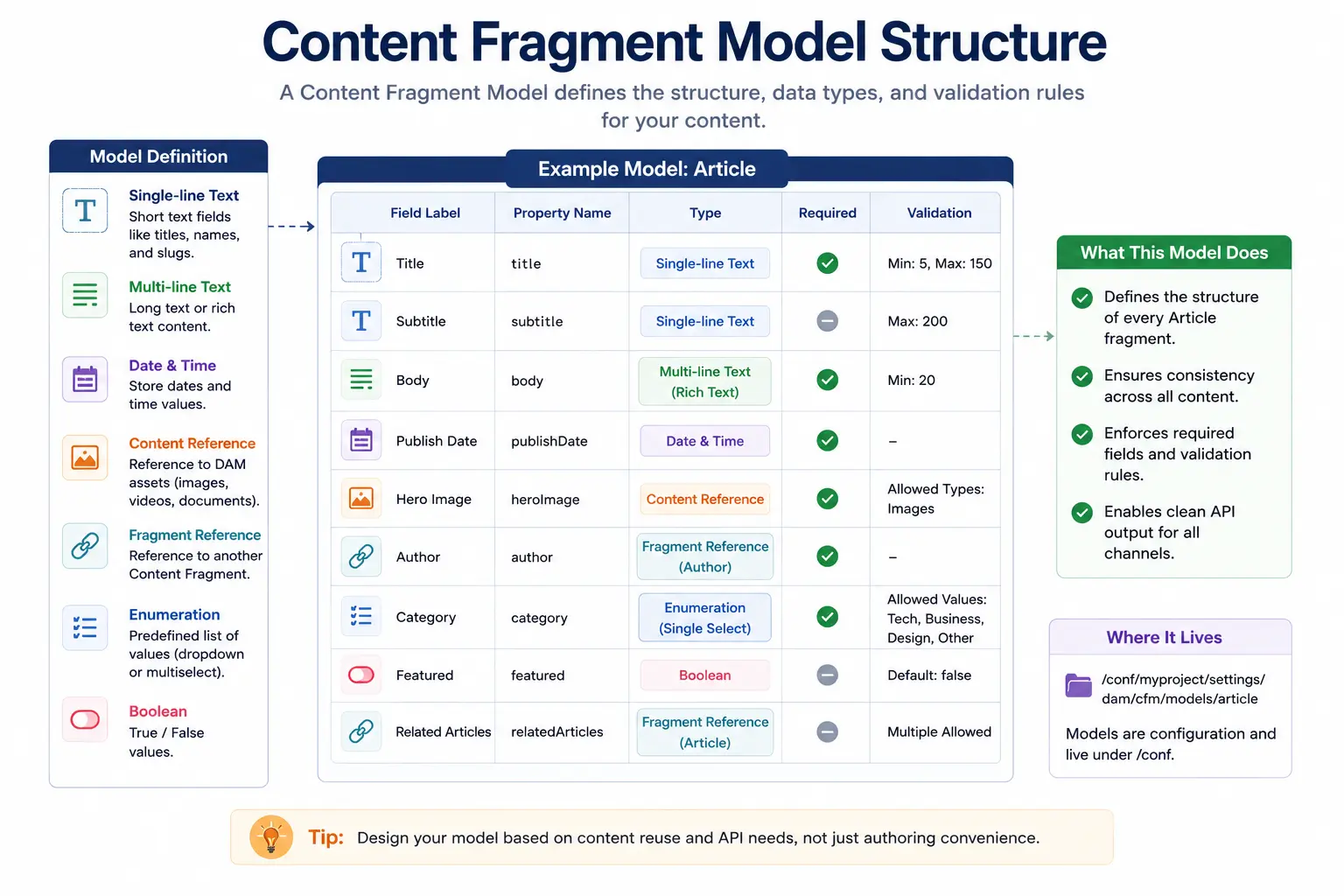
Here's a real-world Article model:
Model: Article
├── title          (Single-line text, required)
├── subtitle       (Single-line text)
├── body           (Multi-line text, rich text)
├── author         (Single-line text, required)
├── publishDate    (Date and Time)
├── heroImage      (Content Reference → /content/dam)
├── tags           (Tags)
└── relatedArticles (Fragment Reference → Article)
Each field has:
- Label — What authors see
- Property Name — What goes into the JCR (becomes the API field name)
- Data Type — Text, number, date, boolean, reference, etc.
- Required — Whether publishing is blocked without it
- Validation — Min/max length, regex patterns
Content Fragment Model Structure
Field Types That Matter Most
Single-line Text — Short values like titles, names, slugs. Use this for anything that shouldn't wrap.
Multi-line Text — Long form content. You can enable rich text (with formatting toolbar) or keep it plain text. Plain text is better for API consumers — HTML tags in a mobile app body are a pain.
Content Reference — Points to a DAM asset (image, PDF, video). This is how you attach images to fragments without embedding binary data.
Fragment Reference — Points to another Content Fragment. This is how you build relationships between content. An Article can reference an Author fragment. A Product can reference multiple Category fragments.
Enumeration — Predefined list of options (dropdown or checkbox). Use this for status fields, content types, difficulty levels — anything with fixed choices. It prevents authors from typing "beginner", "Beginner", "BEGINNER" as three separate values.
Boolean — True/false toggles. Useful for "featured", "sponsored", "breaking news" flags.
Structured vs Unstructured Content
This distinction trips up a lot of developers.
Structured Content
Structured content uses a Content Fragment Model with defined fields. Every fragment of this type follows the same schema.
Article Fragment (Structured)
├── title: "Five Ways AEM Saves Time"
├── author: "Jane Smith"
├── body: "Paragraph content here..."
├── publishDate: "2026-06-22"
└── heroImage: /content/dam/images/aem-hero.jpg
Why structured content wins for most use cases:
- Consistent data shape for API consumers
- Required field enforcement prevents incomplete content
- Easy to query with GraphQL (you know exactly what fields exist)
- Searchable and filterable by any field
Unstructured Content
AEM also allows "simple" or unstructured fragments — essentially a rich text editor with optional metadata. There's no model enforcing field structure.
Simple Fragment (Unstructured)
└── body: (large rich text blob)
When to use unstructured:
- Legacy content migration (you're importing existing HTML)
- Pure editorial content with no API consumers
- One-off content that doesn't fit any model
When NOT to use unstructured:
- When the content will be consumed by any API
- When you need consistency across multiple pieces of content
- When the content will be queried or filtered
Most modern AEM projects use structured models exclusively. Unstructured fragments are largely a legacy path.
Fragment References — Building Content Relationships
Fragment References are the feature that usually changes how developers think about Content Fragments. Until you start using references, it's easy to duplicate data everywhere. Instead of duplicating data, you reference it.
Fragment Reference Architecture
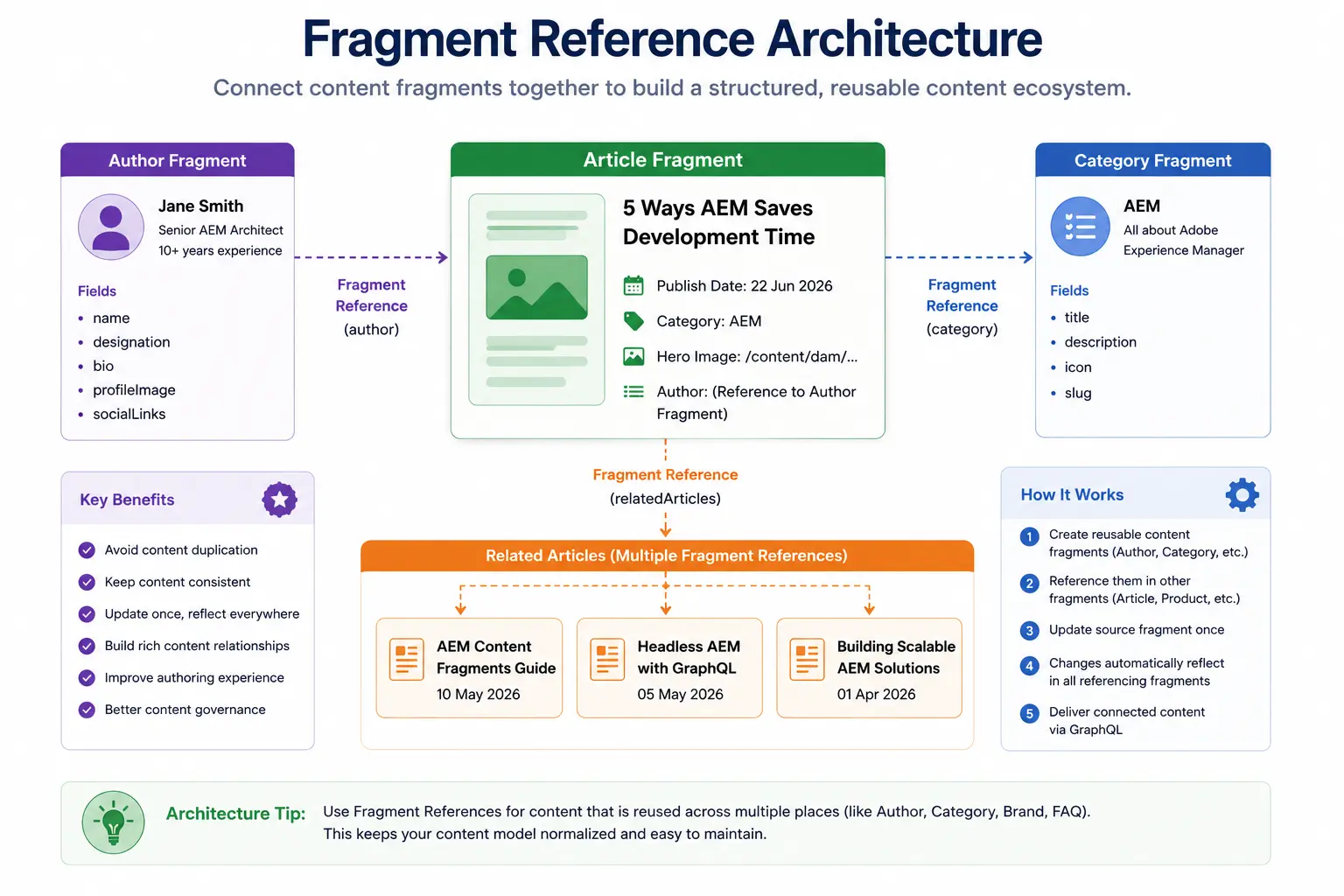
A Real Example: Author Bio
Without references:
Article: "Five Ways AEM Saves Time"
├── title: "Five Ways AEM Saves Time"
├── author: "Jane Smith"
├── authorTitle: "Senior AEM Architect"
├── authorBio: "Jane has 10 years of AEM experience..."
└── authorImage: /content/dam/headshots/jane.jpg
If Jane writes 50 articles and changes her title, you edit 50 fragments.
With references:
Author Fragment: "jane-smith"
├── name: "Jane Smith"
├── title: "Senior AEM Architect"
├── bio: "Jane has 10 years of AEM experience..."
└── headshot: /content/dam/headshots/jane.jpg

Article Fragment: "five-ways-aem-saves-time"
├── title: "Five Ways AEM Saves Time"
└── author: → [jane-smith] (fragment reference)
Jane updates her fragment once. All 50 articles update automatically.
Multi-Value References
Fragment references can be single or multi-value. A product might reference multiple categories:
Product Fragment: "laptop-pro-x1"
├── name: "Laptop Pro X1"
├── price: 1299.99
└── categories: → [laptops], [business], [featured]  (multi-value)
A blog post might reference multiple related articles:
Article Fragment: "aem-performance-tips"
├── title: "AEM Performance Tips"
└── relatedArticles: → [dispatcher-caching], [query-optimization], [clientlibs]
Circular References
Be careful here. Fragment A can reference Fragment B, and Fragment B can reference Fragment A. AEM allows this, but your GraphQL queries will fail or loop if you don't handle the depth correctly.
Design your models so references flow in one direction where possible. Categories reference nothing. Products reference categories. Articles reference authors and products. Authors reference nothing.
Content References (Assets)
Content references work differently from fragment references. A content reference points to anything in the DAM:
Article Fragment
└── heroImage: /content/dam/campaigns/summer-hero.jpg (content reference)
When you query this fragment via GraphQL, the API returns the full asset path, which you then use to construct the image URL via Dispatcher or CDN.
Versioning and Workflow
Versioning
Content Fragments support versioning through the AEM timeline. Every time an author saves a fragment, AEM can create a version. You can view, compare, and restore previous versions through the fragment editor.
Fragment: summer-campaign-article
├── Version 3 (current) — June 22, 2026
├── Version 2 — June 20, 2026
└── Version 1 — June 18, 2026
This becomes useful very quickly in production. Editors make mistakes, content changes, and legal teams sometimes ask for rollbacks. Version history makes those situations much easier to handle. Editors make mistakes. Legal teams request rollbacks. Having clean versioning history means you can restore any fragment to any previous state without code involvement.
Workflow Integration
Content Fragments participate in AEM workflows just like pages. You can set up approval workflows:
Draft → Review → Approved → Published
For enterprise projects — especially in regulated industries — this is non-negotiable. A legal disclaimer can't go live without compliance review. A product announcement can't publish before the embargo lifts.
The workflow configuration lives in:
Tools → Workflow → Models
And fragment workflow states are visible in the Assets UI just like asset states.
Publication States
Fragments have independent publication states from pages. A fragment can be:
- Draft — Not published
- Published — Live on Publish instance
- Modified — Published but has unpublished changes
This matters for headless delivery. If a fragment is referenced by a page AND consumed by a mobile app, changes to the fragment affect both consumers the moment you publish.
How Content Fragment Architecture Works
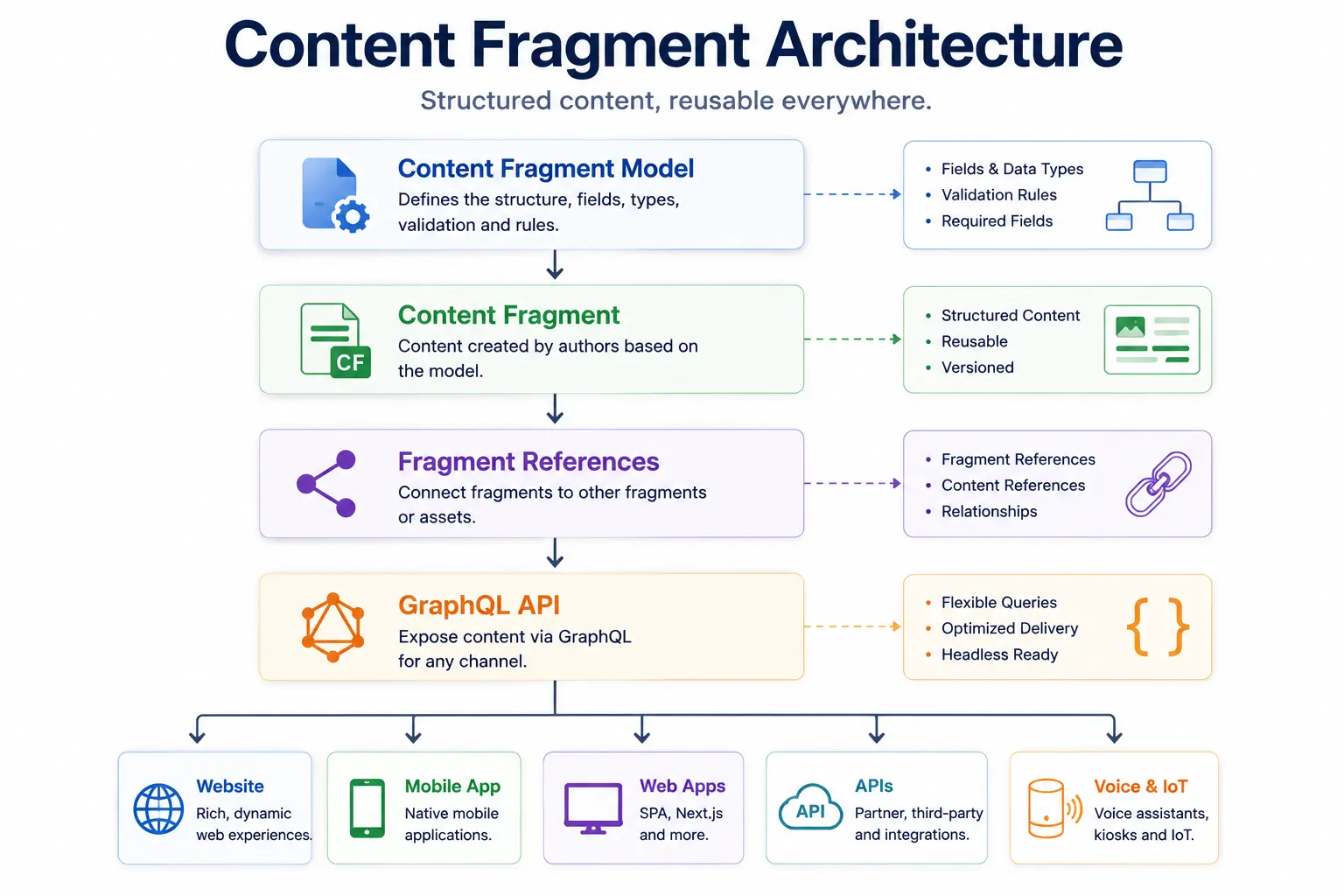
A complete Content Fragment flow looks like:
-
Content Fragment Model
-
Content Fragment
-
Fragment References
-
GraphQL
-
Frontend Application
This is the foundation of most modern Headless AEM implementations.
API Delivery
GraphQL
AEM's native headless delivery method for Content Fragments is GraphQL. Since AEM 6.5 SP7 and all AEM Cloud Service versions, you can query fragments directly.
Example query — fetch an article by slug:
{
  articleByPath(_path: "/content/dam/myproject/articles/five-ways-aem") {
    item {
      title
      body {
        html
      }
      author {
        ... on AuthorModel {
          name
          title
          headshot {
            _path
          }
        }
      }
      publishDate
    }
  }
}
Example response:
{
  "data": {
    "articleByPath": {
      "item": {
        "title": "Five Ways AEM Saves Time",
        "body": {
          "html": "<p>Paragraph content here...</p>"
        },
        "author": {
          "name": "Jane Smith",
          "title": "Senior AEM Architect",
          "headshot": {
            "_path": "/content/dam/headshots/jane.jpg"
          }
        },
        "publishDate": "2026-06-22"
      }
    }
  }
}
Notice how the fragment reference to Author resolves inline — you get nested author data in a single query. This is one of GraphQL's biggest advantages over REST for connected content.
Persisted Queries
For production use, you should use persisted queries rather than ad-hoc GraphQL. A persisted query is a saved GraphQL query that lives in the repository and is executed by name.
GET /graphql/execute.json/myproject/article-by-path;path=/content/dam/...
Benefits:
- Cached by Dispatcher and CDN (GET requests are cacheable, POST queries are not)
- No query logic in your frontend code
- Queries can be updated server-side without frontend deployment
- Better security — clients can't query arbitrary fields
For any production headless delivery, persisted queries are the right approach.
Why Headless Projects Depend on Content Fragments
-
In traditional AEM implementations:
- Content ↓
- HTL ↓
- HTML
-
In Headless implementations:
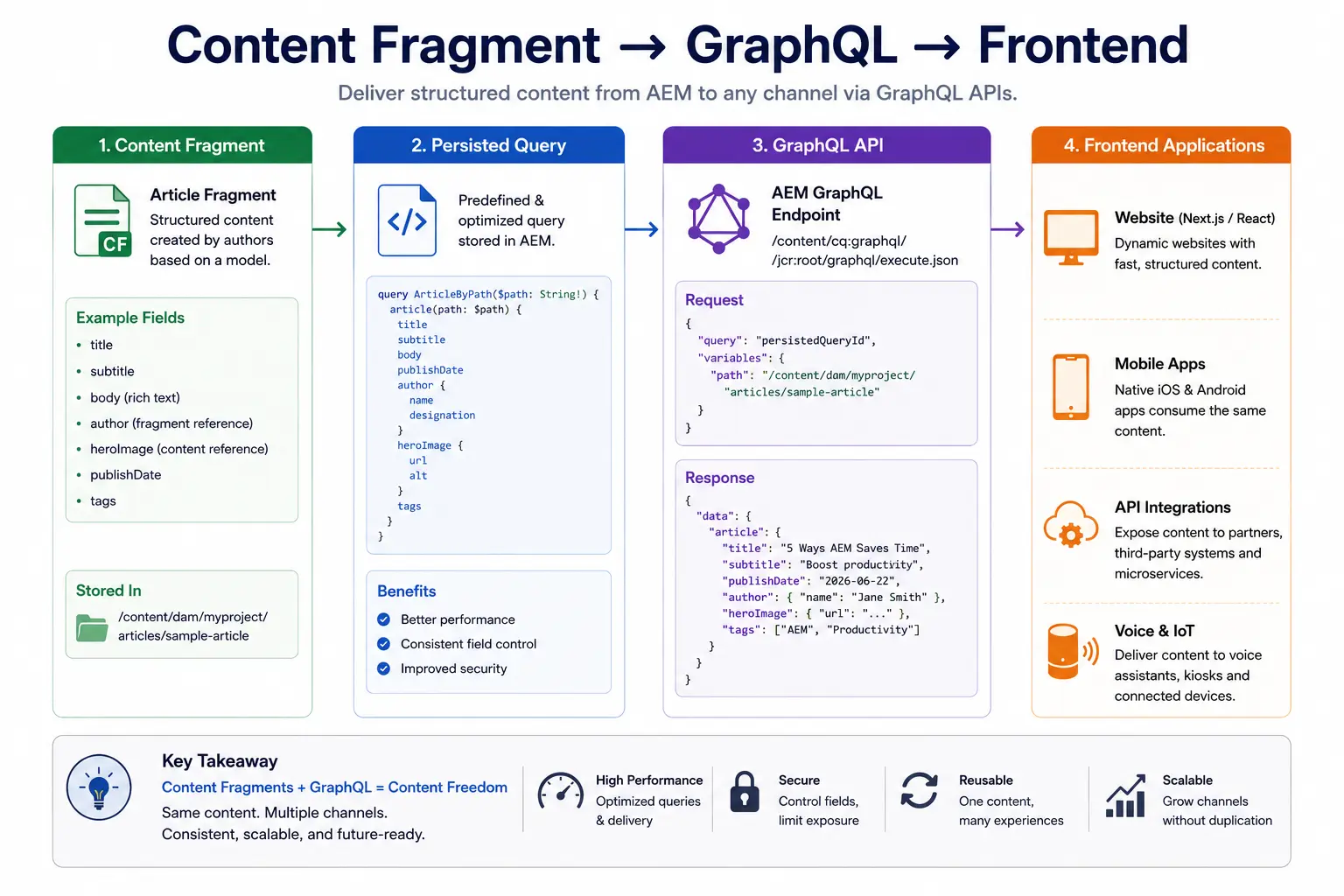
- Content Fragment ↓
- GraphQL ↓
- Frontend
This separation allows frontend teams to build React, Next.js, mobile, and kiosk applications without depending on AEM page rendering.
Content Fragment → GraphQL → Frontend
JSON Exporter (Alternative)
Before GraphQL was added to AEM, developers used the JSON exporter to consume fragment content. By adding .model.json to a fragment URL, you get a JSON representation:
GET /content/dam/myproject/articles/five-ways-aem.model.json
This still works, but GraphQL is the preferred approach for new projects. JSON exporter is useful for quick integration tests or when you need to access fragment data outside the GraphQL schema.
Real-World Examples
Case Study 1: News Site (Multi-Channel Delivery)
Setup:
Models:
├── Article (title, body, author ref, publishDate, tags, heroImage)
├── Author (name, bio, headshot, social links)
├── Category (name, slug, description, parentCategory ref)
└── Tag (name, slug)

Fragments:
/content/dam/news/articles/    (2000+ article fragments)
/content/dam/news/authors/     (150 author fragments)
/content/dam/news/categories/  (40 category fragments)
Delivery channels:
- Web: AEM pages with Content Fragment components reference fragments
- Mobile App: React Native app queries via GraphQL persisted queries
- Voice Assistant: Simple text extraction from
bodyfield - RSS Feed: Servlet queries fragments and generates XML
- Newsletter: Marketing tool pulls fragment data via API
One content model. Five delivery channels. Editorial team works in one place.
Key lesson: The author team didn't need to know anything about channels. They write articles in the fragment editor. The architecture handles delivery.
Case Study 2: E-Commerce Product Catalog
Setup:
Models:
├── Product (name, sku, description, price, images, specs, categories)
├── Category (name, slug, description, parentCategory, image)
├── Specification (label, value, unit)
└── Variant (color, size, sku, price, stockLevel)

Fragments:
/content/dam/catalog/products/    (5000+ product fragments)
/content/dam/catalog/categories/  (200 category fragments)
Delivery:
- Web: Product pages reference fragments for consistent data
- Mobile App: GraphQL queries for product detail pages
- Search Index: Background job reads fragments and indexes to Elasticsearch
- PDP API: Partner retailers consume product data via persisted queries
- Print Catalog: Annual catalog generator reads fragment data directly
Key lesson: With 5000 products, consistency is everything. Every product has exactly the same fields because the model enforces it. The search index, print catalog, and API all read the same structured data.
Part 7: Production Troubleshooting
Problem: GraphQL Query Returns Null for Referenced Fragment
Symptom: Your query returns data, but fragment reference fields come back as null.
Root Cause (most common): The referenced fragment isn't published. A fragment can be saved as draft and still referenced by another fragment, but the API won't return draft content.
Fix:
- Open the referenced fragment in the Assets UI
- Check publication status in the timeline
- Publish the fragment
AEM Author → Assets → Content Fragments → [find referenced fragment] → Publish
Secondary cause: Wrong model type in your GraphQL query. If you're using inline fragments (... on AuthorModel), the model name must exactly match what's configured.
Problem: Model Changes Break Existing Fragments
Symptom: You add a new required field to a model, and existing fragments now show validation errors.
Root Cause: AEM doesn't retroactively populate fields when you modify a model. Existing fragments don't have the new field yet.
Fix: When adding required fields to a model:
- Add the field as not required first
- Set a sensible default value
- Let the editorial team populate it
- Only make it required once all existing fragments are updated
Never add required fields to models that already have fragments in production. This will block publication of existing content.
Problem: Performance — GraphQL Queries Are Slow
Symptom: API responses take 2-3 seconds. Content editors are using the fragments, but the API is sluggish.
Root Cause: Ad-hoc GraphQL queries (POST requests) aren't cached by Dispatcher. Every request hits AEM directly.
Fix: Convert to persisted queries:
1. Test your query in the GraphQL IDE
2. Save as a persisted query via the API or UI
3. Update frontend to call the persisted query endpoint (GET request)
4. Configure Dispatcher to cache GET requests to /graphql/execute.json/*
Response times drop from seconds to milliseconds once caching is in place.
Problem: Fragments Published But Content Not Updating
Symptom: You publish a fragment update, but the web page still shows old content.
Root Cause: The page that references the fragment wasn't invalidated after the fragment was published.
Fix: AEM's replication agent for fragments should trigger page invalidation. Check:
Tools → Replication → Agents on Author → Default Agent → Check Log
If the page component uses ${fragment.title} etc. at render time, Dispatcher needs to invalidate the page when the fragment changes. Configure your replication agent to handle this.
Why Architects Care
Architects rarely think about Content Fragments as individual pieces of content.
Instead, they think about content models that can support an entire digital ecosystem.
A poorly designed Content Fragment Model may work for a website today but become difficult to reuse when a mobile application, GraphQL API, or new digital channel is introduced.
For this reason, architects spend more time designing the structure of a model than creating individual fragments.
A well-designed model should:
- Encourage content reuse instead of duplication.
- Represent real business entities such as Articles, Authors, Products, and Categories.
- Support relationships through Fragment References.
- Be flexible enough to accommodate future business requirements without frequent structural changes.
Experienced AEM architects know that changing a Content Fragment Model after hundreds or thousands of fragments have been created can become a costly migration effort.
Good Content Models are an investment that keeps content scalable, reusable, and maintainable for years.
Summary
Content Fragments give you structured, reusable content that travels beyond the web page.
Here's what separates good fragment architecture from bad:
-
Model design matters more than implementation — Get your models right before you start creating fragments. Changing models after you have thousands of fragments is painful.
-
References beat duplication — Any time you're copying data from one fragment to another, you should probably be using a fragment reference.
-
Persisted queries for production — Ad-hoc GraphQL is for development. Persisted queries are for production.
-
Plan for publication dependencies — When Fragment A references Fragment B, you need to publish both for the API to return complete data.
-
Required fields need migration plans — Don't add required fields to models with existing content without updating those fragments first.
Before creating a model, ask one simple question:: Who is going to consume this content?.The answer usually influences the entire model design. — web, mobile, API, search — before you design your models. Every consumer has slightly different needs, and your model needs to serve them all.
What's Next in This Series
Next we'll understand Experience Fragments and see how AEM reuses not just content, but complete experiences across multiple pages and channels.
After that we'll explore Content Modeling Best Practices, where we'll learn how architects design scalable models for enterprise applications.
Finally, we'll cover Multi Site Manager (MSM) and see how large organizations manage content across countries, brands, and languages.
Enjoyed this chapter?
Get an email when I publish the next chapter. No spam — just new technical deep-dives.