Pages vs Assets vs Content Fragments vs Experience Fragments — Choosing the Right Content Type
Understand the three core content types in AEM — Pages, Assets, Content Fragments, and Experience Fragments. Learn when to use each, how they're stored in the repository, and how to design content architecture decisions that scale across enterprise projects.
Content Objective
In this chapter, you'll understand:
- What Pages, Assets, Content Fragments, and Experience Fragments are and what makes each one unique
- How the repository structure differs between these four content types
- When to reach for a Content Fragment instead of a page or an asset
- How page properties and metadata influence SEO and authoring
- Real-world scenarios showing the right content type for the right job
- How architects make content type decisions that don't cause pain later
Where We Are
Up until now, we've been focused on the rendering side of AEM — requests, components, templates, Sling Models. You now understand how content gets from the repository to the browser.
But we've been a bit hand-wavy about what content actually is in AEM.
When you work on a real project, you'll quickly discover there's more than one way to store content. A developer asks "should this be a page or a content fragment?" and the room goes quiet. It's one of those decisions that seems minor but quietly shapes your entire content architecture.
This chapter answers that question clearly.
The Four Core Content Types
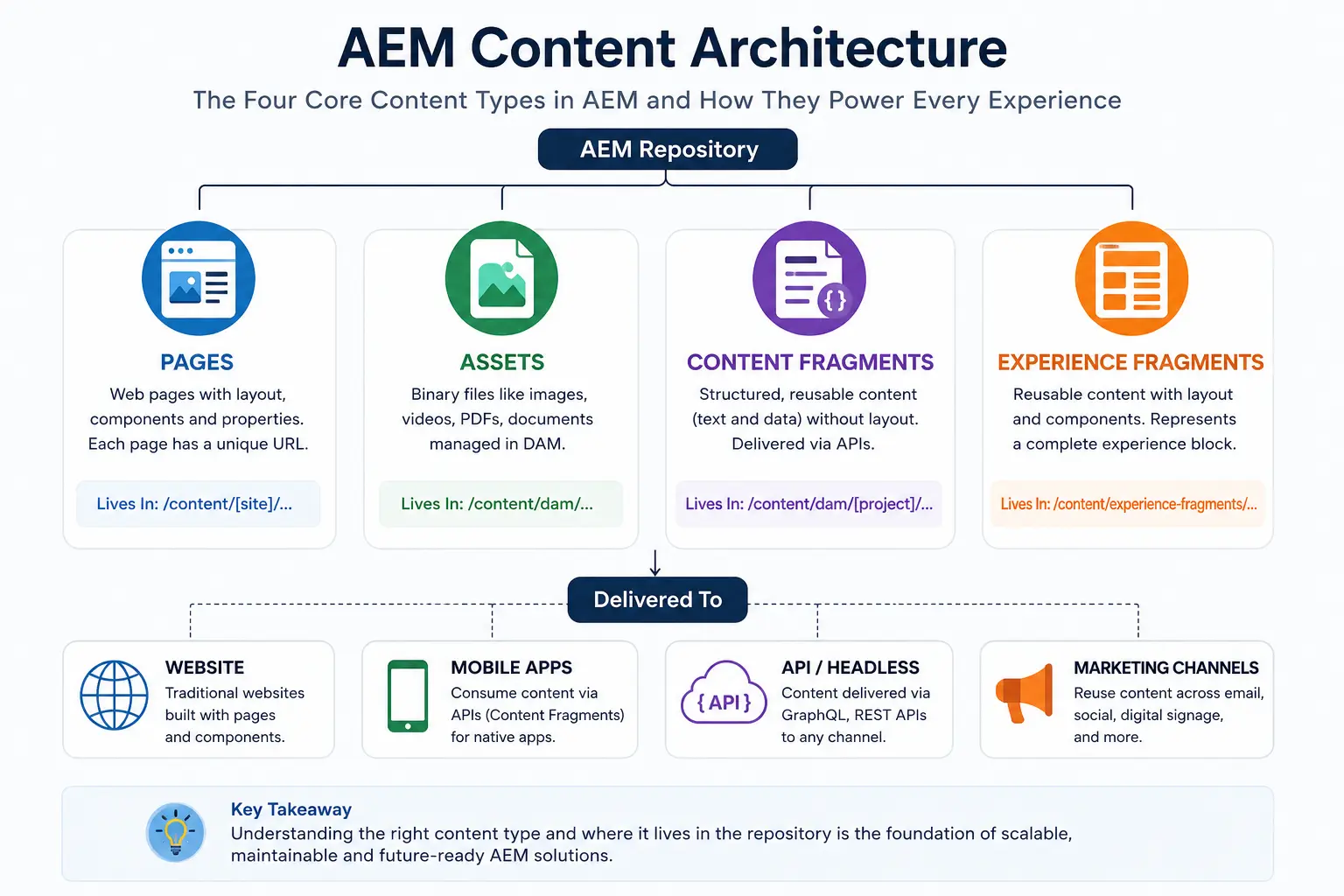
AEM has four primary content types that architects work with most often: Pages, Assets, Content Fragments, and Experience Fragments.
| Type | Lives In | Purpose | Rendered By |
|---|---|---|---|
| Pages | /content/[site]/... | Web pages with layout | Template + Components |
| Assets | /content/dam/... | Binary files (images, PDFs, videos) | DAM, Components, Dynamic Media |
| Content Fragments | /content/dam/[project]/... | Structured content without presentation | GraphQL APIs, JSON Exporter, Components |
| Experience Fragments | /content/experience-fragments/[project]/... | Reusable content + presentation | Components, XF Components, Adobe Target, Channels |
Let's go through each one, because understanding these deeply changes how you design systems.
What a Page Is
A page in AEM is structured content that has a layout. When you think of a web page — a home page, a product page, a blog article — you're thinking of an AEM page.
Every page lives under /content and has a jcr:content node that holds both the page properties and the component tree.
/content/mysite/en/home
└── jcr:content
    ├── jcr:title = "Home"
    ├── sling:resourceType = myproject/components/page
    ├── root
    │   ├── header (component)
    │   ├── hero (component)
    │   └── footer (component)
The key thing about a page: it's layout-aware. It knows where things go on screen.
Page Properties
Every page carries metadata through its page properties:
- Title — SEO title and browser tab text
- Description — Meta description for search engines
- Tags — Classification for search and navigation
- Thumbnail — Preview image for authoring UI
- Vanity URL — Friendly URL aliases
- On/Off Time — Scheduled publishing
Page properties feel mundane, but I've seen projects where bad page property design caused SEO disasters. Every enterprise project should define a standard page property template before anyone starts authoring.
When to Use Pages
Use pages when:
- Content needs a visual layout (columns, carousels, images positioned with text)
- Each piece of content maps to a unique URL that users navigate to directly
- Authors need drag-and-drop component authoring
- Content is primarily for web consumption
Examples:
- Homepage, product pages, landing pages, blog articles with rich layouts, marketing campaign pages
What an Asset Is
An asset is a binary file that AEM manages — images, PDFs, videos, documents. Assets live in the Digital Asset Management (DAM) system under /content/dam.
/content/dam/myproject/images/hero-image.jpg
└── jcr:content
    ├── jcr:title = "Hero Image"
    ├── dc:description = "Summer campaign hero"
    ├── metadata
    │   ├── dc:format = "image/jpeg"
    │   └── tiff:ImageWidth = 1920
    └── renditions
        ├── original (full resolution)
        ├── cq5dam.web.1280.1280.jpeg
        └── cq5dam.thumbnail.319.319.png
When you upload an image, AEM automatically generates multiple renditions — thumbnail sizes, web-optimized versions, etc. This is handled by DAM workflows running in the background.
Asset Metadata
Assets carry rich metadata beyond just the file:
- dc:title — Human-readable name
- dc:description — What the asset shows
- dc:format — MIME type
- dam:assetState — Workflow state (processing, approved, rejected)
- Custom metadata — Industry-specific fields (rights management, expiry dates, brand guidelines)
The metadata isn't cosmetic. In enterprise projects, metadata drives everything: search, personalization, rights management, content reuse. A news organization with 500,000 images needs metadata to find anything.
When to Use Assets
Use assets when:
- You're managing binary files (images, PDFs, videos, documents)
- Content needs to be reused across multiple pages or even multiple sites
- You need rendition management (different sizes for different contexts)
- Rights management and expiry dates matter (licensed images, time-sensitive content)
- Content is shared across channels (web, mobile, print)
Examples:
- Product images reused across 50 product pages, company PDFs linked from multiple pages, brand logos referenced site-wide
What a Content Fragment Is
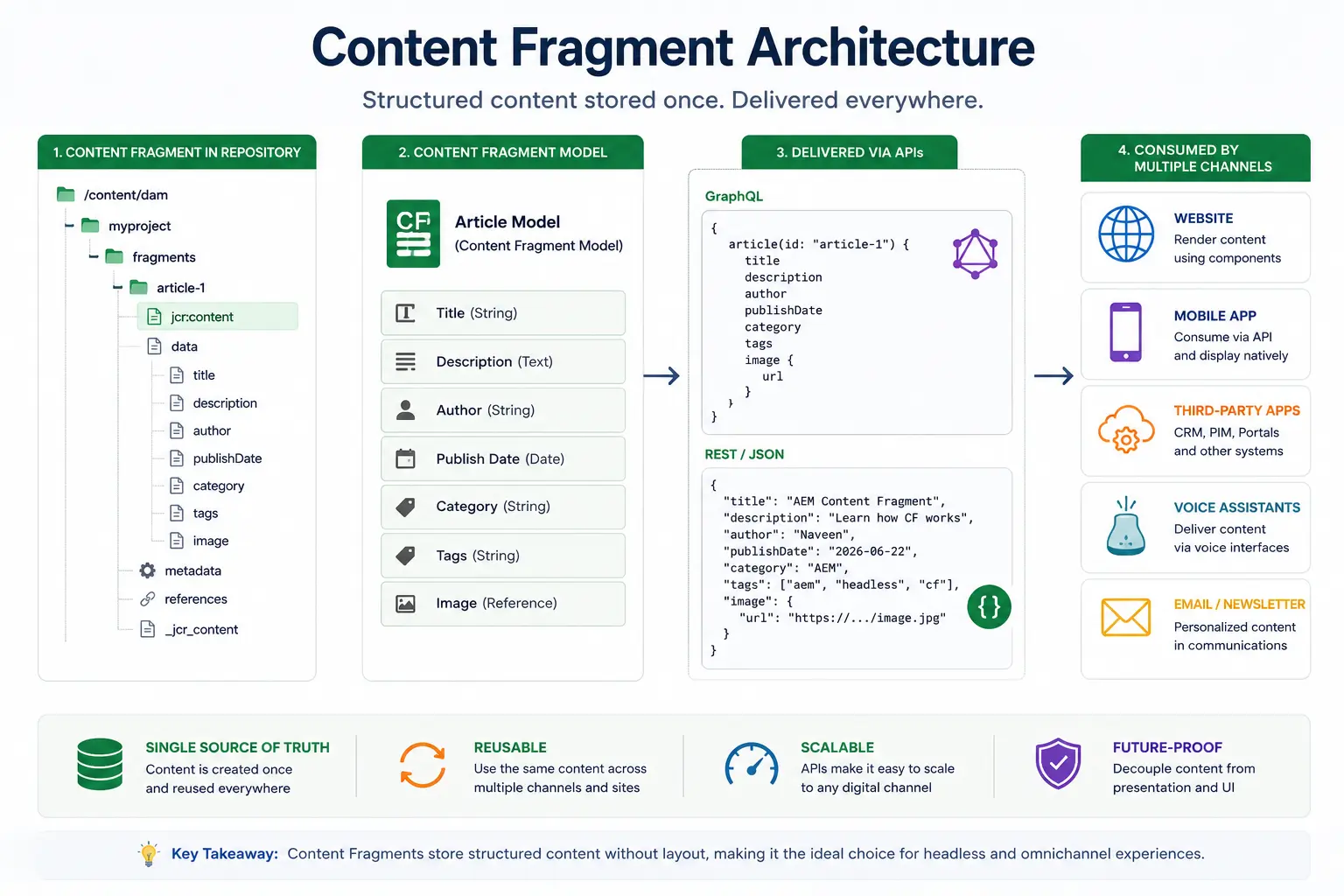
This is where most developers get confused. A Content Fragment is structured text content — without layout. Think of it as a data record, not a web page.
Content Fragments live in the DAM (same location as assets) but they're not binary files — they're structured content with defined fields.
/content/dam/myproject/articles/summer-campaign
└── jcr:content
    ├── sling:resourceType = dam/gui/components/admin/asset/asset
    ├── data
    │   ├── jcr:primaryType = nt:unstructured
    │   ├── title = "Summer Campaign Launch"
    │   ├── body = "This summer we're launching..."
    │   ├── author = "Jane Smith"
    │   └── publishDate = "2026-06-22"
The critical difference: a Content Fragment has no sling:resourceType pointing to a template or layout component. It's pure data.
Content Fragment Models
Every Content Fragment is based on a model that defines its fields. You define the model first, then create fragments based on it.
Example — an Article model:
Content Fragment Model: Article
├── title (Text, required)
├── body (Multi-line Text, rich text enabled)
├── author (Text)
├── publishDate (Date)
├── heroImage (Content Reference → Asset)
└── relatedArticles (Fragment Reference → Article[])
Now every "Article" Content Fragment follows this structure. No article will accidentally miss a title. No article will have an extra field that doesn't belong.
This is what makes Content Fragments powerful for structured content.
When to Use Content Fragments
Use Content Fragments when:
- The same content needs to be delivered to multiple channels (web page, mobile app, email, voice assistant, kiosk)
- Content structure matters more than visual layout
- You're building headless or hybrid AEM architectures
- Content is managed by editorial teams who should focus on content, not page design
- You need API delivery via GraphQL or JSON
Examples:
- Product descriptions delivered to a website AND a mobile app, news articles consumed by web and RSS feed, sports scores delivered via GraphQL to a React frontend
What is an Experience Fragment?
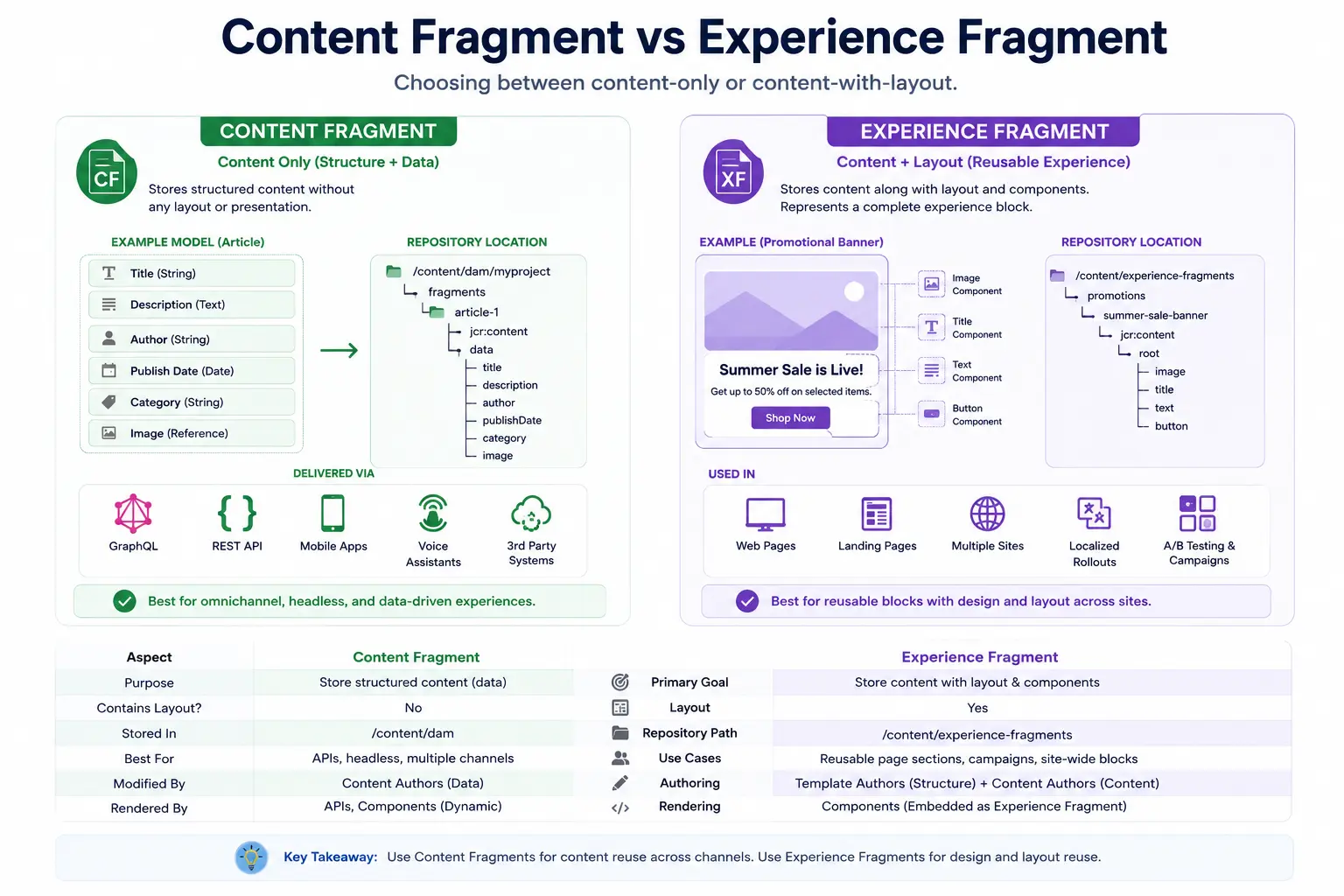
An Experience Fragment is a reusable collection of components and layout that can be shared across pages, sites, and channels.
Unlike a Content Fragment, which stores content only, an Experience Fragment stores both content and presentation.
Examples:
- Promotional Banner
- Campaign Hero
- Site-wide Announcement
- Regional Marketing Experience
Repository Location:
/content/experience-fragments
Content Fragment vs Experience Fragment
A common source of confusion is the difference between Content Fragments and Experience Fragments.
Content Fragment:
- Stores content only
- No layout
- No presentation
- Ideal for APIs and Headless delivery
Experience Fragment:
- Stores content and presentation
- Contains components and layout
- Ideal for reusable marketing experiences
A simple way to remember the difference:
Content Fragment = Content
Experience Fragment = Content + Experience
Real-World Content Architecture Scenarios
Scenario 1: News Organization
A news organization publishes breaking news articles. They have a website, a mobile app, and a voice assistant.
Wrong approach: Create everything as AEM pages.
The website works fine. But the mobile app team now needs to scrape HTML from pages. The voice assistant team has no clean API. When the website redesigns, the mobile app breaks.
Right approach:
Content Architecture:
├── Pages (web only)
│   └── Article Display Page (template + layout)
├── Assets (DAM)
│   └── Article images, videos
└── Content Fragments
    └── Article content (title, body, author, date)
The article page references a Content Fragment. The mobile app queries the Content Fragment via GraphQL. The voice assistant reads the Content Fragment title and first paragraph.
One source of truth. Three delivery channels. No duplication.
Scenario 2: E-commerce
An e-commerce site has 10,000 products. Each product has images, a description, specs, and pricing.
Wrong approach: One AEM page per product, with the description typed into a rich text component.
When you need to update the description on 500 products for a product recall, you're manually editing 500 pages. When the mobile app team wants product data, they're scraping web pages.
Right approach:
Content Architecture:
├── Assets
│   └── Product images (with metadata for color, angle, size)
├── Content Fragments
│   └── Product data (name, description, specs, pricing, category)
└── Pages
    └── Product display templates (reference fragments + assets)
Now you can update descriptions programmatically, deliver to web and app from the same source, and maintain consistent product data.
Scenario 3: Financial Institution
A bank has legal disclaimers that appear on 300 pages. Compliance updates a disclaimer twice a year. In the wrong architecture, that's 300 manual page edits every 6 months.
Right approach: Store disclaimers as Content Fragments. Every page references the fragment. Update the fragment once — all 300 pages update automatically.
This isn't theoretical. I've seen teams spend entire sprints updating disclaimers on individual pages. The fix was architectural, not technical.
Repository Structure
Understanding where content lives helps with both development and debugging.
Pages
/content/
├── [site-name]/
│   ├── en/
│   │   ├── home (page)
│   │   ├── products/ (page)
│   │   │   └── laptop-pro (page)
│   │   └── about (page)
│   └── de/ (German locale pages)
Assets
/content/dam/
├── [project-name]/
│   ├── images/
│   │   ├── hero-banner.jpg
│   │   └── product-shots/
│   ├── documents/
│   │   └── annual-report.pdf
│   └── videos/
│       └── product-demo.mp4
Content Fragments
/content/dam/
├── [project-name]/
│   └── content-fragments/ (convention, not enforced)
│       ├── articles/
│       │   └── summer-campaign (fragment)
│       └── products/
│           └── laptop-pro (fragment)
Notice: Content Fragments live inside /content/dam just like assets. This trips up many developers. The DAM isn't just for binary files — it's for any reusable content.
Production Troubleshooting
Problem: "Our content is duplicated everywhere"
Symptom: The same description appears on 20 pages, edited 20 times. When you update one, others stay outdated.
Root Cause: Content was embedded directly into pages instead of referenced.
Fix: Extract the repeating content into Content Fragments, update pages to reference the fragment. Future changes happen once.
Problem: "Our images look different across pages"
Symptom: Product images have different dimensions, quality, and cropping on different pages.
Root Cause: Images were uploaded directly to pages or multiple versions of the same image exist in the DAM.
Fix: Centralize all images in the DAM with proper naming conventions. Use DAM renditions and Smart Crop for consistent sizing. Reference from the DAM, never upload separately per page.
Problem: "Mobile app can't consume our AEM content"
Symptom: The mobile team is scraping HTML from web pages or maintaining a separate content database.
Root Cause: All content was built into AEM pages — no headless-friendly content model exists.
Fix: This is an architectural problem that needs a proper migration plan. New content should use Content Fragments going forward. Existing content needs to be evaluated for fragmentation.
Problem: "Page properties aren't showing up in search results"
Symptom: Google doesn't show meta descriptions, pages rank poorly for target keywords.
Root Cause: Page properties (description, OG tags) were never populated, or the page component isn't reading them correctly.
Fix: Audit page properties across the site. Establish a governance process requiring description and title on all pages before publishing. Check that your page component's <head> section reads from jcr:content correctly.
Architect Perspective
Content Architecture as a Decision Framework
When I start on a new AEM project, the first question I ask about any content is:
"Who consumes this, and in how many ways?"
- Web only → Page is fine
- Web + one other channel → Start thinking about Content Fragments
- Web + multiple channels, or high reuse → Definitely Content Fragments + referenced Assets
This single question prevents most content architecture mistakes.
The Reuse Test
Before deciding on a content type, ask: "Will this content appear in more than one place?"
- A disclaimer that appears site-wide → Content Fragment
- A campaign hero image used across 5 landing pages → DAM Asset
- A blog article that only exists at one URL → Page is fine
The higher the reuse, the more you want structured, reference-based content.
Performance Implications
Pages generate HTML on request (with Dispatcher caching). Content Fragments served via GraphQL are API responses — typically faster for programmatic consumption, but require separate caching strategy.
For high-traffic scenarios:
- Pages: Dispatcher cache is your friend — static HTML is fast
- Content Fragments: Persisted GraphQL queries + CDN caching for API responses
- Assets: CDN with long TTLs, Smart Crop for responsive images
The Governance Angle
Content Fragments give you model enforcement — you can require certain fields. You can't accidentally create an article without a title if title is required in your model.
Pages don't have this enforcement unless you build custom validation. Authors can publish pages with empty titles, missing descriptions, broken images.
For large teams with many authors, Content Fragments are inherently more governable. You define the model, authors fill in the fields. No layout decisions, no component juggling — just content.
Quick Decision Guide
By this point, you might be wondering:
"How do I decide which content type to use?"
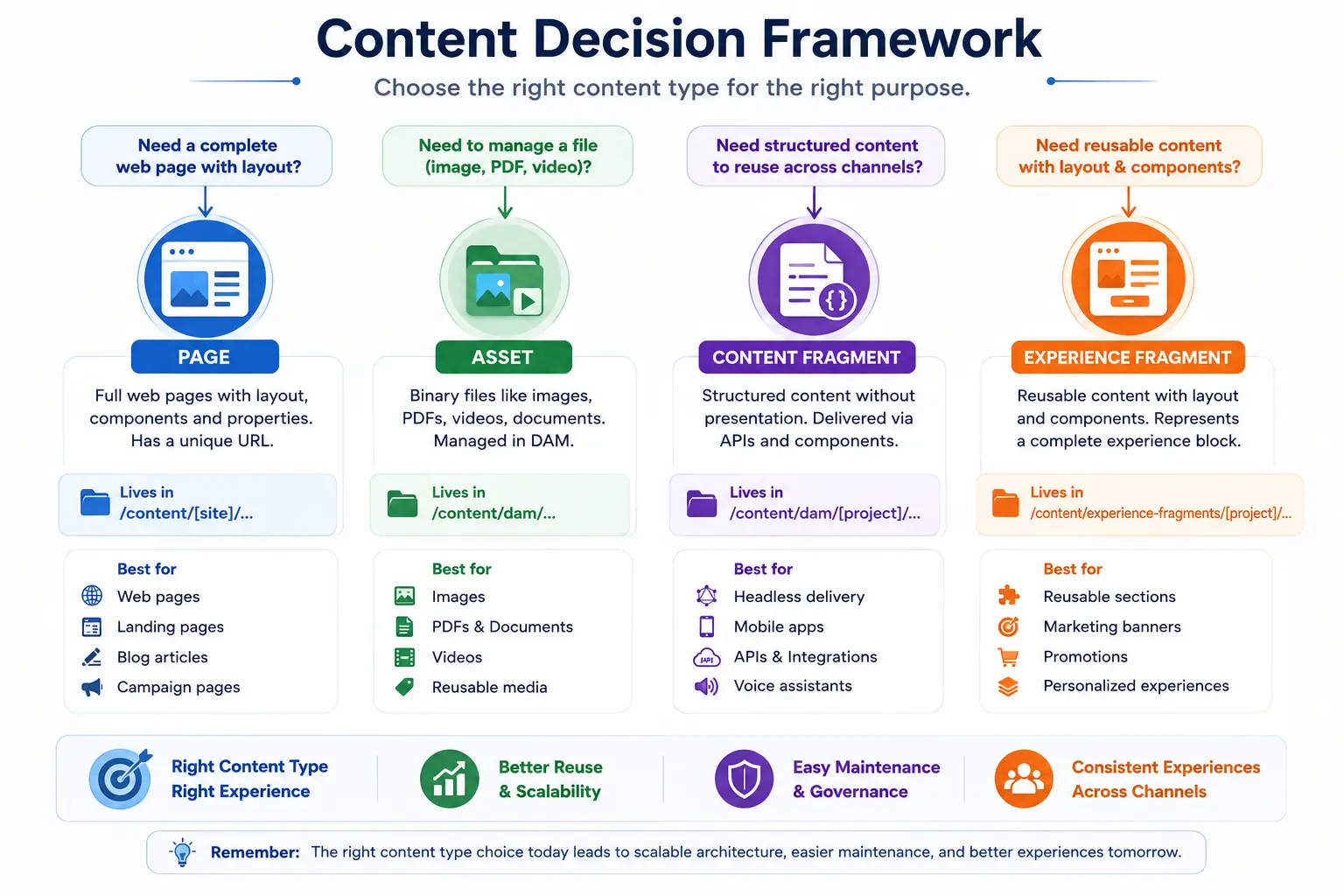
A simple decision framework is:
Another way to think about it:
| Requirement | Recommended Content Type |
|---|---|
| A page with a unique URL and layout | Page |
| Image, PDF, video, or document | Asset |
| Structured content reused across channels | Content Fragment |
| Reusable marketing experience with layout and components | Experience Fragment |
The best content architecture decisions are usually based on a simple question:
"How many places will this content be consumed?"
If the answer is:
- One page → A Page may be enough.
- Multiple pages → Consider Assets or Experience Fragments.
- Multiple channels (Website, Mobile App, API, Voice Assistant) → Content Fragments are usually the better choice.
Making the right decision early prevents content duplication, simplifies maintenance, and allows content to scale as business requirements grow.
Summary
The choice between Pages, Assets, Content Fragments, and Experience Fragments isn't technical trivia — it's the foundation of your content architecture.
Here's how to remember it:
- Page = Content that lives at a URL, has layout, authors design it
- Asset = Binary file, reused across many places, managed in DAM
- Content Fragment = Structured data, no layout, delivered anywhere via API
- Experience Fragment = Reusable content and presentation combined
The question to always ask: "Will this content need to appear in more than one place, or be consumed by more than one channel?" If yes, you want Content Fragments and proper DAM assets. If it's purely a web page with a unique layout, a page is fine.
Get this decision right early, and your content scales gracefully. Get it wrong, and you'll spend entire sprints untangling content duplication problems that should have been solved in week one.
What's Next
Now that you understand what content types exist, the next chapter goes deeper on one of the most powerful: Content Fragments. We'll look at Content Fragment Models, structured content design, references between fragments, and how to deliver via GraphQL.
- Chapter 14: Content Fragment Architecture — Models, references, API delivery
- Chapter 15: Experience Fragments — Reusable page experiences across channels
- Chapter 16: Content Modeling Best Practices — Designing content that scales
Enjoyed this chapter?
Get an email when I publish the next chapter. No spam — just new technical deep-dives.