AEM Core Components: Use, Configure, Extend, or Build?
A practical way to decide whether an AEM requirement fits a Core Component, configuration, an extension, or a new component.
Start with the component you already have
Templates, policies, layout, and styles decide how authors can assemble a page. They still need component implementations for content such as titles, images, teasers, navigation, and accordions.
The first question is not “how do we build this?” It is “does an existing component already meet the requirement?” The answer affects upgrade work, accessibility testing, the authoring experience, and the code the project will own.
Core Components are Adobe-maintained AEM components that give projects a strong starting point for common site features. They are not a reason to force every requirement into an existing shape.
Why a shared component baseline matters
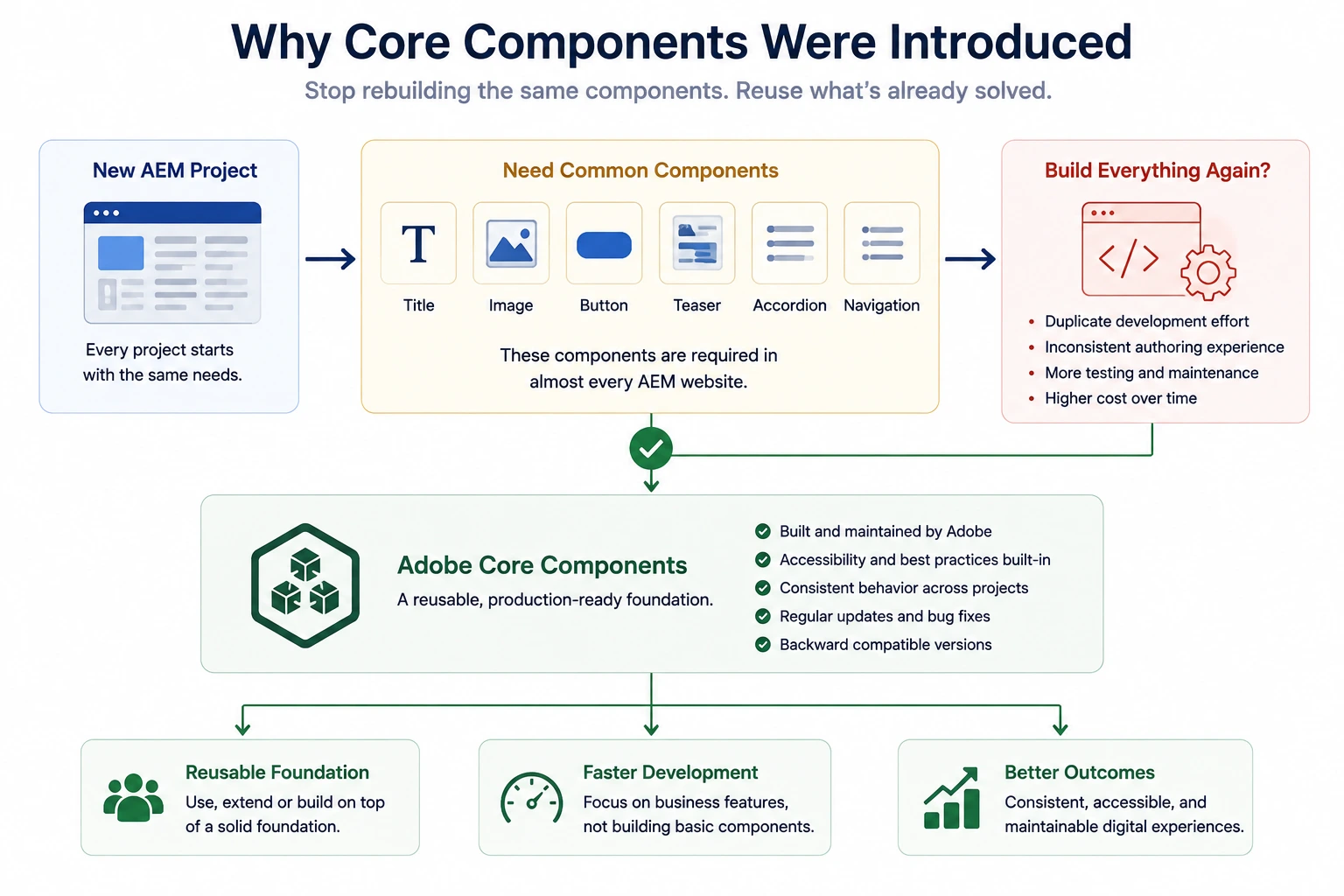
Most site designs include familiar elements:
The page contains:
- A page title
- A hero image
- A call-to-action button
- A teaser section
- An accordion
- A navigation menu
A separate implementation of each one may look inexpensive at first. Over time, it creates several versions of the same authoring problem, with different accessibility, responsive behavior, tests, and upgrade paths.
That is the problem a shared component baseline addresses.
So, What Are Core Components?
Core Components are Adobe's implementation of the building blocks that almost every AEM website needs.
Instead of asking every development team to create their own Title, Image, Button, Teaser, or Navigation component, Adobe provides a standard set of reusable components that can be used across projects.
At first glance, they look like ordinary AEM components.
That's because they are.
They use the same concepts you've already learned throughout this series:
- Sling Models for business logic
- HTL for rendering
- Dialogs for authoring
- Client Libraries for styling and JavaScript
- Component Policies for configuration
They are AEM components built using the same component mechanisms we've already discussed.
The difference is that these components are designed, tested, maintained, and continuously improved by Adobe.
Adobe maintains the components and publishes improvements over time. A project still needs to use a compatible Core Components version and validate upgrades against its own extensions and content.
Instead of spending time rebuilding common functionality, development teams can focus on solving business problems that are unique to their organization.
The value is not that every project must use the same UI. It is that a project can keep a tested implementation where its requirements match, and spend custom work on the parts that actually differ.
Why Adobe Built Core Components
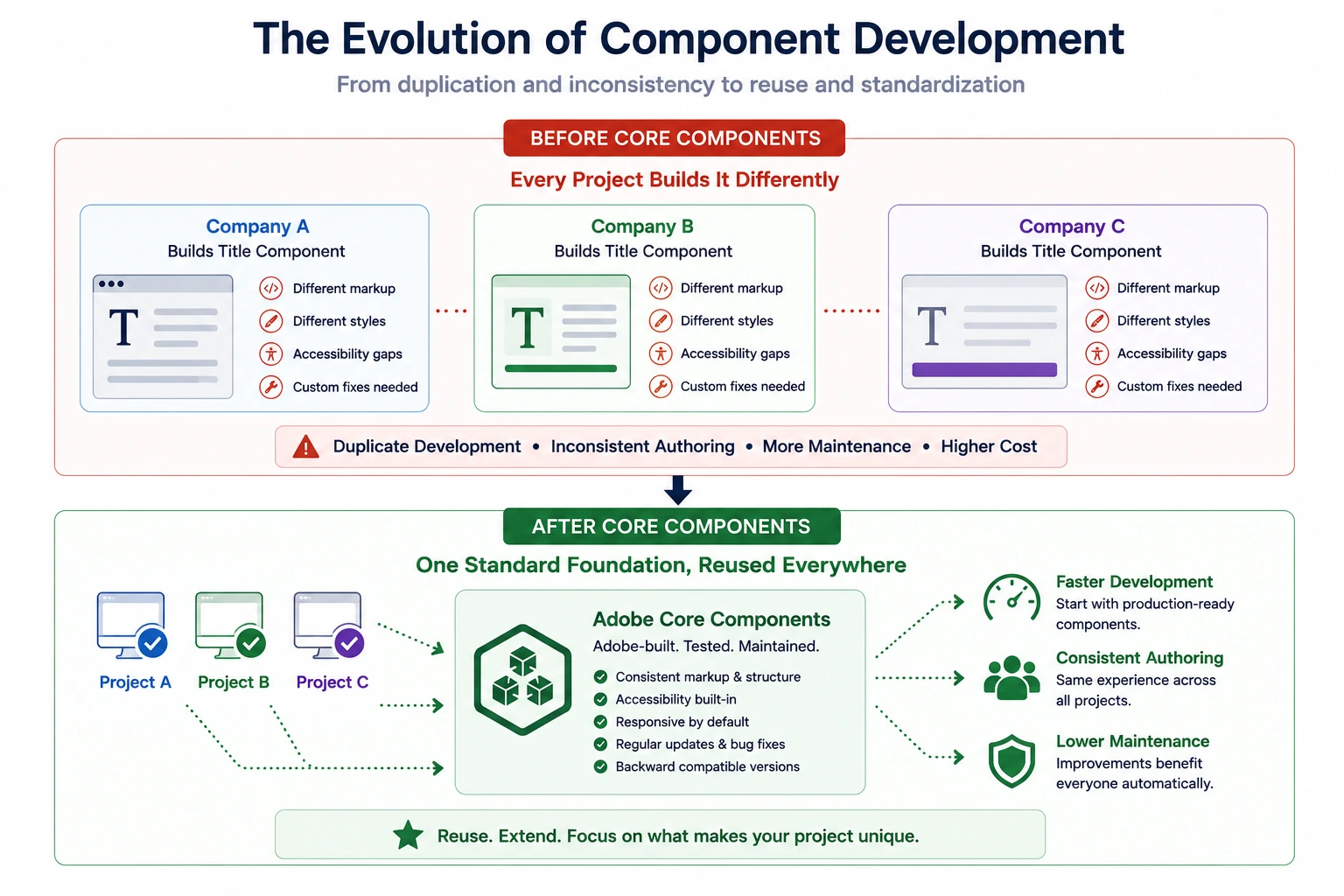
Before Core Components were introduced, almost every AEM implementation followed a similar pattern.
Each project built its own collection of basic components.
One company created a Title component.
Another company created a different Title component.
A third project built another version with slightly different behavior.
Although the names were the same, the implementations were often completely different.
Some supported accessibility well.
Some had responsive behavior.
Others required custom fixes whenever new browser standards or AEM versions were released.
The same problem was being solved repeatedly by different development teams.
Adobe recognized that thousands of developers around the world were investing time in building nearly identical components.
Instead of allowing every project to repeat the same work, Adobe introduced Core Components as a shared, production-ready foundation.
Projects can start with components that provide Adobe-maintained implementations and established accessibility and authoring patterns, while still needing to validate the version and configuration used by the project.
Development teams can then focus on implementing business-specific requirements instead of rebuilding common functionality.
Evaluate the requirement before writing code
For a requirement such as “we need a promotional card for a campaign page,” begin with a narrower question:
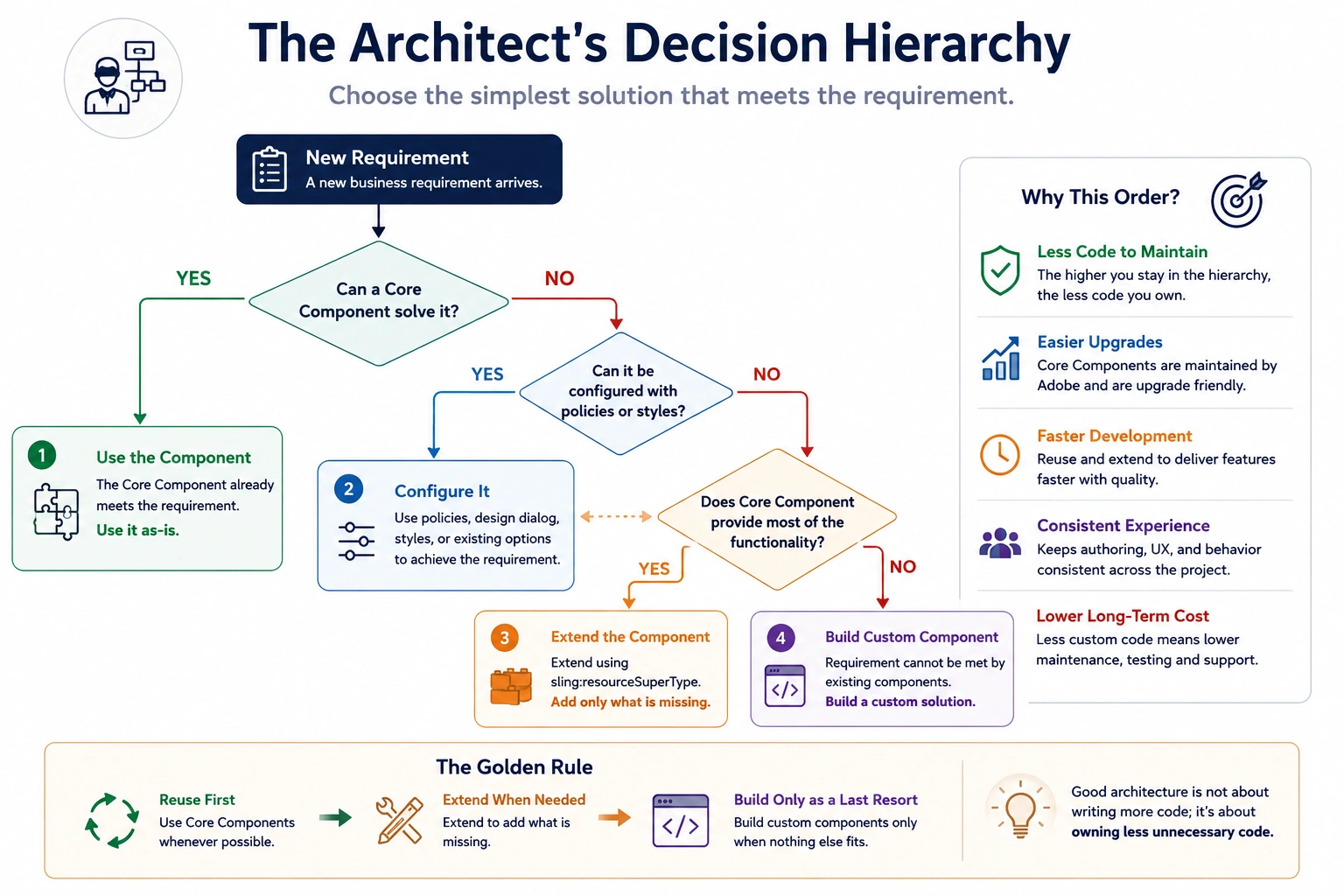
Can an existing Core Component solve this requirement?
If the answer is yes, there is no reason to build another component.
If the answer is almost, extending the existing component is usually the better choice.
Only when the requirement introduces completely new business functionality should a brand-new component be created.
This prevents duplicate component libraries and keeps the authoring contract easier to maintain.
A decision order that keeps the boundary clear
1. Use the Core Component
If the existing Core Component already satisfies the business requirement, use it without modification.
There is no value in rebuilding functionality that already works well.
2. Configure It
If the existing component already supports the required behavior and only the authoring choices, styles, or supported configuration need to change, configure it.
Many requirements can be solved without writing additional code.
3. Extend It
If the Core Component is close to the requirement but needs project-specific behavior, consider extending it using the supported Core Components extension mechanisms.
This allows the project to keep Adobe's implementation while adding business-specific behavior.
4. Build a Custom Component
Only build a completely new component when the business requirement cannot reasonably be achieved using an existing Core Component.
This should be the last option, not the first.
Every custom component increases the amount of code the project must own, maintain, test, and upgrade.
Decision example: a promotional card
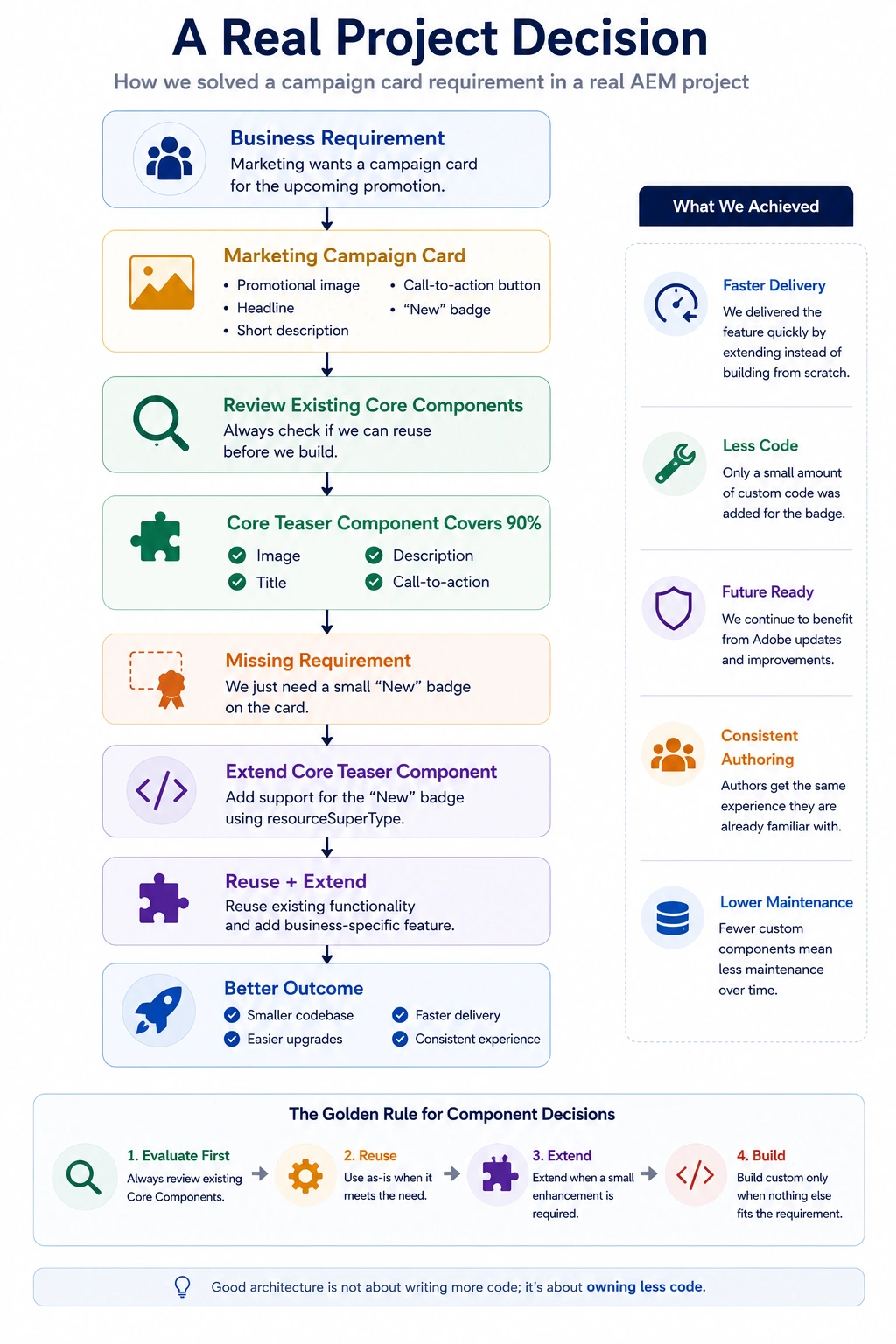
Consider a campaign requirement for a promotional card:
The card should display:
- A promotional image
- A headline
- A short description
- A call-to-action button
- A small "New" badge in the corner
Review the available Core Components before creating a new one.
The Teaser component already supports:
- Image
- Title
- Description
- Call-to-action links
The only missing requirement is the small promotional badge.
Instead of building another promotional card component, the team extends the Core Teaser component and adds support for the new badge.
The result is a component that satisfies the business requirement while continuing to benefit from Adobe's ongoing improvements.
The team writes very little new code, keeps the component library smaller, and avoids maintaining another custom implementation.
The new behavior is small and belongs with the Teaser's existing content model, so extending it can be reasonable. If the card instead needs product pricing, inventory, or a commerce integration, it has a different responsibility and should be designed as a separate component.
Keep custom code deliberate
Every custom component becomes another piece of software that the team must test, document, maintain, and upgrade. Reuse is not a shortcut; it is a deliberate decision to keep that ownership boundary small.
This mindset provides several long-term benefits:
- Smaller component libraries
- Less duplicate code
- Easier upgrades
- More consistent authoring experiences
- Lower maintenance costs
The decision to carry forward
Use this order: Use → Configure → Extend → Build. Each step keeps more tested behavior and reduces the surface area the project must maintain. Move to the next step only when the requirement cannot be met at the current one.
Next: Editable Template Architecture brings the template, policy, layout, style, and component decisions together in the lifecycle of a new page.
Want to See This Applied to a Real Problem?
Extending a Core Component's dialog inherits more than its rendering — see Extending a Core Component's Dialog and Hiding Inherited Fields for what happens to the dialog itself, and The Carousel With No Slides to Navigate for a real incident caused by hiding an inherited tab without replacing what it did.
Enjoyed this chapter?
Get an email when I publish the next chapter. No spam — just new technical deep-dives.
Comments
Share feedback or questions about this blog post.
No comments yet. Be the first to share your thoughts.