Content Fragments: Structured Content Outside the Page
How Content Fragments separate structured business content from the page or application that presents it.
A content item with its own lifecycle
The previous chapter established the problem: one business fact should not be copied into every experience that displays it.
A Content Fragment is AEM's structure for managing that independent, structured content.It stores fields defined by a model, lives in DAM, and can be rendered on a page or delivered to another consumer.
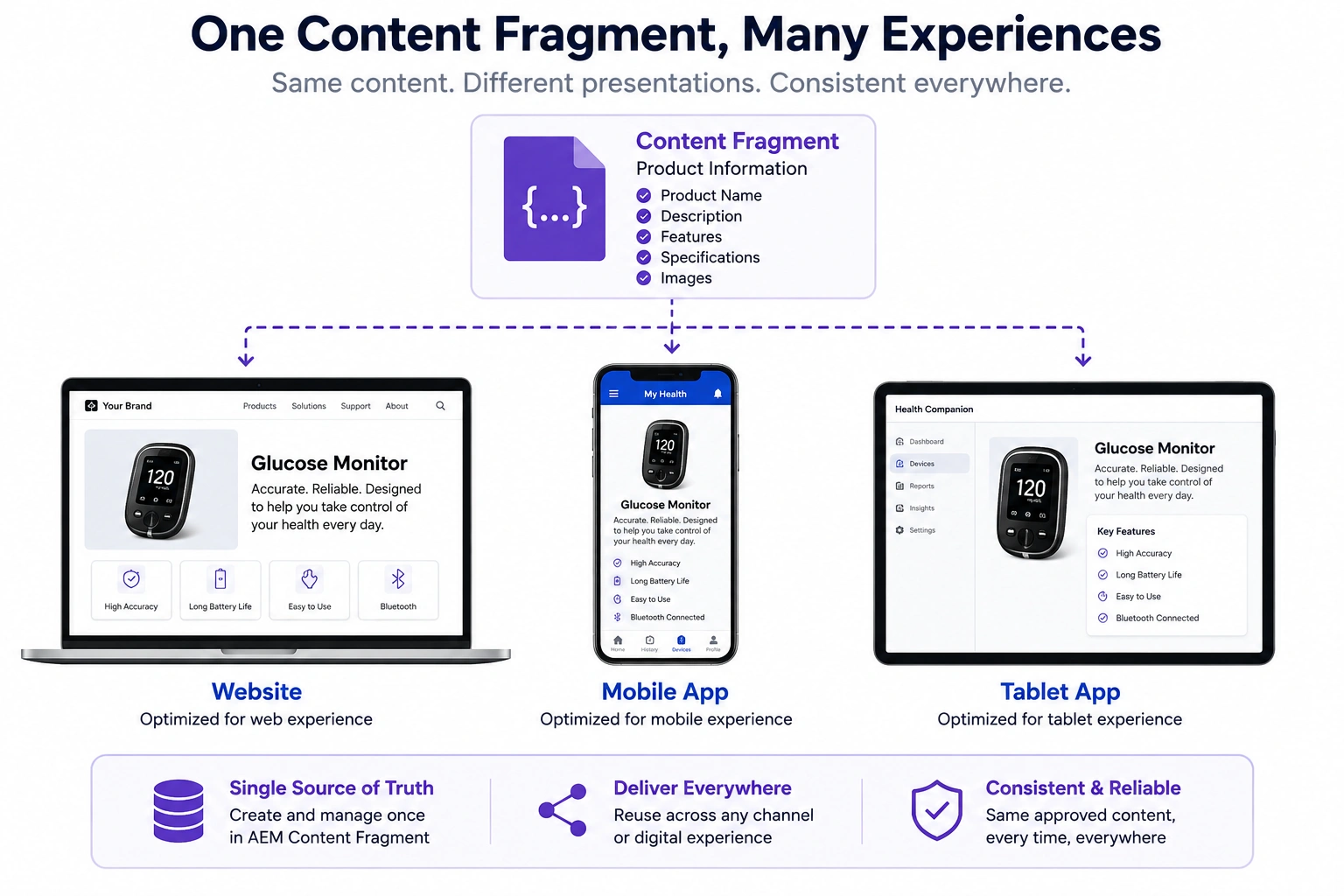
One Piece of Content, Many Experiences
Consider a product description that is required by several digital experiences.
The same product information may be used by:
- A website
- A mobile application
- A partner portal
- A digital kiosk
- Another frontend application
The content is the same even though the presentation is different.
Suppose the product description changes.
With a page-centric approach, each consumer may maintain its own copy.
With a Content Fragment, the product information can be managed as shared structured content and consumed by the experiences that need it.
Although every experience looks different, the product description itself should remain consistent.
If every channel maintains its own copy, updating product information becomes difficult and error-prone.
The organization can manage the product information in one authoritative Content Fragment instead of maintaining separate copies for each channel.
Every application retrieves the same approved content and presents it according to its own user experience.
This is exactly the problem Content Fragments were designed to solve.
What Exactly Is a Content Fragment?
Think about the product information we discussed earlier.
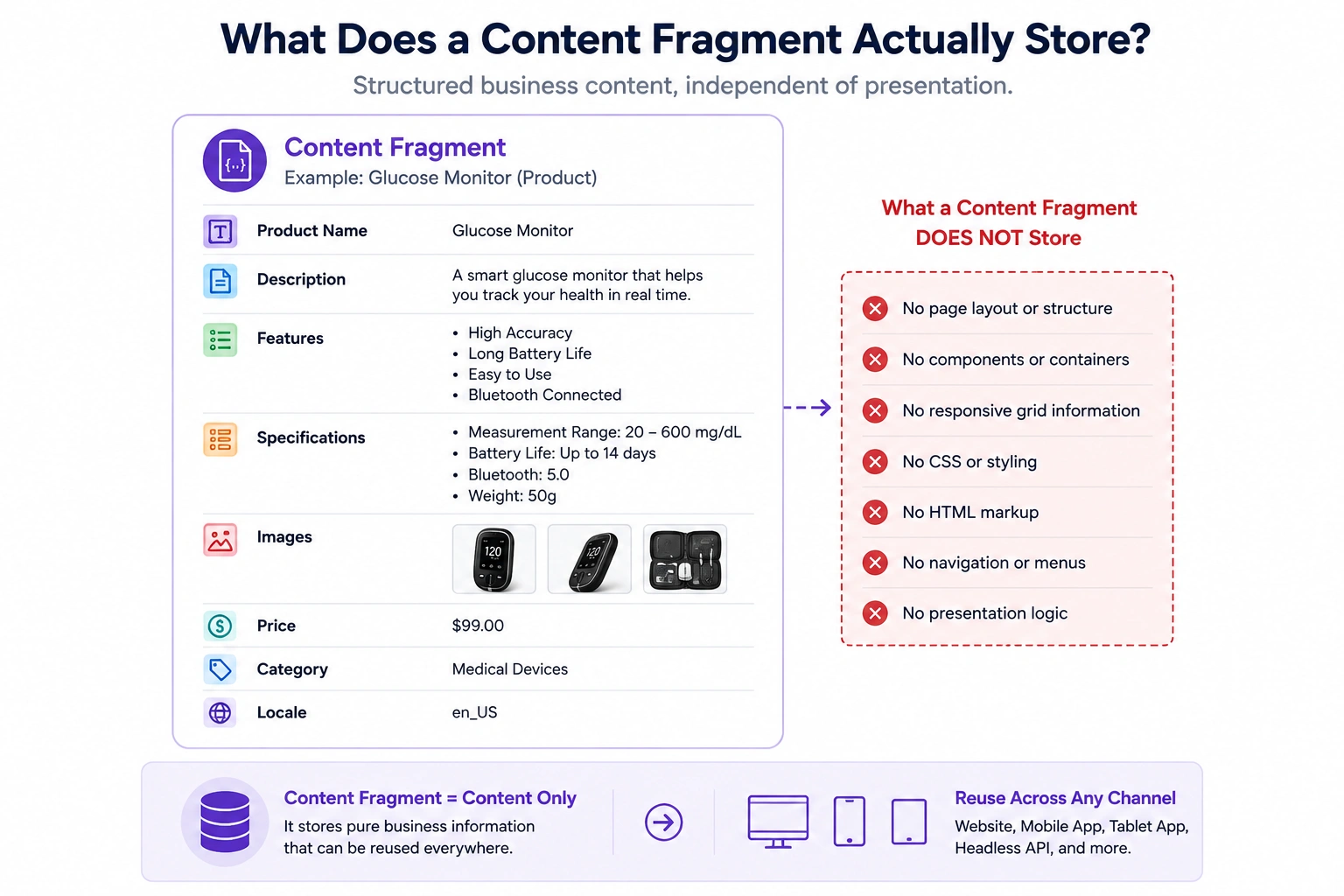
Every application needs the same business details:
- Product name
- Description
- Features
- Specifications
- Images
Notice that none of this information describes how it should appear on a webpage.
It only describes what the business wants to communicate.
That's exactly what a Content Fragment stores.
A Content Fragment is a structured piece of business content that exists independently of any webpage or presentation.
Unlike traditional web content, it doesn't contain page layouts, responsive grids, component placements, or visual styling.
Instead, it focuses entirely on the information itself.
Because the content is independent, it can be reused across multiple digital experiences while maintaining a single source of truth.
Whether the information is displayed on a website, mobile application, tablet, or exposed through an API, every channel consumes the same underlying content.
This separation between content and presentation is one of the core architectural principles behind modern AEM.
Where Are Content Fragments Stored?
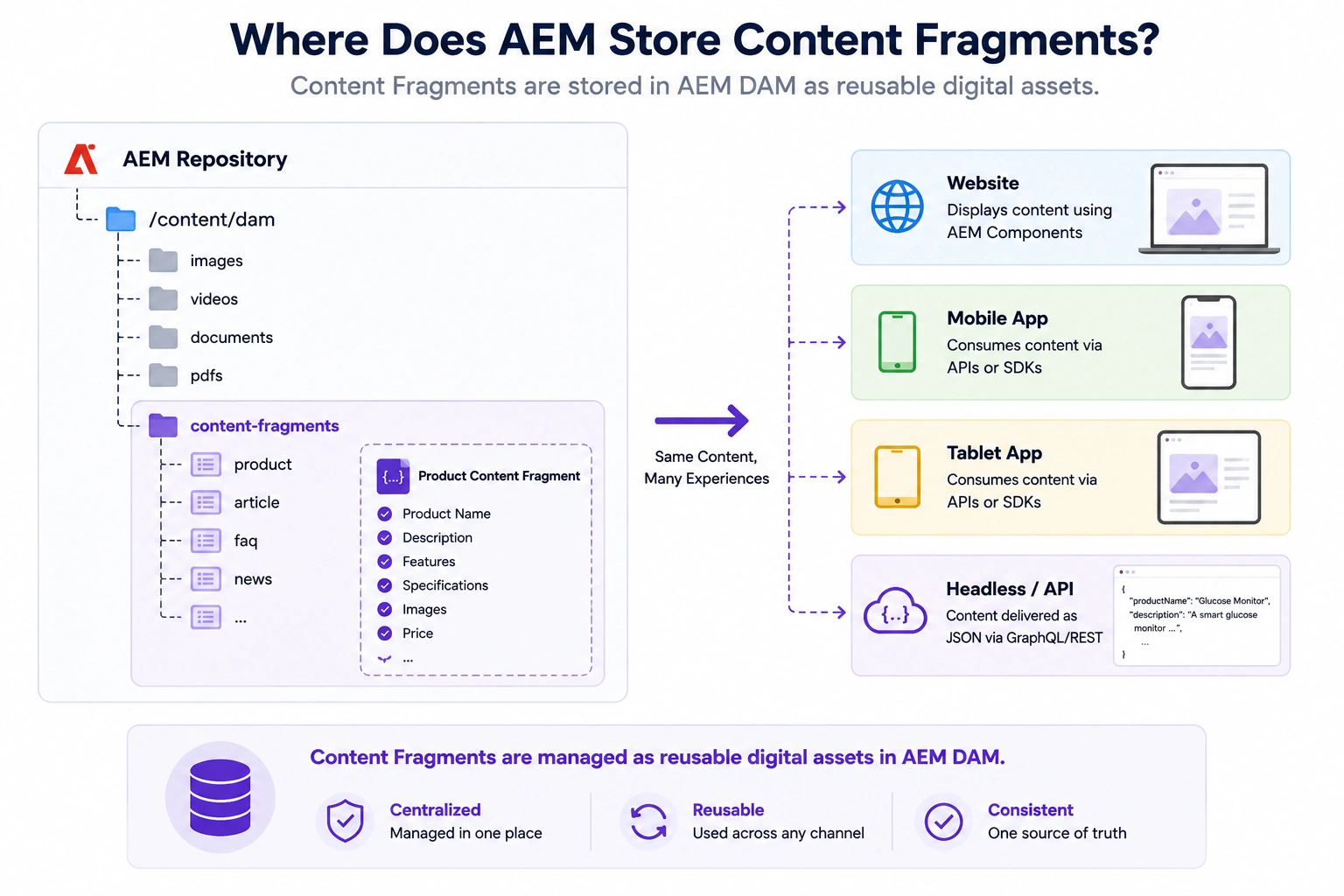
Although Content Fragments are often used by websites, mobile applications, and APIs, they are not stored as webpages.
Instead, AEM stores them as content assets inside the DAM (Digital Asset Management) repository.
At first, this might seem surprising.
Most developers associate the DAM with images, videos, and documents.
However, modern AEM treats structured business content as another valuable digital asset.
Just like an image can be reused across multiple webpages, a Content Fragment can be reused across multiple digital experiences.
This design provides a centralized location where authors can create, update, and manage business content independently of how it will eventually be presented.
Whether the content is used by a website, a mobile application, or a headless application, the consumers can use the same Content Fragment as the managed source of the content.
Architect Perspective
A common misconception is that the DAM stores only media assets such as images and videos.
In modern AEM projects, the DAM is much more than a media library.
It acts as a centralized repository for reusable digital assets, including structured business content stored as Content Fragments.
This allows organizations to manage all reusable assets—from images to product information—in a single governed repository.
How Is a Content Fragment Different from a Webpage?
At first glance, both webpages and Content Fragments seem to store information.
However, they serve very different purposes.
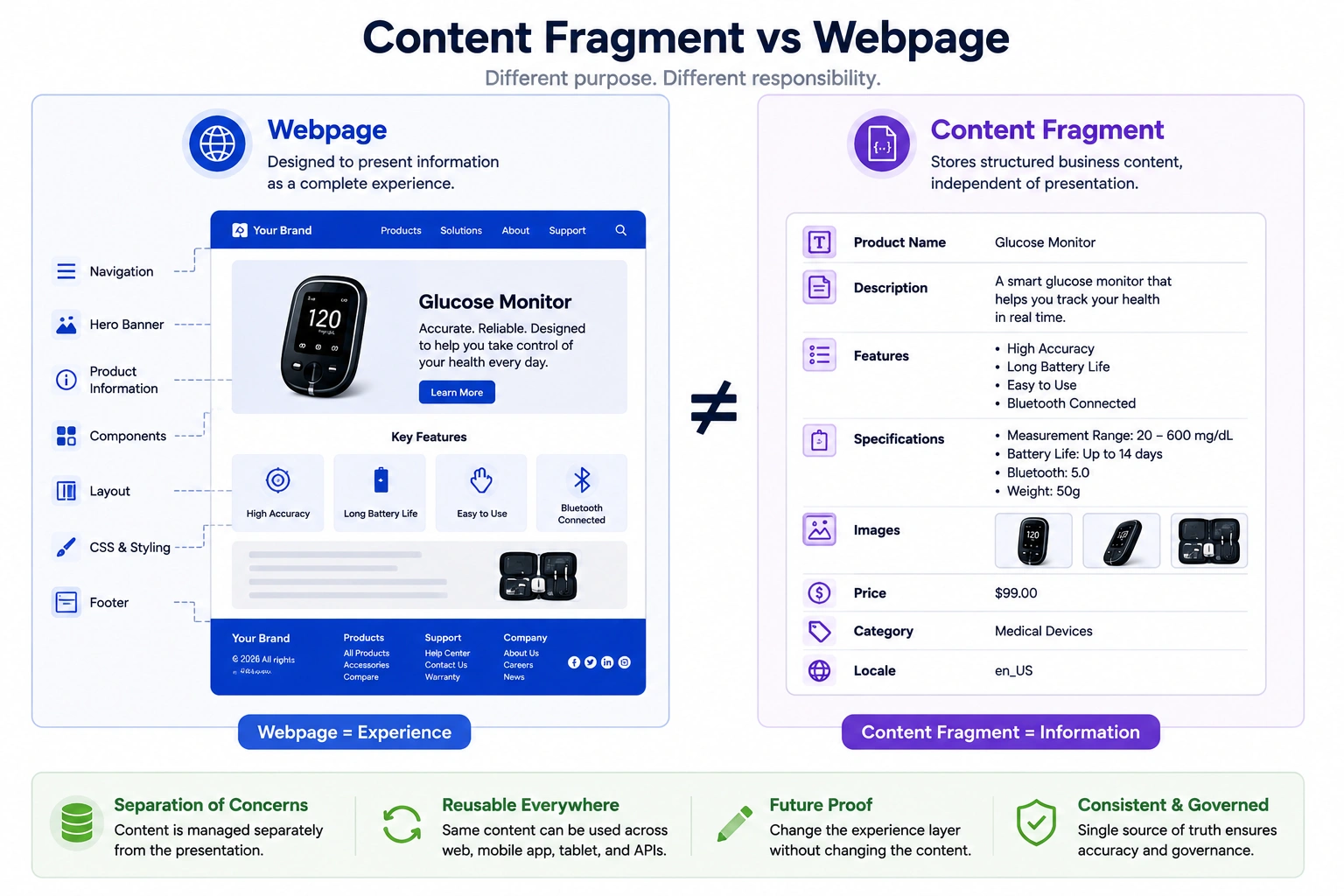
A webpage is designed to present information to users.
It combines business content with page layouts, components, styling, navigation, and user interactions to create a complete digital experience.
A Content Fragment has a different responsibility.
It stores only the business content.
It doesn't define where the content appears, how it should be displayed, or which frontend technology will render it.
Think of a webpage as the finished presentation.
Think of a Content Fragment as the information that powers that presentation.
This separation allows the same Content Fragment to be reused by multiple webpages, mobile applications, and APIs without creating duplicate copies of the content.
Architect Perspective
One mistake developers often make is treating Content Fragments as lightweight webpages.
In reality, they solve an entirely different problem.
A webpage is responsible for delivering an experience to an end user.
A Content Fragment is responsible for managing business information.
Keeping these responsibilities separate allows organizations to redesign websites, adopt new frontend frameworks, or launch new digital channels without rewriting their business content.
How Authors Work with Content Fragments
Creating a Content Fragment is very different from creating a webpage.
When authors create a page, they focus on how information will appear to users.
They choose templates, arrange components, and build the overall experience.
When authors create a Content Fragment, their focus shifts entirely to the business information.
Instead of designing a page, they simply enter structured content into predefined fields.
For example, while creating a Product Content Fragment, an author might provide:
- Product Name
- Description
- Features
- Technical Specifications
- Product Images
Notice that the author never decides where this information will appear.
They don't choose a page layout.
They don't drag components onto a page.
They don't apply styling or responsive layouts.
Their only responsibility is to create accurate, reusable business content.
Once published, that same Content Fragment becomes available to every channel that needs it.
Production Reality: One Product, Multiple Consumers
Let's return to the glucose monitor example.
The product team updates the description of the device.
With a page-centric approach, that information might exist inside a website component. The mobile application may have its own copy, and another application may maintain another version.
Now imagine the product description changes.
Someone has to find every place where that information exists and make sure each version is updated.
With a Content Fragment, the product information has a single managed source.
The author updates the Content Fragment once.
The consuming experiences can then use that updated content according to their own requirements.
The website can present it as part of a product page.
The mobile application can display it inside a product screen.
A tablet application can use the same information in a different layout.
The presentation changes.
The business content does not.
This is where the value of Content Fragments becomes clear.
They are not simply another place to store text.
They provide a way to manage business content independently from the experiences that consume it.
The Architectural Boundary
A useful way to think about a Content Fragment is to draw a boundary between two responsibilities.
On one side:
Content Management
- What is the product?
- What is its description?
- What are its features?
- What are its specifications?
- Which content is approved?
On the other side:
Experience Delivery
- Where should the product appear?
- How should it look?
- Which components should render it?
- How should it behave on mobile?
- How should the frontend present it?
The Content Fragment belongs to the first side.
The consuming application belongs to the second.
Keeping this boundary clear is what allows the same business content to support multiple experiences without coupling the content to a particular presentation.
Architect Perspective
The real value of a Content Fragment is not that it can store reusable text.
The important part is the boundary it creates.
The content has its own lifecycle.
The experience has its own lifecycle.
When those lifecycles are independent, teams can change one without unnecessarily changing the other.
That is the architectural reason Content Fragments become important in large AEM implementations.
The goal isn't simply to reuse content.
The goal is to reduce coupling between business content and digital experiences.
The decision to carry forward
Use a Content Fragment for content that represents a business concept and needs to outlive one page layout. The next decision is the contract for that content: Content Fragment Models define its fields and relationships.
For a project example of that boundary and the cases where a fragment adds needless complexity see When a Content Fragment Beats a Page (and When It's Overkill).
Enjoyed this chapter?
Get an email when I publish the next chapter. No spam — just new technical deep-dives.
Comments
Share feedback or questions about this blog post.
No comments yet. Be the first to share your thoughts.